Understanding MQL5 Program Structure

Understanding MQL5 Program Structure
MQL5 is a programming language tailored for trading on MetaTrader 5. It focuses on automating trading tasks through tools like Expert Advisors, indicators, and scripts. Its structure is crucial for creating efficient and reliable trading systems. Key elements include:
- Preprocessor Directives: Set constants, include libraries, and define metadata.
- Input Variables: Allow traders to adjust settings without altering code.
- Global Variables: Maintain data across events.
- Custom Functions and Classes: Organize code into reusable components.
- Event Handlers: Manage program flow by responding to specific events like price updates or user actions.
Properly structuring MQL5 programs ensures better performance, easier debugging, and smoother trading operations. Tools like Traidies simplify coding by converting strategies into MQL5 code, streamlining development and testing processes.
Master MQL5 Programming (Complete All In One Guide)
sbb-itb-3b27815
Main Components of an MQL5 Program
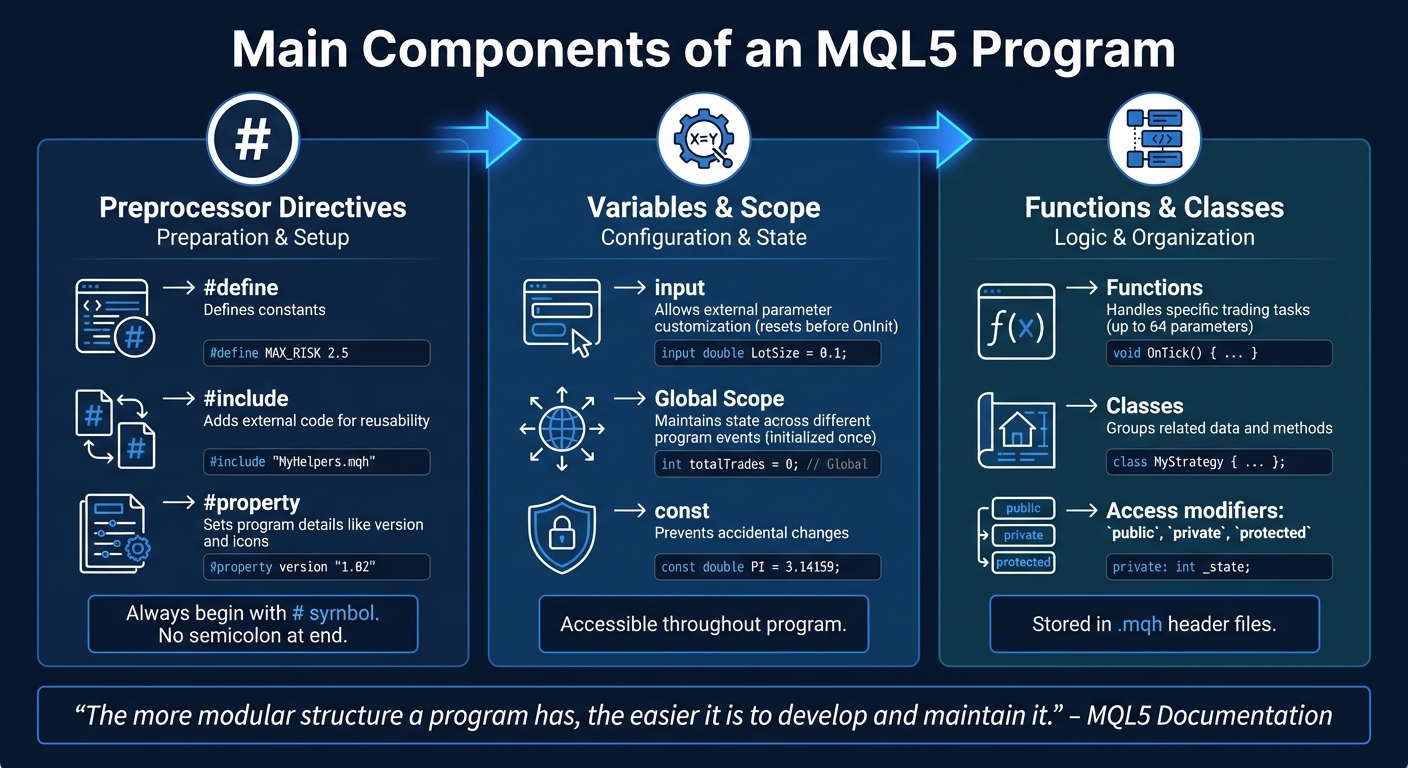
MQL5 Program Components and Their Functions
An MQL5 program is built around three key components that define how it operates. These elements dictate how the code is structured, how users interact with it, and how effectively it handles trading tasks.
Preprocessor Directives
Preprocessor directives, which always begin with the # symbol, prepare your code by setting constants, including external files, and defining metadata like program version or copyright.
Common directives include:
#define: Used to create symbolic constants.#include: Imports external libraries or files. For example:#include <Trade\Trade.mqh>adds MetaTrader's trading functions.#include "MyCustomLibrary.mqh"imports custom local files.
#property: Configures program metadata like version numbers or icons.
It's important to note that directives should not end with a semicolon, as this can cause compilation errors. The #include directive ensures each file is only inserted once, even if called multiple times.
After setting up these directives, input variables and global declarations help configure user settings and define program-wide states.
Input Variables and Global Scope
Input variables, marked with the input modifier, allow traders to adjust parameters directly from MetaTrader's interface without editing the code . These variables reset before every OnInit() call. For instance, traders can tweak Stop Loss levels or lot sizes through the terminal settings. You can also add inline comments to make parameter names more user-friendly.
Global scope variables, on the other hand, are declared outside any function and remain accessible throughout the program . They retain their values across different events, making them ideal for tracking data like running totals or open positions. Unlike input variables, global variables are initialized only once when the program starts. To prevent accidental changes, use the const specifier for variables that should remain unchanged.
With these variables in place, custom functions and classes bring structure and efficiency to your code.
Custom Functions and Classes
Custom functions and classes are essential for organizing your code into logical sections, making it easier to manage and maintain. Functions break down trading tasks into smaller, focused operations. Each function includes a header (return type, name, and parameters) and a body with the actual code. MQL5 allows up to 64 parameters per function, which is more than sufficient for most use cases.
Classes go a step further by grouping related data and methods into a single entity. They use public and private modifiers to control access to internal variables. Placing variables in the private section and modifying them only through public methods ensures better code reliability.
As stated in the MQL5 documentation:
"The more modular structure a program has, the easier it is to develop and maintain it."
Both functions and classes can be stored in .mqh header files and included with the #include directive. This keeps your main program file clean and focused on event handling.
| Component | Directive/Modifier | Primary Role |
|---|---|---|
| Constants | #define |
Defines constants |
| Metadata | #property |
Sets program details like version and icons |
| Libraries | #include |
Adds external code for reusability |
| User Settings | input |
Allows external parameter customization |
| Global Data | Global Scope | Maintains state across different program events |
| Logic Blocks | void, int, etc. |
Handles specific trading tasks through functions |
Event Handlers in MQL5
MQL5 uses event handlers to manage program flow in a structured and efficient way. These handlers allow programs to respond to specific events like price updates, timer intervals, or user actions. By processing events one at a time, MQL5 ensures system resources are used wisely. If a handler is still running when a new event of the same type occurs, subsequent events may be skipped to avoid overloading the system.
OnInit and OnDeinit
The OnInit event runs immediately after an Expert Advisor (EA) or indicator is added to a chart. It’s primarily used to initialize variables, set up indicator handles, and validate input values. Instead of using void OnInit(), it’s better to use int OnInit() because it allows you to return error codes, such as INIT_FAILED, to halt execution if initialization doesn’t succeed.
The OnDeinit event is triggered before the program is removed, recompiled, or when the terminal is shut down. This is where you clean up resources - delete graphical objects, stop timers using EventKillTimer(), or log the reason for termination. The reason parameter provides context, like whether the program stopped due to a chart change or a parameter update. Properly handling cleanup tasks improves reliability and keeps your code organized.
OnTick and OnTimer
The OnTick event is specific to Expert Advisors and runs whenever a new price quote arrives for the attached symbol. This is where the core trading logic usually resides - evaluating signals, opening trades, or modifying orders. OnTick is ideal for high-frequency strategies, while OnTimer is better for less time-sensitive approaches.
The OnTimer event is triggered at intervals set by EventSetTimer() or EventSetMillisecondTimer(). For strategies focused on higher timeframes, like H1 or H4, using a timer to check conditions at regular intervals (e.g., once per minute) is more efficient than reacting to every tick. Always activate the timer in OnInit and deactivate it with EventKillTimer() in OnDeinit to avoid resource leaks. These handlers work seamlessly with modular code structures, enhancing efficiency.
Other Event Handlers
MQL5 also provides other specialized handlers. OnTrade and OnTradeTransaction deal with trade-related events. OnTrade activates when a trade operation is completed on the server, while OnTradeTransaction handles changes in account state, such as order updates, deals, or position changes.
The OnChartEvent handler manages user interactions on the chart, like mouse clicks, keyboard inputs, or the addition and removal of graphical objects. For indicators, OnCalculate is the key event, triggered when new price data is received or historical data is synchronized. Together, these handlers form the backbone of a responsive and efficient trading system.
Best Practices for Organizing MQL5 Code
Keeping your MQL5 code well-organized is not just about aesthetics - it’s about creating programs that are easier to maintain, debug, and share. A structured approach with modular design, clear documentation, and solid error handling can save you a lot of headaches down the road.
Using Comments and Documentation
Adding comments to your code isn’t just a courtesy to your future self - it’s a practical way to make your code more understandable for others, especially if you’re sharing it or working in a team. For instance, when defining an input variable, including a comment on the same line ensures that MetaTrader 5 displays a helpful label in the "Inputs" tab. This makes your Expert Advisor (EA) more user-friendly. Here's an example:
input int MA_Period=20; // Moving Average Period
Instead of showing a vague variable name, this comment gives traders a clear idea of what the parameter does.
If you’re publishing your work or collaborating with others, tools like Doxygen can take your comments to the next level. By using tags like \brief, \param, and \return in your comments, you can generate professional documentation directly from your source code. The key is to integrate this step into your development process rather than leaving it for later. This not only saves time but also ensures your documentation stays up-to-date as your code evolves.
Once your code is well-documented, the next step is to organize it into manageable, modular pieces.
Modular Programming Approach
Breaking your code into smaller, reusable modules can make even the most complex trading systems easier to handle. For example, Sergey Pavlov demonstrated a modular EA design that divided trading logic, money management, signal generation, and filtering into separate components. This setup allowed the EA to operate with default logic even if certain modules were missing.
MQL5 makes modular programming straightforward. You can use include files (.mqh), classes for object-oriented programming, and external indicators that pass data through indicator buffers. Storing shared functions and class declarations in .mqh files within the MQL5\Include\ directory is a common practice. Clemence Benjamin highlights the benefits of this approach:
"By breaking the code into structured modules, we simplify navigation, making development and maintenance much more efficient".
A good module should follow the IPO principle - Input, Process, Output. This means it takes in data, processes it, and returns a clear result. To protect your code, use access modifiers like private, protected, and public within classes. This prevents accidental changes to internal logic by external code and makes debugging easier by isolating issues to specific sections of your program.
With modularity and documentation in place, it’s time to focus on error handling to keep your system running smoothly.
Error Handling and Debugging
Error handling is essential to prevent small issues from spiraling into major problems, especially during live trading. Before executing trades, always verify critical factors like connection status, trading permissions, and EA settings.
For temporary issues, such as file locks, you can use retry loops with increasing Sleep() intervals. This gives your program a chance to recover without crashing. Beyond simple Print() statements, consider implementing structured logging. Use severity levels like DEBUG, INFO, WARN, ERROR, and FATAL to categorize issues, and log these details to files or databases for analysis.
MetaEditor offers powerful debugging tools to help you refine your code. Use the Profiler to identify performance bottlenecks and the debugger (activated with F5) to step through your code line by line. Breakpoints (set with F9) let you pause execution at specific points, making it easier to pinpoint issues. Contextual macros like __FUNCTION__, __FUNCSIG__, and __LINE__ can also be included in log messages to automatically capture where an error occurred.
Finally, input validation is a must. For example, using unsigned integers (uint) for parameters like "period" or "volume" ensures users can’t enter negative values, which could otherwise lead to logic errors. Sergey Eryomin sums it up well:
"Stability implies that the program will continue working with errors, even if it leads to slightly inaccurate results. Correctness doesn't allow returning inaccurate results or performing wrong actions".
How Traidies Simplifies MQL5 Programming

Traidies takes the structured framework of MQL5 and uses AI to make programming faster and easier. Writing MQL5 code manually can be a slow and error-prone process, especially for those new to the language. Traidies (https://traidies.com) steps in to automate much of the work, letting you focus on perfecting your trading strategies instead of worrying about coding details.
AI-Powered Strategy Parser
With Traidies, you can describe your trading strategy in plain English or pseudocode, and the platform translates it into working MQL5 code. This method acts as a bridge between your trading concepts and their technical implementation. Instead of memorizing complex syntax, you can simply outline your strategy - such as entry and exit rules or risk management - in everyday language. Traidies' AI processes your input and generates the corresponding code, complete with event handlers, input variables, and custom functions. If the initial output isn’t quite right, you can tweak your description and let the AI refine it. This feature saves time by automating repetitive coding tasks.
Automated Backtesting with Historical Data
After your strategy is converted into code, Traidies makes validation easy with automated backtesting. The platform compiles your strategy into an .ex5 file, ready for testing. It integrates seamlessly with MetaTrader 5's Strategy Tester, syncing historical data for the symbol you’re working with. You can choose from several testing modes: Every tick for maximum accuracy, 1 Minute OHLC for a balance of speed and precision, or Open prices only for strategies focused on bar openings. This step ensures your Expert Advisor performs as expected before you use it in live trading. As MQL5.com highlights:
The robot does not get tired, doubtful or scared, it's totally free from any psychological problems.
Customizable Expert Advisors
Traidies also creates Expert Advisors tailored to your preferences. You can adjust risk and lot management settings, such as calculating position sizes as a fixed amount or a percentage of your account balance (commonly 1% to 3%). Additional options include trade filters like maximum spread limits or high-impact news blockers, as well as trailing stops based on fixed pips or ATR indicators. Traidies even allows you to set operational schedules and assign unique Magic Numbers to distinguish trades. With this level of customization and AI support, you can fine-tune your trading system without the need to code each detail yourself - perfectly complementing MQL5’s organized structure.
Conclusion
Summary of MQL5 Structure
A well-organized MQL5 structure is essential for creating dependable trading systems. The language follows a specific order: starting with preprocessor directives, followed by input and global variables, then custom functions or classes, and finally event handlers like OnTick or OnInit. At least one properly defined event handler is required for the program to function.
Maintaining this structure helps avoid critical issues such as event queue overflows, missed trading opportunities, and memory leaks. Whether you're working on an Expert Advisor (EA), indicator, script, or service, the program type dictates which APIs are available and how code interacts with market events. Adopting a modular approach - such as using include files and custom functions - keeps your code manageable and simplifies debugging. This structured method not only ensures reliability but also allows developers to take full advantage of advanced tools for streamlined development.
Using Tools for Efficiency
To build on this foundation, platforms like Traidies (https://traidies.com) make it easier to turn strategy ideas into structured MQL5 code. By describing your strategy in plain English, AI generates the corresponding MQL5 code, removing the hurdle of learning programming while automating trades. Traidies takes care of technical aspects like preprocessor directives, event handlers, and trade request structures, allowing you to focus on perfecting your strategy. Paired with automated backtesting and customizable Expert Advisors, these tools help you design and validate trading systems more efficiently while maintaining the reliability that a proper MQL5 structure ensures.
FAQs
What’s the minimum code an MQL5 EA needs to run?
The bare minimum for creating an MQL5 Expert Advisor (EA) involves including three key functions: OnInit(), OnDeinit(), and OnTick(). These functions ensure the EA initializes correctly, processes incoming price ticks, and performs cleanup when it’s removed. For scripts, however, you only need the OnStart() function, which handles everything from start to finish. Each of these functions plays a crucial role in ensuring smooth operation based on the program type.
When should I use OnTick vs OnTimer?
When deciding between OnTick() and OnTimer(), it’s all about the timing and purpose of the task:
- OnTick() is ideal for executing code immediately when a new market tick is received. This is especially useful for actions tied to market activity, like analyzing price movements or triggering trades. Since multiple ticks can occur within a single bar, you’ll want to check for new bars within this function if that’s part of your logic.
-
OnTimer() is better suited for tasks that need to run on a consistent schedule, regardless of market activity. You can set these intervals using functions like
EventSetTimer()to ensure the code runs at the desired frequency, whether the market is active or not.
Each has its own strengths depending on whether you’re reacting to market events or performing time-based operations.
How do I safely organize code into .mqh files?
To keep your MQL5 code well-organized, consider storing reusable elements like functions or classes in .mqh header files. You can include these files in your main program using the #include <filename.mqh> directive, making sure to use the correct file paths. For simplicity and to avoid issues, save your .mqh files in MetaEditor’s Include directory. This method not only minimizes duplicate definitions but also helps prevent errors, making your code easier to maintain and manage for larger projects.