Checklist for Volatility-Based Risk Management in MQL5

Checklist for Volatility-Based Risk Management in MQL5
Volatility-based risk management helps traders adjust position sizes and stop-loss levels based on market conditions, ensuring consistent risk despite fluctuations. By using tools like ATR (Average True Range), traders can dynamically manage exposure during high or low volatility periods. This approach is essential for protecting accounts, especially in unpredictable markets like 2026, where the VIX spiked to an average of 26.7, and execution slippage increased by 40% during news events.
Here’s the key takeaway:
- Position Sizing: Use ATR to calculate position sizes, shrinking them in volatile markets and slightly increasing them during calmer periods.
- Stop Losses: Base stop-loss distances on ATR (e.g., 1.5–3× ATR) to avoid premature exits.
- Automation: Implement these rules in MQL5 to ensure consistent execution.
- Risk Checks: Set daily loss limits (e.g., 2–3% of equity) and avoid trades during extreme spreads or slippage.
This method is critical for long-term trading success and protecting accounts from sudden market moves.
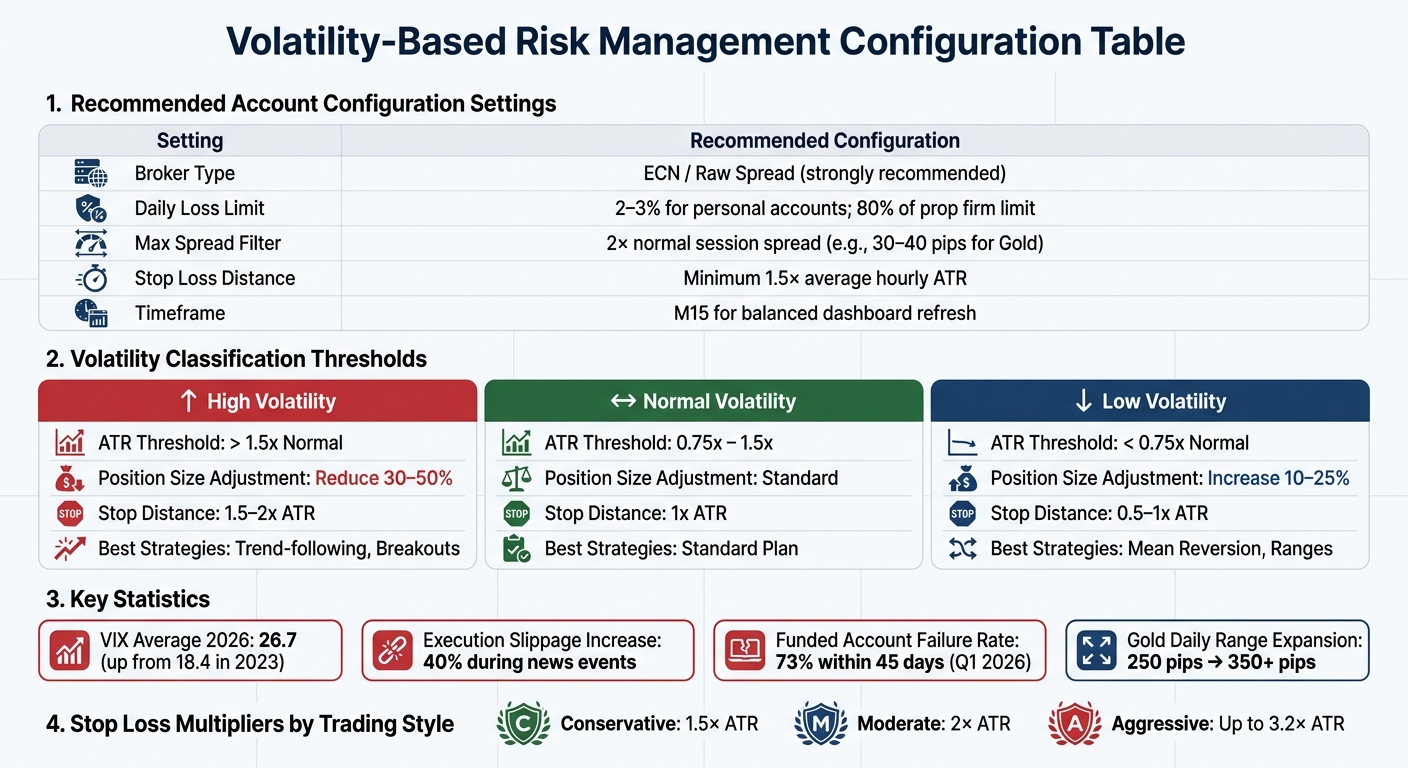
Volatility-Based Risk Management Settings and Thresholds for MQL5 Trading
Preparing for Volatility-Based Risk Management
Setting Up MetaTrader 5
Start by downloading MetaTrader 5 from a trusted ECN or Raw Spread broker, such as IC Markets or Pepperstone. These brokers are ideal because standard accounts might restrict signals when spreads widen during periods of high volatility.
Once installed, configure Market Watch to include highly volatile instruments like XAUUSD (Gold), USOIL (Crude Oil), and NATGAS (Natural Gas). Make sure both real-time and historical market data are available, as these are essential for accurate ATR (Average True Range) and volatility calculations. Additionally, activate the built-in Economic Calendar (found under View > Economic Calendar) to track high-impact events, such as OPEC meetings or Federal Reserve rate decisions, which often lead to sudden market swings.
For traders using automated strategies, it’s a good idea to set up a 24/5 VPS (Virtual Private Server). This ensures your risk management tools and strategies run without interruptions, even when your local machine is offline. After completing these steps, you’ll be ready to install key indicators to measure market volatility effectively.
Installing Required Indicators
To manage volatility, load the following indicators onto your platform:
- ATR (Average True Range): Use the 14-period setting as standard. For faster markets, adjust to 7–10 periods, or for swing trading, use 14–20.
- Bollinger Bands: Configure with 20 periods and 2 standard deviations.
- RVI (Relative Vigor Index) and RSI (Relative Strength Index): Use these to confirm potential trade entries.
For those working with MQL5, use the OnInit() function to create indicator handles, such as iATR or iRSI, to process real-time market data efficiently.
Configuring Account Settings
After setting up your platform and indicators, fine-tune your account settings to align with your volatility-focused strategy.
First, review your leverage and margin requirements. Keep in mind that leverage impacts your margin but doesn’t directly affect trade risk. For volatility-based trading, leverage typically ranges between 1:30 and 1:500. Use MQL5 functions like OrderCheck or SymbolInfoDouble (with SYMBOL_MARGIN_INITIAL) to ensure position sizes stay within your available margin.
Next, establish a daily loss limit. For personal accounts, this is usually set at 2–3% of account equity. If you’re trading with a funded or proprietary firm account, configure your EA’s daily loss limit to 80% of the firm’s limit to provide an extra safety buffer.
Set up a spread filter to avoid entering trades during extreme volatility. For instance, if the normal spread for Gold is around 15 pips, configure the filter to trigger at approximately 30–40 pips. This helps prevent trades in unfavorable conditions.
To minimize cumulative risk, limit the number of simultaneous trades. Assign unique magic numbers to each EA (Expert Advisor) to track their trades and manage risk metrics effectively.
| Setting | Recommended Configuration |
|---|---|
| Broker Type | ECN / Raw Spread (strongly recommended) |
| Daily Loss Limit | 2–3% for personal accounts; 80% of prop firm limit |
| Max Spread Filter | 2× normal session spread (e.g., 30–40 pips for Gold) |
| Stop Loss Distance | Minimum 1.5× average hourly ATR |
| Timeframe | M15 for balanced dashboard refresh |
sbb-itb-3b27815
Measuring and Classifying Volatility
Configuring Volatility Indicators
Setting up your indicators correctly is crucial for getting accurate volatility readings. Start by checking your Average True Range (ATR) settings. A 14-period ATR is standard, but you can tweak it depending on your trading style - reduce it to 7–10 for scalping or extend it to 14–20 for swing trading.
For Bollinger Bands, use a 20-period Simple Moving Average (SMA) with 2 standard deviations. This setup helps you monitor volatility changes effectively. When the bands widen, it signals rising volatility. Conversely, when they narrow (a "squeeze"), it often precedes a breakout. If you're using MQL5, initialize these indicators with functions like iATR() and iBands(). Use CopyBuffer() to retrieve real-time data, enabling your scripts to dynamically adjust trading parameters. Always double-check ATR values to prevent execution errors in your strategy.
Defining Volatility Thresholds
To classify volatility, use the 20-period moving average of ATR as your baseline. As Welles Wilder explained, "ATR does not provide price or market direction but it provides only the volatility measurement". In simpler terms, ATR measures how much prices are swinging, not where they’re heading.
Here’s how to define volatility levels:
- High Volatility: ATR > 1.5× average
- Normal Volatility: ATR between 0.75× and 1.5× average
- Low Volatility: ATR < 0.75× average
| Volatility Level | ATR Threshold | Position Size Adjustment | Stop Distance | Best Strategies |
|---|---|---|---|---|
| High | > 1.5x Normal | Reduce 30–50% | 1.5–2x ATR | Trend-following, Breakouts |
| Normal | 0.75x – 1.5x | Standard | 1x ATR | Standard Plan |
| Low | < 0.75x Normal | Increase 10–25% | 0.5–1x ATR | Mean Reversion, Ranges |
In MQL5, you can automate these thresholds using switch logic. For example, if you're trading XAUUSD in a high-volatility environment, you might reduce your usual 0.10 lot size to 0.05 and widen your stop loss from 1x ATR to 2x ATR. This approach helps you avoid getting stopped out by sudden price spikes. Adjusting position sizes based on volatility ensures you maintain consistent risk management. With these thresholds defined, you can fine-tune your position sizing and stop loss settings to align with current market conditions.
Dynamic Position Sizing and Stop Loss Placement
Calculating Position Sizes
Here's the formula you need:
Lot Size = (Account Equity × Risk %) / (Stop Loss in Pips × Pip Value per Lot)
Notice how this works: when the ATR (Average True Range) increases and your stop loss widens, your lot size automatically shrinks. This keeps your dollar risk steady, no matter the volatility.
In MQL5, start by using AccountInfoDouble(ACCOUNT_EQUITY) to pull your account equity. This is better than relying on balance because it includes any floating profits or losses. Then, calculate the ATR using iATR() and CopyBuffer(). Multiply the ATR by your chosen factor - like 1.5×, 2×, or even 3× - to set your stop loss distance. Use SymbolInfoDouble() to fetch SYMBOL_TRADE_TICK_VALUE and SYMBOL_POINT for accurate monetary calculations.
Make sure to normalize your lot size with MathFloor and keep it within the broker's limits (SYMBOL_VOLUME_MIN and SYMBOL_VOLUME_MAX).
You might also want to adjust your risk percentage based on market conditions. For example:
- High volatility (ATR > 1.5× average): Lower risk to 0.5–1.0% of equity.
- Normal volatility (ATR between 0.5× and 1.5× average): Stick to 1.0–1.5%.
- Low volatility (ATR < 0.5× average): Increase risk to 1.5–2.0%.
This tiered approach can help safeguard your account during unpredictable markets. As Mauricio Vellasquez explains:
"The money management system in your EA isn't a feature - it's the immune system. The trading strategy is the body".
Before finalizing your lot size, double-check margin availability. Use OrderCalcMargin or check ACCOUNT_MARGIN_FREE to ensure your position doesn't exceed the leverage you have available.
Once your position size is set, you can move on to configuring stop loss levels that align with market volatility.
Configuring Stop Loss and Take Profit
After determining your position size, it's time to set stop loss and take profit levels. ATR-based stops are a great way to manage risk. Start by calculating the current 14-period ATR, then apply a multiplier based on your trading style:
- Conservative traders: 1.5× ATR
- Moderate traders: 2× ATR
- Aggressive traders: Up to 3.2× ATR
A larger multiplier gives trades more room to breathe, but remember to reduce your position size accordingly to keep your dollar risk consistent.
Don’t forget slippage. In Q1 2026, slippage on major currency pairs during high-impact news events rose by 40% compared to 2024. To account for this, add a small buffer - like 0.2 pips or half the current spread - to your ATR-based stop distance. For instance, if your 2× ATR stop is 30 pips on EUR/USD, adding 4 pips for slippage gives you a final stop of 34 pips.
For long trades, subtract the stop distance from your entry price; for short trades, add it. If you're using trailing stops, update the stop level at the close of each new candle. A simple formula for this is:
NewStop = CurrentPrice − (Multiplier × ATR) (for long trades).
This method locks in profits while staying aligned with market volatility.
You can also set a spread filter to avoid entering trades during extreme market spikes. A good rule of thumb is to set this filter at twice your broker's normal active-session spread. Finally, implement a hard daily loss limit - 1.5–2% of your account equity. If this limit is hit, your EA should automatically stop trading.
Why is this so important? In early 2026, 73% of funded accounts using automated systems failed within just 45 days. The culprit? Poorly configured money management settings - not bad strategies.
Automating Risk Management Strategies in MQL5
Generating MQL5 Code
Automating risk management is a smart way to streamline trading operations while adapting to market volatility in real time. With tools like Traidies, you can quickly turn your risk management strategies into MQL5 code. Simply describe your approach in plain English - such as "reduce risk by 50% if ATR doubles" - and let the tool handle the conversion into executable MQL5 logic.
Start by defining input parameters like ATR periods, stop-loss multipliers, and risk percentages for different volatility levels. Use the OnInit() function to initialize indicator handles with iATR(), enabling real-time volatility tracking. Create a volatility classification function, such as CalculateRiskLevel(), to compare the current ATR with a 20-bar historical average and assign the appropriate risk tier.
For position sizing, apply a dynamic formula that uses AccountInfoDouble(ACCOUNT_EQUITY) to fetch account equity and SymbolInfoDouble() for tick values. Normalize lot sizes with MathFloor and ensure they stay within broker-defined limits (SYMBOL_VOLUME_MIN and SYMBOL_VOLUME_MAX).
Next, integrate these elements into the OnTick() function to enable real-time trade adjustments. Use the CTrade class to manage entry signals and implement calculated lot sizes, stop losses, and take profit levels. Add a trailing stop function that adjusts stop-loss levels dynamically, using the ATR multiplied by your chosen factor.
Finally, clean up resources in OnDeinit() by releasing indicator handles to avoid memory leaks.
"Using fixed lot sizes or static stop losses can lead to oversized positions in volatile markets or missed opportunities in stable ones."
With the code ready, the next step is to test and validate its performance across different market conditions.
Validating Automated Risk Management
Once your code is generated, thorough validation is essential before deploying it with real funds. Begin by checking input parameters. Ensure values like account balance, risk percentages, and stop-loss distances are not zero or negative, as these could cause your EA to crash or result in significant losses.
Use GetLastError() to identify and log specific issues. Common errors include TRADE_RETCODE_REJECT (insufficient funds) and TRADE_RETCODE_INVALID_STOPS (stop-loss levels placed too close to the market price).
Backtesting is an essential first step. Test your EA in the MetaTrader 5 Strategy Tester using historical data. For example, between June 11, 2025, and August 1, 2025, a dynamic multi-pair EA was backtested on a 1-hour timeframe. It used a 3.2× ATR multiplier with risk tiers of 0.19% for high volatility and 0.0335% for low volatility. The test confirmed the EA could effectively manage multiple symbols while dynamically adjusting lot sizes and stop losses based on ATR data.
Evaluate metrics such as Profit Factor (gross profit vs. gross loss), Drawdown (maximum decline), and Sharpe Ratio (risk-adjusted return) to ensure your risk logic is functioning properly.
After backtesting, move to forward testing on a demo account. For instance, in August 2025, a trader validated the "Risk Enforcement EA" on a EURUSD M5 demo chart. The EA successfully triggered an emergency stop mechanism, logging a "TRADING BLOCKED" event at 10:36:21 AM when a daily loss of -$191.30 approached the -$300.00 limit. The system transitioned to "Emergency Active", halting new trades and recording a detailed audit trail in the Experts tab.
To improve usability, consider adding graphical chart objects with ObjectCreate(). These can display real-time risk metrics, such as current position sizes and risk-reward ratios, directly on your trading interface.
Testing and Monitoring Risk Management Strategies
Conducting Backtesting
Running historical tests is a critical step in building a reliable risk management system. In MetaTrader 5's Strategy Tester, select the "Every tick based on real ticks" model to validate your volatility strategies with precision. To avoid data gaps that could skew results, make sure to download high-quality modeling data from the History Center (press F2).
Set parameters that closely resemble your actual trading conditions. For instance, you might use a starting deposit of $10,000 and leverage of 1:100, matching your broker's settings. Test your strategy across 2–5 years of historical data to account for a variety of market conditions, and aim for at least 100 to 500 trades to ensure statistical reliability.
Pay attention to key performance metrics like a Profit Factor above 1.5, a Maximum Drawdown below 20%, a Sharpe Ratio over 1.0, and a Recovery Factor greater than 2.0. To refine your strategy, consider using Genetic Algorithms during optimization. These can help identify "parameter plateaus" - ranges where performance remains steady instead of being confined to narrow, overfitted peaks. When splitting your data, allocate 70% for optimization and reserve 30% for out-of-sample validation. If the out-of-sample results achieve 60–70% of the in-sample performance, your strategy is likely reliable.
"Backtesting in MT5 allows you to rigorously test strategies on historical data, revealing their true edge before risking real capital."
– Saeid Soleimani, Psychology and Trading Expert
Once backtesting is complete, move on to validating your strategy in a live demo environment.
Forward Testing in a Demo Environment
After completing backtesting, the next step is forward testing in real-time conditions using a demo account. This process highlights the differences between theoretical and actual performance, often caused by factors like slippage, latency, and widening spreads. Monitor your demo account for at least 2–4 weeks to evaluate how the strategy performs in a live setting.
For a strategy to be considered reliable, its out-of-sample performance should reach at least 80% of its backtested results. Before transitioning to live trading, adjust your expectations by reducing profit projections by 5–15% and increasing maximum drawdown estimates by 20–30% to account for real-market challenges. Additionally, ensure the strategy is tested over at least 200–300 trades to confirm its robustness.
The insights gained from forward testing can be used to fine-tune your EA's risk management settings, ensuring they are well-suited for live trading.
Tracking Performance Over Time
Once your strategy has been validated through backtesting and forward testing, ongoing performance tracking becomes essential. Review your EA's risk parameters monthly or immediately after major events like geopolitical shifts or central bank announcements.
Compare the current 14-period ATR (Average True Range) to your baseline measurement. If the ATR exceeds the baseline by 50%, adjust by reducing position sizes proportionally and setting stop losses to at least 1.5× the average hourly range. During periods of heightened volatility, tighten your daily loss limit to 1.5–2% of equity.
For traders using prop firm accounts, configure your EA to enforce a daily loss limit that is 20% stricter than the firm's official limit. For example, if the firm allows a 5% daily loss, set your EA to stop trading at 4%. Additionally, implement spread filters to avoid trades during sudden spikes. If your broker's typical spread is 15 pips, set the filter to 30–40 pips to safeguard against unexpected market movements.
By continuously monitoring performance, you can adjust lot sizes and stop loss settings to adapt to changing volatility, ensuring consistent risk control.
"The market does not notify you when conditions change. Your EA does not know its settings are outdated."
– Diego Arribas Lopez
Beginner to Expert Risk Management (MetaTrader 5)
Conclusion
Managing volatility-based risks effectively in MQL5 is crucial to safeguarding your trading account from unpredictable market shifts. Without proper preparation, consistent testing, and disciplined automation, even the most profitable trading signals can quickly turn into significant losses.
Market trends have shifted dramatically in recent years. For instance, in the first four months of 2026, the VIX averaged 26.7, a notable increase from 18.4 in 2023. Similarly, gold's daily ranges expanded from 250 pips to over 350 pips. These shifts highlight the importance of adapting strategies to meet the demands of changing market conditions.
A successful approach requires multiple layers of protection. This includes using dynamic position sizing based on ATR, setting total exposure limits to manage correlation risks, embedding drawdown circuit breakers in your Expert Advisor (EA), and implementing daily loss limits to prevent emotional trading. Alarming statistics from Q1 2026 show that 73% of funded accounts using automated systems blew their risk limits within 45 days due to poor money management configurations.
To stay ahead, schedule a quick 15-minute risk recalibration session each month. During this time, review your 14-period ATR against your baseline, adjust position sizes if volatility increases, ensure stop losses are set at least 1.5× the average hourly range, and configure spread filters to block trades when spreads exceed twice their normal levels. This is especially critical during geopolitical events, which can cause slippage to spike by 40% or more. These proactive adjustments help ensure your EA remains aligned with current market conditions.
Consistent recalibration is your best defense against evolving risks. As Diego Arribas Lopez wisely cautioned:
"The market does not notify you when conditions change. Your EA does not know its settings are outdated".
Treat risk management as an ongoing process. By combining disciplined automation with constant monitoring, you can build a foundation for long-term trading success.
FAQs
How do I pick the best ATR period for my strategy?
The ideal ATR (Average True Range) period varies based on your trading objectives and how much market volatility you’re comfortable with. A 14-day period is widely used as it provides a balanced measure of market fluctuations. If you prefer quicker signals, shorter periods might suit you better. On the other hand, longer periods tend to generate fewer signals but can be more dependable. It’s a good idea to start with the 14-day standard and experiment with different settings in MetaTrader 5 to find what aligns with your strategy and the market environment you’re trading in.
How can my EA avoid trading during bad spreads or slippage?
To avoid having your EA trade during periods of high spreads or slippage, it's important to use real-time risk management techniques. Here’s how you can do it:
- Keep an eye on spreads: Make sure the spread stays below a predefined limit before allowing trades to execute.
- Track slippage: If slippage goes beyond acceptable levels, cancel or postpone trades to minimize losses.
- Apply filters: Steer clear of trading during times known for high spreads, like market openings or major news releases.
These steps can help safeguard your funds and enhance your trading outcomes.
What should I check to trust my backtest results in MT5?
To ensure your backtest results in MT5 are dependable, pay attention to these critical aspects:
- Historical data quality: Make sure the historical data, particularly M1 (one-minute), is accurate and free from errors. Poor data can lead to unreliable results.
- Modeling mode: Confirm that the simulation of past price movements is precise. The modeling mode directly impacts how realistic your backtest is.
- Performance metrics: Evaluate key metrics such as maximum drawdown, profit factor, and trade consistency. These figures provide insight into the strategy's stability and effectiveness.
By examining these factors together, you can better judge the trustworthiness of your backtest results.