Best Practices for Error Handling in MQL5

Best Practices for Error Handling in MQL5
Error handling in MQL5 is critical to avoid financial risks and ensure smooth trading operations. Whether you're dealing with runtime issues, trade server rejections, or logic flaws, unhandled errors can lead to incorrect trades, unprotected positions, or even account losses.
Here’s what you need to know:
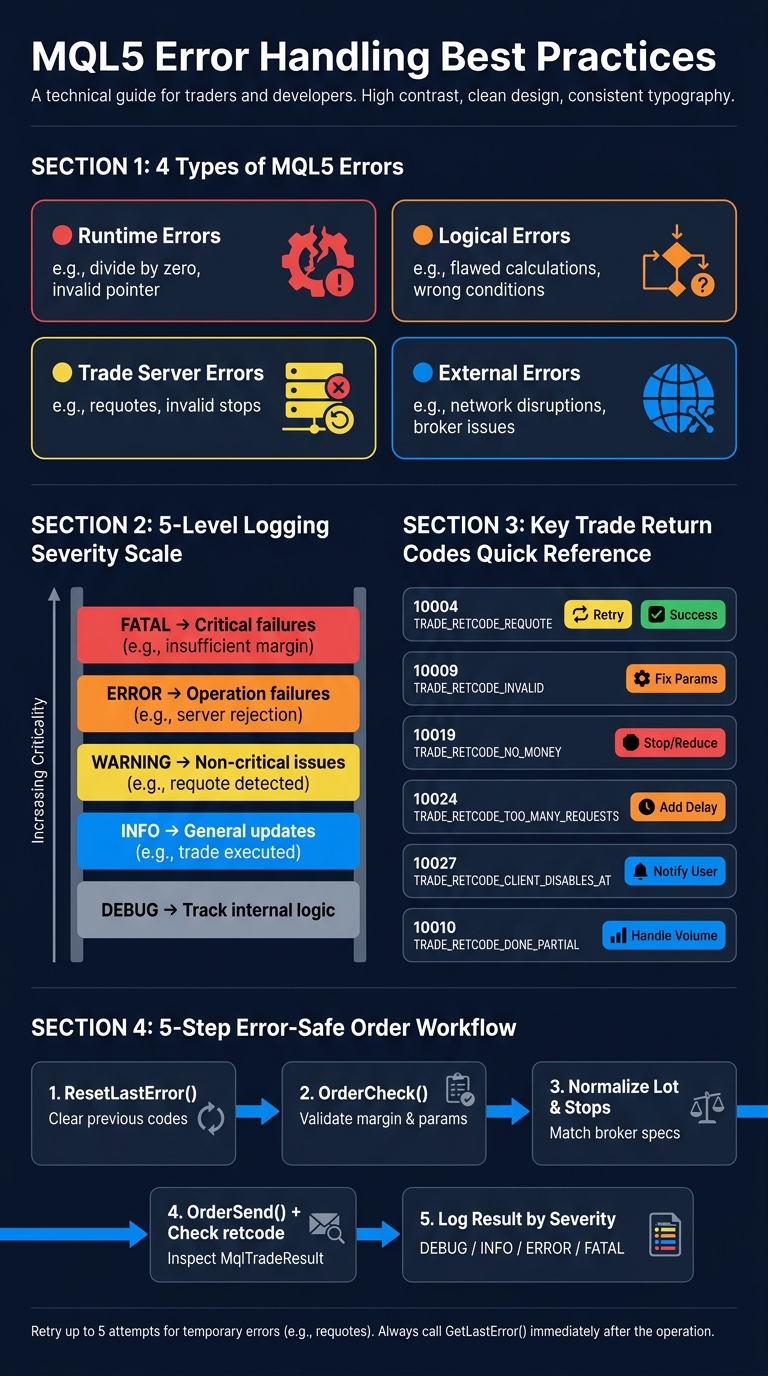
- Types of Errors: Runtime (e.g., divide by zero), logical (e.g., flawed calculations), trade server (e.g., requotes), and external issues (e.g., network disruptions).
- Key Tools: Use
_LastErrorandGetLastError()to identify issues, and always reset errors withResetLastError(). - Best Practices: Validate inputs with
OrderCheck(), implement retry logic for temporary errors, and maintain a clear logging system with severity levels (DEBUG, INFO, ERROR, FATAL). - Trade Safety: Always normalize lot sizes and ensure stop-loss levels meet broker requirements to avoid invalid orders.
- Logs: Categorize logs by severity and use timestamps for better analysis. Export logs for deeper insights during backtesting.
Proper error handling safeguards your trading system from cascading failures and financial losses. By using structured logging, validating inputs, and addressing errors promptly, you can build a more reliable and efficient trading robot.
MQL5 Error Handling: Logging Levels, Error Types & Trade Return Codes
Core Tools and Practices for MQL5 Error Handling
Using MQL5's Built-in Error Handling Tools
MQL5 provides several tools to help you identify and manage errors effectively. The _LastError system variable is key, as it stores the code of the most recent error. To retrieve this code, you use the GetLastError() function. However, always call ResetLastError() beforehand to clear any lingering error codes, ensuring the data you get is specific to the operation you're monitoring.
Certain critical errors, such as division by zero, array index issues, or invalid pointers, will stop execution immediately. For less severe issues, like trade server rejections, you'll need to handle the response manually.
Timing is everything here. Call GetLastError() right after the operation that might fail. If you delay, subsequent actions could overwrite the error code. To make error logs more readable, use EnumToString() to convert numeric error codes into descriptive names. For instance, instead of logging 10016, you’d log TRADE_RETCODE_INVALID_STOPS, which is far easier to understand and act upon.
Key Principles for Handling Errors Well
"Programming art relies on the ability to instruct the program what and how it must do and also to protect it against potentially doing something wrong." - MQL5 Algo Book
When handling errors, it's crucial to prioritize accuracy over action. A poorly executed trade can be far worse than no trade at all. For critical errors, the best course of action is often to stop the Expert Advisor (EA) entirely rather than continue with flawed parameters.
For trade server responses, categorize errors to determine the appropriate action. Temporary errors, like requotes or price freezes, might warrant retries. On the other hand, errors such as invalid stop levels or insufficient funds require immediate parameter adjustments or even halting the method entirely. A retry loop with a fixed cap - say, five attempts - works well for temporary issues and avoids the risk of infinite loops.
Always check error codes immediately after the operation that might fail. Even a slight delay could lead to diagnosing the wrong issue. Pair these practices with a solid logging system to ensure you can track and resolve errors efficiently.
Setting Up a Logging System
A well-organized logging system is essential to building a reliable EA. MQL5's Print() function is a good starting point, as it writes logs to the Experts tab and daily log files. For more persistent and detailed records, consider custom file logging using FileOpen(), FileWrite(), and FileClose(). These files will be stored in /MQL5/Files/.
Logging isn’t just for debugging - it’s also vital for safer live trading. To make logs more effective, categorize entries by severity for easier filtering:
| Level | Purpose | Example Use |
|---|---|---|
| DEBUG | Track internal logic | Monitoring variable states during development |
| INFO | General updates | Successful trade execution |
| WARNING | Non-critical issues | Requote detected, retrying |
| ERROR | Operation failures | Trade server rejection |
| FATAL | Critical failures | Insufficient margin, account disabled |
For timestamps, use the U.S. format MM/DD/YYYY HH:MM:SS, such as 05/18/2026 14:32:07. When logging financial values, format them with DoubleToString(value, 2) and add "USD" for clarity in multi-currency setups. A properly formatted log entry might look like this:
[ERROR] 05/18/2026 14:32:07 | OrderSend failed | TRADE_RETCODE_INVALID_STOPS | SL: $1,245.50 USD.
To maintain performance, buffer log messages and flush them in batches of 100 entries. This reduces the risk of slowdowns caused by excessive file I/O operations.
sbb-itb-3b27815
Writing Safer Code for Trade Execution and Position Management
Error Handling in Trade Operations
When working with trade operations, it's essential to go beyond just a logging system and error categorization. Directly inspecting errors is key. For instance, every call to OrderSend() provides an MqlTradeResult structure, and the retcode field within it reveals the outcome. Always check this field instead of relying solely on the function's return value.
Some errors are temporary and can be retried, while others require halting further execution. Here's a quick reference table for common return codes and how to handle them:
| Code | Constant | Handling Strategy |
|---|---|---|
| 10004 | TRADE_RETCODE_REQUOTE |
Update prices and retry |
| 10009 | TRADE_RETCODE_DONE |
Request completed successfully |
| 10010 | TRADE_RETCODE_DONE_PARTIAL |
Handle remaining volume if necessary |
| 10013 | TRADE_RETCODE_INVALID |
Check parameters and normalization |
| 10019 | TRADE_RETCODE_NO_MONEY |
Stop execution or reduce lot size |
| 10024 | TRADE_RETCODE_TOO_MANY_REQUESTS |
Add a delay before retrying |
| 10027 | TRADE_RETCODE_CLIENT_DISABLES_AT |
Notify the user to enable AutoTrading |
For temporary errors, like TRADE_RETCODE_REQUOTE, apply retry logic as previously outlined. Sergey Eremin emphasizes this approach:
"If we receive an error after the first request to the server, we will send the trading order as many times as there are defined trading attempts... till the order is successfully sent to the server or before all attempts are made." - Sergey Eremin
Validating Inputs Before Sending Orders
Preventing errors starts with validating your order parameters. Before calling OrderSend(), use OrderCheck() to confirm the correctness of your request. This function evaluates financial aspects like required margin and available funds without actually placing the order on the server.
"OrderCheck is useful for programmers at the initial stage of getting acquainted with the trading API in order to experiment with requests without sending them to the server." - MQL5 Algo Book
Additionally, confirm trading permissions on three levels: the terminal (TERMINAL_TRADE_ALLOWED), the expert advisor (MQL_TRADE_ALLOWED), and the account (ACCOUNT_TRADE_ALLOWED). If any of these permissions are disabled, the order will fail before reaching the broker.
Other critical validations include ensuring proper lot size normalization, checking acceptable deviation, and adhering to SYMBOL_TRADE_STOPS_LEVEL for Stop Loss and Take Profit levels. Placing these levels too close to the current price results in an INVALID_STOPS error.
Once your orders are validated, you can proceed with confidence to manage positions effectively.
Safe Position Management Techniques
Managing positions safely is just as important as executing orders. For example, partial fills, indicated by TRADE_RETCODE_DONE_PARTIAL, mean only part of your requested volume was executed. In such cases, decide whether to complete the order or accept the partial position.
To minimize risks during execution, set a maximum deviation for market orders using the deviation field in MqlTradeRequest. Also, always record ticket references immediately after execution. This is especially crucial for hedging accounts, where multiple positions on the same symbol can exist simultaneously.
Error Handling in mql5
Error Handling for Indicators, Data, and Files
Error handling goes beyond trade execution - it's essential for maintaining the integrity of indicators, data, and file operations in your system.
Protecting Indicator Logic
Errors in indicators might not crash your program, but they can lead to inaccurate data. Two common issues are invalid buffer indices and missing data. Always check for ERR_INDICATOR_DATA_NOT_FOUND (4806) before using indicator values in calculations, and validate buffer indices to prevent ERR_INDICATOR_WRONG_INDEX (4812).
To avoid these problems, use the modulus operator (%) and unsigned integers (uint). For instance, index % ArraySize(buffer) ensures you never reference an out-of-bounds position, while uint prevents negative values from entering your calculations at the compiler level.
"The ability of a program to 'digest' incorrect data without fatal consequences is the most important indicator of its quality, along with producing correct results for correct input data." - MQL5 Algo Book
Mathematical operations also require careful attention. Use NormalizeDouble() for price calculations and ensure results are neither NaN nor Inf before generating signals. A single division by zero in an indicator can halt execution entirely.
Similarly, safeguarding file operations and configurations is critical for maintaining data reliability.
Handling File and Configuration Errors
File operations can fail silently, so it's essential to verify every FileOpen() call. If it returns INVALID_HANDLE, stop the process and use GetLastError() to diagnose the issue. Common reasons for failure include missing files (error 5019), accessing paths outside the MQL5 sandbox, or exceeding the terminal's limit of 64 open files (error 5001).
| Error Code | Constant | Description |
|---|---|---|
| 5001 | ERR_TOO_MANY_FILES |
More than 64 files open at once |
| 5004 | ERR_CANNOT_OPEN_FILE |
File not found or path error |
| 5007 | ERR_INVALID_FILEHANDLE |
Handle closed or never opened |
| 5019 | ERR_FILE_NOT_EXIST |
Specified file does not exist |
| 5027 | ERR_FILE_ENDOFFILE |
End of file reached during read |
Before performing any file operation, call ResetLastError() to ensure the captured error code directly relates to the current action. After writing data, use FileFlush() to save it to disk and protect against loss if the program unexpectedly terminates. Always close file handles with FileClose() once you're done.
When working with configuration files, don't assume that valid file openings guarantee valid content. Use SetUserError() to flag application-level issues - like invalid time ranges or zero lot sizes - that the system might overlook. These user-defined error codes, starting at 65,536, provide a clean way to log and manage logic errors.
Building Reusable Error Handling Utilities
Streamline debugging and resource management by centralizing error handling with reusable utilities. A shared utility, such as a ControlErrors class, can manage logging, alerts, and error formatting.
At a minimum, your utility should translate numeric error codes into readable names using EnumToString() with a custom error enumeration. For example, instead of logging a raw 4301, you can display ERR_MARKET_UNKNOWN_SYMBOL, making debugging far easier. Add severity levels - DEBUG, INFO, ERROR, FATAL - to ensure routine events don't overwhelm your logs.
A robust utility should also handle resource cleanup automatically. For instance, wrapping file handles in a class with a destructor ensures they are closed even if a function exits early or encounters an error. This approach, known as the RAII pattern, enhances reliability and reduces development time. Once these utilities are in place, adding error-handling capabilities to new scripts becomes a quick and efficient process.
Adding Error Handling to Automated Workflows
Creating reusable utilities and implementing solid logging practices is just the starting point. To ensure your automated and AI-assisted workflows are dependable, effective error handling is a must.
Reviewing AI-Generated MQL5 Code
AI tools can churn out MQL5 code in no time, but the results often have subtle flaws that only show up when the code runs. A frequent issue? Missing parentheses in built-in functions. For instance, using PositionsTotal instead of PositionsTotal() leads to an "undeclared identifier" error. Another common oversight is skipping ResetLastError(), which can cause errors to be misinterpreted.
"Every MQL5 statement is a potential source of runtime errors." - MQL5 Algo Book
When evaluating AI-generated scripts, pay close attention to these four critical areas:
- Error Resetting: Ensure
ResetLastError()is called before each trade operation. - Array Bounds Validation: Use the modulus operator
%to avoid out-of-bounds errors, a common issue in dynamically generated code. - Normalization: Confirm that prices and lot sizes are normalized with
NormalizeDouble()using the symbol'sDigitsandVolumeStepproperties. - Retry Logic: Check that trade retry mechanisms are in place. For retriable errors like requotes, the Expert Advisor (EA) should retry up to five times.
While runtime errors can halt execution, logic errors are sneakier - they let the program continue running but produce incorrect results. Adding assert() calls, such as ensuring stopLoss < Bid before placing a Buy order, can catch these issues early and prevent costly mistakes. Incorporating these checks into your workflow makes your system more reliable.
How Traidies Supports Safer Automation

Traidies takes a proactive approach to safety in automated trading. Its AI-driven code generation transforms natural-language strategy descriptions into MQL5 code that includes built-in error-handling structures. This reduces the need for manual reviews, particularly for traders unfamiliar with MQL5's intricacies.
Traidies also offers automated backtesting with historical data, a crucial step for identifying weak points in error handling before live deployment. Running your EA through MetaTrader 5's Strategy Tester under different tick generation modes - like "Every Tick" or "Open prices only" - can help uncover logic paths that only emerge under specific market scenarios. By prioritizing error handling throughout the process, Traidies helps traders create more resilient automated trading systems.
Using Logs and Backtests to Improve Strategies
Once error handling is in place, the next step is to refine your strategy using logs and backtests. Without structured logging, backtesting can feel like navigating in the dark. After running a test, MetaTrader 5's "Experts" tab captures runtime messages, but raw error codes (e.g., 10016) can be tough to interpret. Converting these codes into readable constants like TRADE_RETCODE_INVALID_STOPS makes debugging much faster.
For more detailed analysis, export Strategy Tester logs as CSV files and open them in Excel. Use the Autofilter feature to isolate rows with "ERROR:" or "ASSERT:" prefixes, making it easier to spot recurring issues in thousands of lines of trade data. By correlating errors with specific market conditions - like time of day, volatility spikes, or spread changes - you can fine-tune your strategy logic.
Additionally, the Strategy Tester's optimization tool allows you to test your EA across multiple symbols at once. This can help identify which currency pairs are more prone to specific runtime or logic errors.
"Every second spent deciphering an error is a second away from the next right decision." - joaopedrodev
Conclusion
Handling errors effectively in MQL5 is more than just a technical skill - it's what sets a reliable trading system apart from one that could drain your account over time. Incorporating practices like calling ResetLastError() before critical operations, ensuring lot sizes and stop levels align with symbol specifications, and implementing retry mechanisms for temporary server issues can help you avoid expensive errors.
When managing a USD account, risk management should be treated as a continuous process. Adjusting position sizes at the start of each session - keeping risk levels between 1–2% of your current balance - can prevent a losing streak from spiraling into a major drawdown. As noted in the MQL5 Algo Book:
"The ability of a program to 'digest' incorrect data without fatal consequences is the most important indicator of its quality, along with producing correct results for correct input data."
Logging and validation act as your safety net. Translating raw error codes into readable constants like TRADE_RETCODE_REJECT and categorizing logs by severity (DEBUG to FATAL) simplify troubleshooting. But logs alone aren't enough for critical errors - set up alerts that notify you via email or phone, so you can respond immediately when something goes wrong.
These principles apply whether you're coding manually or using tools powered by AI. For instance, if you're leveraging platforms like Traidies to generate and backtest strategies, the same guidelines hold true. Always review scripts for proper error resets, boundary validations, and data normalization. Testing under a variety of market conditions can help you uncover potential issues before they affect live trading.
Error handling isn't something you can set and forget. It's an ongoing effort that ensures your automated systems remain reliable, your account stays protected, and your strategies work as intended.
FAQs
Which MQL5 errors should stop my EA immediately?
Errors like ERR_TRADE_CONTEXT_BUSY (4014) signal that the trading context is currently occupied. When this happens, your Expert Advisor (EA) should halt operations immediately. Pushing forward with trade executions in this state can cause additional problems or lead to erratic system behavior. Addressing these errors quickly is essential to ensure your automated trading system runs smoothly and reliably.
How do I decide when to retry a failed OrderSend()?
When deciding whether to retry a failed OrderSend() operation, focus on the error code provided in the MqlTradeResult structure. Here's how to approach it:
- Retry for temporary issues: Errors like requotes or timeouts might only be short-term problems. In these cases, consider retrying the operation after a brief delay or by adjusting parameters such as price or slippage.
- Avoid retrying for permanent errors: If the error stems from something like an invalid volume or incorrect parameters, retries won't help unless the underlying issue is fixed first.
- Set retry limits: To prevent endless loops, always cap the number of retries. This ensures your program remains efficient and doesn't hang indefinitely.
- Log every failure: Keeping a record of failed attempts helps you diagnose issues and refine your error-handling strategy over time.
What should I log to debug backtests and live trades faster?
To troubleshoot backtests and live trades effectively, it's essential to log detailed error codes using GetLastError(). Pair these codes with contextual details about the error's location and cause. Make sure to record key variables, critical decision points, and the status of orders at the time of the error. Use clear and descriptive error messages that specify the function or module where the issue occurred. This kind of custom logging streamlines the debugging process, making it easier to pinpoint problems quickly - whether you're backtesting strategies or running live trades.