TensorFlow to MQL5: Data Exchange Basics

TensorFlow to MQL5: Data Exchange Basics
When combining TensorFlow and MQL5, the goal is clear: use TensorFlow for machine learning predictions and MQL5 for executing trades in MetaTrader 5. TensorFlow handles tasks like price movement forecasting, while MQL5 automates trade execution based on those predictions. Here's a quick breakdown:
- MQL5 Strengths: Real-time market data handling, order execution, and MetaTrader 5 integration.
- TensorFlow Strengths: Advanced machine learning for generating trading signals.
- Workflow: Market data flows from MQL5 to TensorFlow, which processes it and sends back signals (e.g., BUY, SELL, WAIT). MQL5 then executes trades based on these signals.
- Setup Requirements:
- Python 3.x with libraries like TensorFlow, Pandas, and MetaTrader5.
- MetaTrader 5 with "Algo Trading" enabled and proper permissions for Python integration.
- Data Exchange: Methods include REST APIs, sockets, or file-based transfers, with REST being the easiest to implement.
Python ↔ MQL5: Sending Real-Time Data Both Ways via Sockets
sbb-itb-3b27815
Setting Up the Development Environment
Getting TensorFlow and MetaTrader 5 configured correctly is key to ensuring a stable and functional connection.
Configuring MetaTrader and Python
First, make sure that "Algo Trading" is enabled in the MetaTrader 5 terminal settings. Additionally, check the option for "Integration with Python." As MetaQuotes explains:
"MetaTrader 5 provides out-of-the-box support for Python scripts. To enable these operations, the terminal developers provide MetaTrader5 module for Python." – MetaQuotes
To initialize the connection in Python, use:
mt5.initialize()
You can verify the connection by calling mt5.terminal_info() or mt5.version(). If the initialization fails, diagnose the issue using mt5.last_error(). For example, error code 10027 indicates that algorithmic trading is disabled. If you're working with multiple MetaTrader terminals, specify the full path to terminal64.exe to avoid connecting to the wrong instance.
Setting Up TensorFlow for Trading
Begin by activating a virtual environment, then install the necessary libraries listed below:
| Library | Purpose |
|---|---|
| MetaTrader5 | Provides terminal connectivity and data access |
| TensorFlow | Builds and trains deep learning models |
| pandas | Handles data manipulation and analysis |
| NumPy | Performs numerical operations and array handling |
| scikit-learn | Assists with data scaling, splitting, and metrics |
| tf2onnx | Converts TensorFlow models to ONNX format |
| onnxruntime | Tests ONNX models in Python |
When installing Python, ensure you select the "Add Python to PATH" option. Additionally, configure MetaEditor (navigate to Settings → Compilers) to execute Python scripts directly.
Saving and Loading TensorFlow Models
After training your TensorFlow model, save it in the SavedModel format. However, MetaTrader 5 cannot directly execute .h5 or SavedModel files. Instead, it requires models in the ONNX (Open Neural Network Exchange) format. As MQL developer Mauricio Vellasquez notes:
"MetaTrader 5 can't run TensorFlow models directly. It runs models in the ONNX (Open Neural Network Exchange) format." – Mauricio Vellasquez, MQL Developer
To convert your model, use the tf2onnx library with the following command:
python -m tf2onnx.convert --keras [model_name].h5 --output [model_name].onnx
Once converted, embed the .onnx file into your Expert Advisor using the #resource directive. This allows the model to run without relying on external Python dependencies. When loading the model in MQL5 using OnnxCreateFromBuffer, define the input and output shapes explicitly with OnnxSetInputShape and OnnxSetOutputShape to prevent runtime errors.
Lastly, save the scaling parameters used during training so they can be applied to live data.
With the environment set up, you're ready to move on to designing the data exchange interface.
Designing the Data Exchange Interface
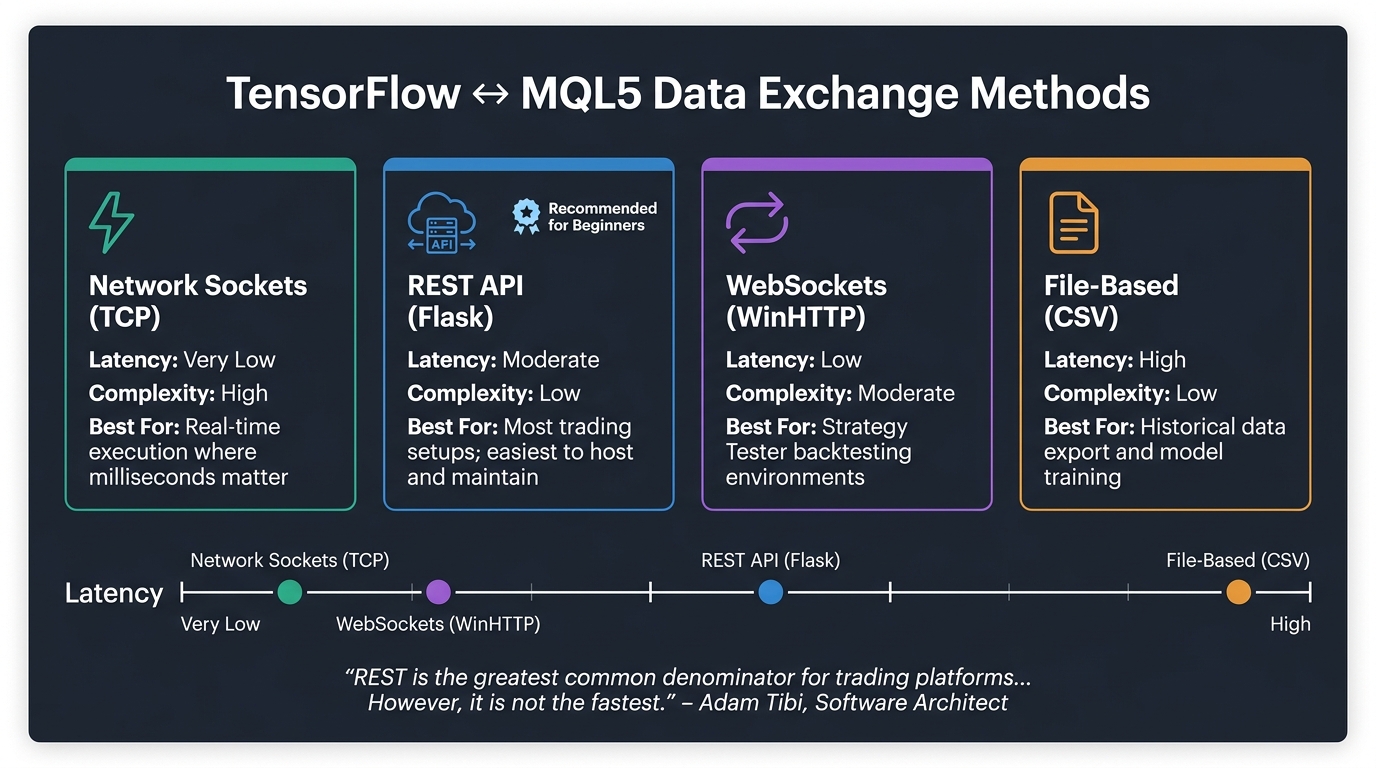
TensorFlow to MQL5 Data Exchange Methods Compared
Creating a seamless connection between TensorFlow's predictions and MQL5's trading execution hinges on a well-thought-out data exchange interface.
Types of Data to Exchange
The data exchanged between MQL5 and TensorFlow falls into two main categories: inputs and outputs.
- Inputs: MQL5 typically sends market data, including OHLCV bars, technical indicators (like RSI and ATR), and contextual metadata such as the symbol, timeframe, and timestamp. Including metadata in every payload ensures proper backend validation and logging.
- Outputs: TensorFlow returns predictions, often in the form of buy/sell/hold signals or probability scores. For classification models, the output might be a probability array, such as
[0.2, 0.1, 0.7], corresponding to Up, Down, and Hold, respectively. Using ArgMax in MQL5 to identify the predicted class simplifies decision-making.
Efficient transmission of this data is the next critical consideration.
Data Exchange Methods
| Method | Latency | Complexity | Best For |
|---|---|---|---|
| Network Sockets | Very Low | High | Real-time execution where milliseconds matter |
| REST API (Flask) | Moderate | Low | Most trading setups; easiest to host and maintain |
| WebSockets (WinHTTP) | Low | Moderate | Strategy Tester backtesting environments |
| File-Based (CSV) | High | Low | Historical data export and model training |
"REST is the greatest common denominator for trading platforms and for modern systems in general. However, it is not the fastest." – Adam Tibi, Software Architect
For many setups, a Flask-based REST API offers a practical balance of simplicity and reliability. However, when execution speed is paramount, TCP sockets provide faster communication, albeit with added complexity.
Structuring Input and Output Data
After selecting a transmission method, the next step is to define how data will be structured. The format of inputs and outputs is as important as the method of exchange.
- REST APIs: Inputs should be serialized as normalized, one-dimensional JSON arrays. For example, use
DoubleToString(value, 8)in MQL5 to maintain precision. Outputs should include a status key (e.g.,"success"or"error") alongside prediction data, ensuring the MQL5 script can quickly identify and handle any issues. - Sockets: Data can be transmitted as space-separated strings, such as
"1.105 1.106 1.104", which can be parsed in TensorFlow usingnumpy.fromstring.
In one implementation, a 12-dimensional feature vector was serialized into JSON, sent via a Flask endpoint, and the response was parsed to trigger trades. This approach underscores the importance of consistency in data formatting.
Normalization is another critical factor. As MQL Developer Mauricio Vellasquez explains:
"Neural networks don't like raw price data. A price of 2300.00 is just a 'big number' and can cause the model's math to explode. We must normalize all our features, usually to a range between 0 and 1." – Mauricio Vellasquez, MQL Developer
Ensuring consistent normalization across all inputs not only improves model performance but also prevents errors during data processing.
Implementing Data Flows Between TensorFlow and MQL5
With your data structures and exchange methods in place, the next step is to establish the data flow: sending market data from MQL5 and receiving predictions from TensorFlow.
Sending Market Data from MQL5 to TensorFlow
To send market data, you can use MQL5's WebRequest() function to POST data to your Flask or FastAPI endpoint. Your Expert Advisor collects the latest OHLCV values and any additional features on each new bar, serializes the data into JSON, and sends it to the server. This step is crucial for integrating AI-driven insights into your trading strategy within MetaTrader 5.
For example, a typical payload for a 50-bar LSTM model might look like this: {"features": [0.412, 0.418, 0.403, ...]}. On the Python server, this array is reshaped into the [1, 50, 1] format required by TensorFlow before being passed to the model for processing.
To ensure efficiency, track the last processed bar time using a static variable and trigger the data exchange only on new candle openings. As Hlomohang John Borotho, Founder and CEO at GIT Capital, explains:
"Incorporating an AI model into an MQL5 trading strategy can help overcome existing challenges by infusing machine learning-based adaptability."
For even lower latency, consider using TCP sockets instead of HTTP. In this approach, MQL5 acts as the client, using SocketSend() to stream price data as space-separated strings to a Python TCP server. The server can then parse the data with numpy.fromstring. Developer Dmitrievsky highlights the advantages of this method:
"Sockets are one of the fastest and most flexible solutions... This is a common interface for different programming languages, as it uses system calls at the operating system level."
With this setup, you’ve established an efficient outbound data flow. The next step is to handle TensorFlow’s predictions and integrate them back into MQL5.
Sending Predictions from TensorFlow Back to MQL5
Once TensorFlow generates a prediction, the system must send the result back to MQL5. After completing model inference, the Python server sends a JSON response with details like the predicted signal, confidence score, and suggested stop-loss and take-profit levels. For instance: {"signal": "buy", "confidence": 0.74, "sl": 1.1045, "tp": 1.1120}.
On the MQL5 side, the JSON response is parsed, and a confidence threshold is applied before executing any trades. For example, only act on predictions with a confidence score above 0.65 to avoid low-quality signals. To prevent freezing, use SocketIsReadable() before calling SocketRead().
To further refine the process, include an EnableTrading flag in your Expert Advisor. This allows you to visually verify signals on the chart before executing trades in live mode.
Synchronization and Error Handling
Effective synchronization and error handling are essential for ensuring smooth data exchange between TensorFlow and MQL5 while maintaining the accuracy of trade signals.
Timing and Synchronization
Avoid triggering data exchanges on every tick. Instead, use an isNewBar() check to ensure your model processes complete and meaningful candle data without overloading the server.
Since WebRequest() in MQL5 is synchronous, it's important to set a timeout between 5,000 and 15,000 milliseconds. This prevents the terminal from freezing during communication. Additionally, synchronize the Python server and MetaTrader 5 terminal to UTC to avoid timestamp mismatches. If the server fails to respond within the set timeframe, the EA should log the issue and skip processing for that bar.
Once timing is optimized, the next focus should be on error handling to protect your trading operations.
Error Handling and Fallback Strategies
Even a robust pipeline can run into problems, such as a Python server crash, malformed JSON, or unexpected model outputs. Your EA should be prepared to handle these scenarios gracefully, avoiding unnecessary errors or flawed trades.
On the MQL5 side, always check the HTTP status code before acting on a response. A 200 OK confirms success, while 4xx or 5xx codes indicate issues. Use GetLastError() to catch lower-level errors like socket failures. Common errors to account for include:
- Error 4014: Indicates a system function is not allowed.
- Error 403: Occurs when the URL is not whitelisted. To fix this, add your Python server's address (e.g.,
http://127.0.0.1:5000) to the "Allow WebRequest for listed URL" list in MetaTrader 5 settings.
On the Python side, wrap your inference logic in try...except blocks to handle unexpected issues. Instead of letting the server crash, return structured error responses like {"status": "error", "message": "Invalid feature dimensions"} with a 500 status code. Implement a /health endpoint to let your EA confirm that the server is operational before sending prediction requests.
For fallback strategies, your EA should include contingency plans. If the TensorFlow service is down or returns results with a confidence score below your threshold, the EA can switch to a traditional indicator-based strategy instead of halting altogether.
Logging and Monitoring
Once error handling is in place, logging becomes essential for ongoing monitoring and troubleshooting.
In MQL5, use Print() to log status messages and HTTP response codes in the "Experts" tab. For more detailed records - such as model responses or signal histories - write logs to external .csv or .txt files using FileOpen and FileWrite.
On the Python side, leverage the logging module to record every incoming request and outgoing prediction. Keeping a persistent log that includes input features and model outputs can help identify issues like model drift or trace back problematic trades.
To make event reconstruction easier, include a UTC timestamp in every JSON payload exchanged between MQL5 and Python. This ensures consistency when reviewing logs from both systems.
Conclusion and Next Steps
Key Points Recap
Creating a TensorFlow–MQL5 data exchange pipeline comes down to a few critical decisions: how you choose to communicate between systems, keeping data normalization consistent, and combining workflows effectively. Whether you go for a REST API with Flask, a native ONNX model, or a socket-based connection, each option has its pros and cons, especially when balancing ease of use against latency concerns. Consistent normalization is key to avoiding performance issues over time.
In this setup, MQL5 handles real-time tasks like feature extraction and executing trades, while Python takes care of tensor operations and retraining the model. To move from a basic prototype to a reliable live system, you'll need solid synchronization, error management, and comprehensive logging in place.
"Incorporating an AI model into an MQL5 trading strategy can help overcome existing challenges by infusing machine learning-based adaptability and decision-making capabilities." - Hlomohang John Borotho, Founder and CEO, GIT Capital
With these basics covered, you're ready to take your system to the next level.
Tools to Explore Next
Once your pipeline is up and running, you can dive into more advanced tools. For example, converting your Keras model to ONNX format using the tf2onnx library allows MQL5 to handle inferences directly. This eliminates the need for an active Python server, cutting down latency and speeding up your trading strategies. If you're working with larger datasets, SQLite, which MetaTrader 5 supports natively, offers a more reliable alternative to transferring data through string-based sockets. These upgrades can streamline your pipeline, reduce delays, and improve overall data handling.
If you'd rather avoid manually coding in MQL5, check out Traidies. This platform uses AI to generate MQL5 code from natural language descriptions of your strategies. It also supports automated backtesting with historical data, which is perfect for testing your TensorFlow-driven signals before committing to a full implementation.
FAQs
Should I use REST, sockets, or ONNX in MQL5?
The choice ultimately boils down to what you need. ONNX works great for deploying pre-trained models in MQL5 because it’s natively supported and simplifies the process. Sockets are your go-to for fast, real-time data exchange, especially when working with external systems like Python scripts. On the other hand, REST APIs are handy for request-response tasks but can introduce more latency, making them less ideal for high-frequency trading. Stick with ONNX for model deployment and use sockets when real-time communication is key.
How do I keep feature scaling consistent in live trading?
To ensure consistent feature scaling in live trading, it's crucial to apply the exact preprocessing steps used during model training to your live data. This means using the same scaling parameters - like mean, standard deviation, or min/max values - from your training dataset to normalize or standardize the incoming data. By saving and reusing these parameters, you maintain uniformity in how the data is processed, which helps preserve prediction accuracy and prevents issues caused by mismatched data distributions.
How can my EA fail safely if the Python server times out?
To keep your Expert Advisor (EA) running safely during a Python server timeout, you need to implement proper error handling. One common issue to watch for is the "-10005, 'IPC timeout'" error.
Here’s how you can manage this:
- Monitor Function Returns: Always check the return values of connection or data transmission functions. A timeout might indicate a problem that needs immediate attention.
- Take Preventive Actions: If a timeout is detected, consider pausing the EA, halting trading actions, or even closing open positions to prevent further risks.
- Use
mt5.last_error(): This function can help you detect and log timeout errors effectively, ensuring you stay informed and can act quickly.
By staying proactive with these measures, you can ensure your EA operates securely, even in the face of server timeouts.