Checklist for Integrating AI Models in MQL5

Checklist for Integrating AI Models in MQL5
Want to integrate AI models into MQL5 for trading automation? Here's a step-by-step guide to make it work seamlessly. AI models like LSTMs and MLPs can improve trading strategies by analyzing complex data patterns, but the process involves several technical steps. Here's a quick overview of what you'll need to do:
- Set Up Your Tools: Install MetaTrader 5, MetaEditor, Python (3.8+), and libraries like TensorFlow, PyTorch, or ONNX Runtime.
- Prepare Data: Collect high-quality OHLC data, normalize it, and label it for machine learning tasks.
- Train Models: Use Python to train models like LSTMs or MLPs. Save models in ONNX format for MQL5 compatibility.
- Integrate with MQL5: Use ONNX Runtime or external servers (e.g., Flask) for real-time predictions.
- Test Thoroughly: Run demo tests to ensure accuracy and address issues like latency or model drift.
- Implement Risk Management: Use tools like ATR-based stop-losses and daily loss caps to protect your capital.
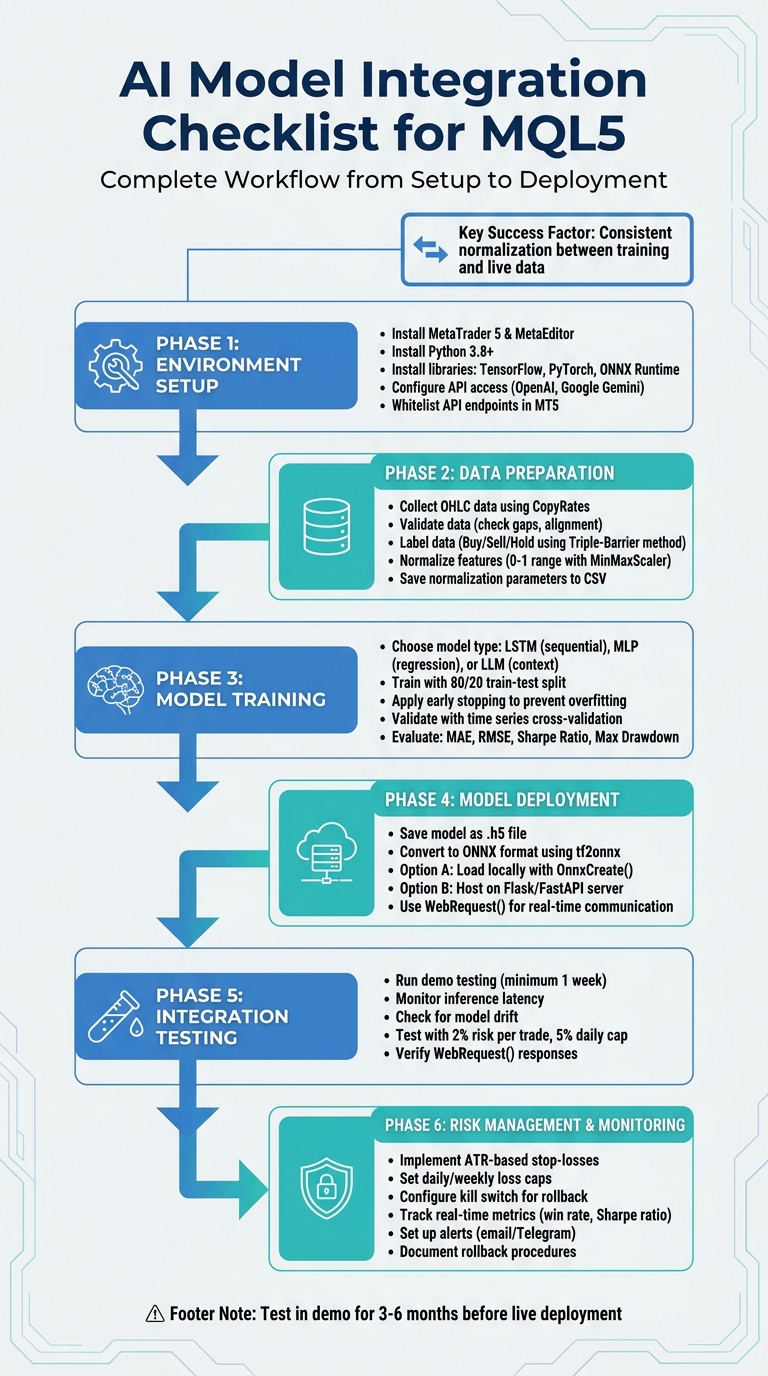
6-Phase AI Model Integration Workflow for MQL5 Trading
Python ↔ MQL5: Sending Real-Time Data Both Ways via Sockets
sbb-itb-3b27815
Setting Up Your Environment
Getting your development environment ready is a critical first step when integrating AI models with MQL5 scripts. A properly set-up environment ensures smooth development and execution.
Verify Software and Resources
Start by confirming that you have the MetaTrader 5 Terminal and MetaEditor installed and up to date. MetaEditor serves as the primary tool for creating Expert Advisors and includes built-in support for running Python scripts directly. Next, make sure you have Python 3.8 or later installed - this is essential for compatibility. Install the official MetaTrader5 Python module by running the command pip install MetaTrader5 in your terminal. This library enables Python scripts to interact with MT5, facilitating data retrieval and account management.
For training AI models, you'll need machine learning libraries like TensorFlow (Keras), PyTorch, or Scikit-learn, depending on the model architecture you plan to use, such as LSTM, Gradient Boosting, or GPT-2. If you intend to run AI models locally within MQL5, install ONNX Runtime for inference. Use pip install onnxruntime for CPU-based inference or pip install onnxruntime-gpu if you have a compatible GPU. Lastly, configure MetaEditor by going to Tools → Options → Compilers and setting the path to your Python executable.
Once these tools are in place, you can expand your environment by integrating external AI services.
Obtain API Access
To use cloud-based AI services like OpenAI's GPT-4 or Google's Gemini, you'll need to secure API access. For OpenAI, visit platform.openai.com, navigate to the "API Keys" section, and generate a new secret key (these keys typically start with "sk-"). For Google Gemini, head to aistudio.google.com, select "Get API Key", and create a new key. Store these keys securely.
Next, whitelist the API endpoints within MetaTrader 5. Open the terminal, go to Tools → Options → Expert Advisors (shortcut: Ctrl + O), check "Allow WebRequest for listed URL", and add the relevant API URLs. For OpenAI, use https://api.openai.com, and for Google Gemini, use https://generativelanguage.googleapis.com. If you're running a custom AI model locally using a framework like Flask or FastAPI, add the local address (e.g., http://127.0.0.1:5000) to the allowed URLs. Before diving into coding, test your API key with a simple curl command or a basic script to confirm it's working.
With API access ready, focus on preparing historical market data for model training.
Review Historical Data Requirements
Reliable model training and backtesting depend on high-quality OHLC (Open, High, Low, Close) data that covers diverse market conditions. You can either export this data as CSV files or access it directly through the MT5 Python API. Use libraries like Pandas and NumPy for data manipulation, the ta library for calculating technical indicators, and Prophet for trend forecasting. Preparing your data thoroughly lays the groundwork for effective training and accurate backtesting results.
Preparing and Processing Data
Once your setup is ready, the next big task is transforming raw market data into a format that your AI model can actually learn from. This means gathering historical prices, checking their accuracy, and organizing the data in a way that makes sense for machine learning.
Collect and Validate Data
Start by extracting OHLC and volume data from MetaTrader 5 using the CopyRates function in MQL5. This function pulls data directly from the terminal, ensuring you're working with the same data your live strategy will use. Export this data to a CSV file to bridge the gap between MQL5 and Python-based training frameworks. Use the matrixf (float matrix) in MQL5 to ensure the data is in float32 format - this is critical for compatibility with ONNX and most machine learning libraries.
Next, check for issues like alignment problems, missing bars, or gaps. Gaps can seriously disrupt sequence-based models like LSTMs, so it’s important to address them early in the process. Use Python libraries like Pandas and NumPy to organize OHLC prices and add technical indicators before feeding the data into your model.
"Data normalization is among the most crucial things that need to be done right for a dataset that is going to be used by a machine learning model."
– MetaQuotes
During training, save your normalization parameters (like min, max, mean, or standard deviation) to CSV files. These exact values must be applied to live data later. If you don’t, your model might produce inconsistent predictions during real-time trading.
Once your data is validated, move on to labeling it to define what your model should learn.
Label Data for AI Models
Labeling is how you teach your model what to predict. For supervised learning, historical data points are assigned labels like Buy (1), Sell (-1), or Hold (0). A common method is the Triple-Barrier approach, which uses three thresholds - a profit target, a stop-loss, and a time limit - to decide labels based on which threshold is hit first. Instead of fixed pip values, use volatility-adjusted thresholds based on an exponentially weighted moving standard deviation to adapt to changing market conditions. Automate this process in Python by iterating through historical timestamps and applying your labeling rules systematically.
"Would you rather practice shooting at perfect circles on a paper target, or train with human-silhouette targets that mimic real combat scenarios? ... You need targets that reflect the reality you'll face."
– Mauricio Vellasquez, MQL Developer
Make sure labels are based only on data available at the decision time. Financial data often results in imbalanced classes, with many "Hold" signals and fewer "Buy" or "Sell" signals. Use techniques like oversampling or undersampling to address this imbalance and reduce model bias.
Preprocess Data for Model Training
After labeling, the data needs to be formatted for model training. Raw prices can destabilize neural networks, so normalize all features to a 0–1 range using Python's MinMaxScaler. Save the scaler's min, max, and scale values to a CSV or header file for consistency across training and live environments. For LSTM models, restructure the data into fixed-length sequences (typically 50–60 bars) to capture temporal patterns.
Beyond raw OHLC data, include technical indicators like RSI, MACD, and ATR to provide additional market context. Additionally, convert raw prices into returns or log returns to handle non-stationarity, ensuring that properties like mean and variance stay stable over time.
Document every preprocessing step and replicate these steps in MQL5 functions. This ensures that the inputs your model sees during training match the live data processed in MQL5. Before deploying the model in a live environment, test your entire data pipeline in a demo setup to catch potential issues like inference delays or data inconsistencies.
Training and Selecting an AI Model
Once your data is prepped and cleaned, it's time to focus on building and training the AI model that will guide your trading decisions. The type of model you choose depends on your prediction goals and the hardware you have available.
Choose the Right Model
For sequential data, LSTM models are a solid choice since they excel at capturing long-term dependencies in price movements. If your task involves simpler predictions, like hitting specific price targets, Multi-Layer Perceptron (MLP) models are effective for regression tasks, achieving R2 accuracy scores of approximately 93% during training and 95% during testing. On the other hand, for tasks requiring deeper context - such as analyzing news sentiment or creating strategies - GPT or LLM models offer excellent generalization abilities.
Keep in mind your hardware constraints. Larger models demand significant memory and processing power, and API-based models like GPT-4o or Claude 4.5 may introduce latency (around 30 seconds for inference). These are better suited for higher timeframe analysis rather than high-frequency trading.
"The ability to export and import AI models in ONNX format streamlines the development process, saving time and resources when integrating AI into diverse language ecosystems."
– MetaQuotes
Train and Validate the Model
Start by implementing your chosen model architecture in TensorFlow or PyTorch. For LSTM models, use a sequence length of about 50 bars, the Adam optimizer, and Mean Squared Error (MSE) as the loss function. To prevent overfitting, apply early stopping. Split your dataset into 80% for training and 20% for testing to assess how well the model performs on unseen data.
To validate the model, use time series cross-validation with n-splits. This method evaluates performance across different historical data segments while avoiding look-ahead bias. Assess the model using metrics like Mean Absolute Error (MAE), Root Mean Square Error (RMSE), Sharpe Ratio, and Maximum Drawdown. To further minimize overfitting risks, consider adding dropout layers and using genetic algorithms for parameter optimization.
Once you've confirmed the model's performance through these metrics, it’s time to prepare it for deployment in your MQL5 environment.
Save and Prepare the Model for Deployment
After training, save the model in a format compatible with MQL5. If you're using Keras or TensorFlow, save it as a .h5 file. Then, convert it to ONNX format using tf2onnx for seamless integration with MetaTrader 5. Import the .onnx file into MQL5 as a resource using #resource, and create a model handle with OnnxCreate or OnnxCreateFromBuffer. Make sure the data types align - MQL5's matrixf (float32) is required if the ONNX model expects float32 inputs, as mismatched data types can trigger errors.
Alternatively, you can host the model using FastAPI or Flask to create a prediction endpoint. MQL5's WebRequest() function allows you to send market data, such as 50-bar OHLC sequences, to the server and receive trading signals in JSON format. Don’t forget to whitelist the server URL in MetaTrader 5 under Tools > Options > Expert Advisors > Allow WebRequest for listed URL.
Integrating AI Models into MQL5
After training your AI model, the next step is connecting it to MetaTrader 5 for real-time trading. Since MQL5 doesn't directly support Python, you'll need to build a bridge between the two systems.
Convert Trading Logic Between Python and MQL5
To ensure your AI model trains under conditions that match live trading, replicate your MQL5 trading logic in Python. This includes incorporating key indicators like ATR and RSI, as well as order management and risk protocols. Normalize all technical indicators and price data using the parameters saved during training. Store these normalization values in a CSV file and apply them consistently to live data - mismatched normalization can hurt prediction accuracy.
Once the trading logic is synchronized, focus on establishing reliable communication between MQL5 and your Python environment.
Establish Real-Time Communication
Host the trained AI model on a Python microservice, such as Flask or FastAPI, which can receive market data from MQL5 in JSON format and return trading signals. In MetaTrader 5, go to Tools > Options > Expert Advisors and whitelist the server URL under "Allow WebRequest for listed URL". Use MQL5's WebRequest() function to send POST requests with JSON-formatted market data to the Python server. Set a timeout of 5 seconds to handle potential network delays. Once the server responds with signals - like BUY/SELL and Stop-Loss levels - parse the JSON response and execute trades using the CTrade class.
"By offloading all data science to Python, the EA remains lean, responsive, and easy to maintain."
– Vyacheslav Izvarin
For lower latency, you could use sockets instead of REST APIs, although this adds complexity to the communication process. Alternatively, if your model is converted to ONNX format, you can bypass the external server entirely and run the model directly in MQL5 using OnnxCreate().
Once the connection is established, thoroughly test the integration with paper trading.
Test Integration with Paper Trading
Before deploying the system live, conduct at least a week of demo testing to evaluate how your AI performs under various market conditions. Pay close attention to inference latency (the time it takes for the model to generate a signal) and watch for signs of model drift, where accuracy declines as market dynamics shift. During paper trading, enforce strict risk management rules, such as limiting risk to 2% per trade and a 5% daily drawdown cap, to test the AI's ability to protect capital.
Monitor the responses from WebRequest() to ensure they are accurate and troubleshoot errors as they arise. It's also wise to implement rollback procedures, allowing you to revert to traditional indicator-based strategies if the AI server becomes unresponsive or produces unreliable predictions.
Risk Management and Deployment
When your AI model successfully navigates paper trading, the next step is deploying it with safeguards to protect your investment. Trading losses can be challenging to recover from - requiring disproportionately higher gains to offset them. This makes strong risk management an absolute must. Below, we’ll explore how to set up, monitor, and adjust these safeguards effectively.
Implement Risk Management Protocols
Start by embedding strict risk limits directly into your MQL5 code. These could include daily or weekly loss caps, maximum drawdown checks, and dynamic position sizing methods like the Kelly Criterion, adjusted with ATR (Average True Range). Every trade should have clear Stop-Loss and Take-Profit levels based on AI-generated signals. To ensure consistency, set the AI model’s temperature between 0.1 and 0.5 for more predictable outputs.
Additionally, include a kill switch that can automatically revert the system to conventional trading strategies if irregularities are detected. For added security, store the risk-blocking state locally, using tools like SQLite, to ensure seamless reactivation if needed.
Monitor and Update Model Performance
Keeping an eye on your model’s performance is critical. Track key metrics like inference latency and model drift in real time. Set up alerts - using tools like SendMail or Telegram API - for when critical thresholds are breached. For instance, trigger notifications if the win rate drops below 40% or the Sharpe ratio falls under 0.5. You can also display AI signals directly on trading charts through MQL5 graphical objects, making it easier to interpret and act on the data.
"The required recovery percentage increases exponentially as losses increase. This is not a linear relationship, but a hyperbolic one."
– Vyacheslav Izvarin
Document and Test Rollback Procedures
Even with robust safeguards, unexpected failures can happen. That’s why having well-documented rollback procedures is essential. Design your Expert Advisor (EA) so that its trading logic, risk management, and AI components can be updated independently. Test rollback scenarios using demo accounts to ensure the kill switch activates reliably when needed. Clearly define quantitative triggers - such as excessive slippage, poor execution, or drawdown breaches - that would prompt an immediate rollback. Finally, maintain detailed logs to compare AI predictions with actual market outcomes, which will help refine your strategy over time.
Using Traidies for AI Integration
Traidies provides a streamlined, automated way to integrate AI models into MQL5, simplifying what can often be a complex process. By automating tasks like converting trading ideas into MQL5 code and backtesting strategies, Traidies allows you to focus on your trading logic. You can describe your strategy in plain English, and the platform's AI tools handle the rest, including generating code and implementing safeguards.
AI Strategy Parsing and Code Generation
Traidies excels at translating natural language instructions into functional MQL5 code. For example, you could input something like: "I need a scalping EA for EURUSD on M5 with ATR-based stop losses", and Traidies will generate modular, executable code. The system also identifies potential issues like logical gaps or ambiguities that could lead to errors. On top of that, it automatically integrates critical risk management features, such as proper lot sizing, to ensure smoother execution [29-31].
Automated Backtesting with Historical Data
Backtesting is a breeze with Traidies. Once your code is ready, you can set up your Expert Advisor (EA) in the MT5 Strategy Tester. Choose your symbol, timeframe, and a historical data range - typically 3 to 6 months. The optimization tab helps you fine-tune parameters, and you can save the best configurations for forward testing on a demo account. If any compilation errors occur, the platform’s AI assistant analyzes them and suggests fixes, saving you time and frustration.
Customizable Expert Advisors
One of Traidies' standout features is its compatibility with multiple AI engines, including OpenAI (ChatGPT), Google Gemini, DeepSeek, and Mistral. This allows for flexibility in how your strategies are created and executed. You can define detailed trading conditions, risk parameters, and constraints using plain English. Advanced reasoning models, such as OpenAI's o-series and DeepSeek Reasoner, handle nuanced instructions, enabling you to develop multi-layered, sophisticated strategies tailored to your needs. These customization options align seamlessly with the risk management principles discussed earlier.
Conclusion and Key Takeaways
Integrating AI models into MQL5 can help you create a structured, data-driven trading system. To achieve this, you'll need to isolate your Python environment, ensure consistent data collection and normalization, train and validate your model effectively, and establish seamless communication between Python and MQL5. This can be done through ONNX integration or REST APIs. Additionally, prioritize risk management by incorporating tools like ATR-based stops, daily drawdown limits (e.g., 5%), and confidence thresholds to filter out unreliable signals.
Checklist Recap
The integration process can be broken down into six main phases:
- Phase 1: Confirm your software setup and secure any necessary API access.
- Phase 2: Collect and preprocess historical data, ensuring consistent normalization for both training and live execution.
- Phase 3: Select and train your AI model - whether it's an MLP, LSTM, or LLM. Export it to ONNX for local use or deploy it on a FastAPI server.
- Phase 4: Connect Python and MQL5 using tools like
WebRequestorOnnxCreateFromBuffer. Validate the integration with paper trading. - Phase 5: Implement robust risk management measures.
- Phase 6: Document rollback procedures and test them regularly to prepare for server outages or prediction inconsistencies.
These steps provide a solid framework for integrating AI into your trading strategy. A disciplined approach will help you navigate the challenges and improve execution.
Final Tips for Success
"AI trading isn't 100% win rate. It's consistent, disciplined execution that wins over time. Expect drawdowns; trust the process." - Diego Arribas Lopez, Trader
Avoid over-tweaking your system; constant adjustments can obscure its actual performance. Test your strategy in live market simulations for 3–6 months before making significant changes. Adopt a phased deployment approach: begin in a demo environment, monitor key performance indicators, and then transition to live trading with small position sizes. Lastly, separate your user interface from intensive AI processes by using a millisecond timer (around 20ms). This keeps chart animations smooth and prevents your EA from freezing during critical market events.
FAQs
Should I run my model inside MQL5 (ONNX) or call a Python API?
Running your AI model directly in MQL5 using the ONNX format offers a faster and more streamlined solution compared to relying on a Python API. With ONNX, models can be easily imported, validated, and executed within MQL5 itself, cutting down on latency and avoiding reliance on external systems. Tools like OnnxCreate and OnnxRun simplify the integration process, making this method especially suited for real-time trading scenarios. While Python APIs are an alternative, they often add extra complexity and potential delays.
How do I prevent mismatched normalization between training and live trading?
When working with AI models in trading, consistent data preprocessing is critical. One common pitfall is mismatched normalization, where the data transformation differs between training and live trading. This can throw off your model's predictions.
To avoid this, always use the same scaling parameters - like the mean and standard deviation - from the training phase. Save these parameters and apply them directly to live trading data. Do not re-calculate these values with live data, as it could lead to inconsistencies and unreliable model behavior.
By sticking to this approach, you maintain consistent data processing, which is essential for dependable AI performance in live trading scenarios.
What’s the best way to detect model drift and know when to retrain?
To keep AI models in MQL5 performing at their best, it's essential to watch for signs of model drift. This happens when a model's performance starts to degrade over time, often due to changes in market conditions or data patterns.
The key is to monitor performance metrics like accuracy and precision consistently. If you notice a sharp drop in these metrics, it’s a clear sign the model might need retraining.
You can also use specific techniques to spot drift:
- Track predictions against actual market outcomes: Compare the model's forecasts with real-world results to identify inconsistencies.
- Analyze residuals: Look for patterns in the errors made by the model.
- Check for input data shifts: Watch for changes in the characteristics of the input data compared to what the model was trained on.
By combining regular monitoring with scheduled retraining sessions, you can ensure the model stays accurate and continues to adapt to changing market dynamics.