How to Handle Runtime Errors in MQL5

How to Handle Runtime Errors in MQL5
Runtime errors in MQL5 can disrupt trading systems, leading to incorrect results or program crashes. These errors usually fall into two categories: logical errors (like division by zero or accessing invalid array indexes) and trade operation errors (such as insufficient funds or invalid trade volumes). Both can impact trading performance and account safety.
To address runtime errors effectively:
- Use logs and MetaEditor’s debugging tools to identify issues.
- Implement error-handling mechanisms, like
ResetLastError()andGetLastError(), to track and resolve errors. - Validate inputs and parameters to prevent invalid operations.
- Limit trade requests to avoid broker disconnections.
- Log and notify critical issues for better monitoring.
Tools like Traidies can simplify the process by automating error handling, input validation, and backtesting, helping ensure trading systems run smoothly.
Understanding and addressing runtime errors is key to maintaining stable and reliable MQL5 programs.
Error Handling in mql5
sbb-itb-3b27815
Common Runtime Errors in MQL5
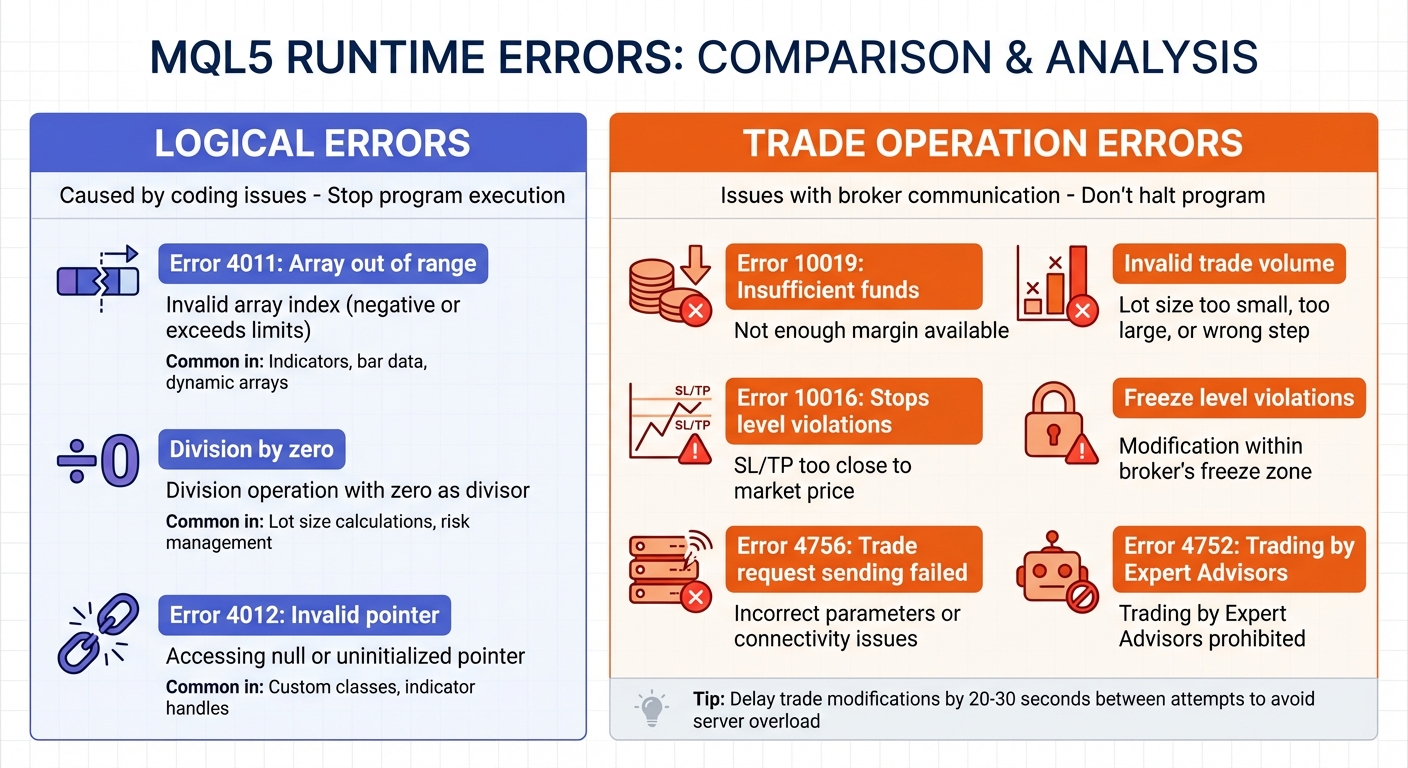
Common MQL5 Runtime Errors: Logical vs Trade Operation Errors
In MQL5, runtime errors generally fall into two categories: logical errors (caused by coding issues) and trade operation errors (stemming from communication problems with the broker). Knowing how to identify and address both is crucial for creating trading systems that can handle the challenges of live market conditions.
Logical Errors
Logical errors occur when coding mistakes disrupt the program's execution. These errors stop the program entirely, making them critical to address. Here are three common examples:
- Array out of range (Error 4011): This happens when trying to access an invalid array index - either a negative value or one that exceeds the array's limits. It's a frequent issue in indicators, especially when working with bar data or dynamic arrays that haven't been resized correctly.
- Division by zero: This error arises when a division operation uses zero as the divisor. It's often seen in calculations involving lot sizes, risk management, or market data.
- Invalid pointer (Error 4012): Occurs when attempting to access a null or uninitialized pointer. This is common when dealing with custom classes or indicator handles that haven't been properly initialized.
As highlighted in MQL5 Programming for Traders:
Programming art relies on the ability to instruct the program what and how it must do and also to protect it against potentially doing something wrong.
Trade Operation Errors
Trade operation errors result from issues during communication with the broker's trade server. Unlike logical errors, these don't necessarily halt the program but can lead to failed trade actions, which may affect overall execution.
Some frequent trade operation errors include:
- Insufficient funds (Error 10019): This occurs when trying to open a position without enough margin available.
- Invalid trade volume: Happens when the lot size is either too small, too large, or not aligned with the broker's required volume step.
- Stops level violations (Error 10016): Triggered by placing Stop Loss or Take Profit levels too close to the current market price.
- Freeze level violations: Occurs when attempting to modify an order within the broker's freeze zone (defined by
SYMBOL_TRADE_FREEZE_LEVEL). - Trade request sending failed (Error 4756): A general failure caused by incorrect parameters or connectivity issues.
Repeated failed trade requests can overload the server. To avoid this, consider delaying trade modifications by 20–30 seconds between attempts.
| Error Category | Common Error Code | Description |
|---|---|---|
| Logical | 4011 | Array out of range (Index beyond bounds) |
| Logical | – | Division by zero (Division operation with zero as divisor) |
| Logical | 4012 | Invalid pointer (Accessing a nonexistent object) |
| Trade | 4752 | Trading by Expert Advisors prohibited |
| Trade | 4756 | Trade request sending failed |
| Trade | 10016 | Invalid stops (Stop Loss/Take Profit levels too close to price) |
| Trade | 10019 | Insufficient funds to perform trade |
Understanding these errors is the first step toward building effective error-handling mechanisms, which will help ensure smoother trading operations.
How to Identify Runtime Errors in MQL5
Spotting runtime errors quickly is crucial for maintaining stable trading systems. MQL5 offers two primary ways to tackle this: checking journal logs for error codes and messages, and using MetaEditor’s debugging tools to track issues in real time. Each approach plays a specific role in identifying and resolving problems effectively.
Using Journal Logs
MetaTrader 5 keeps a detailed record of runtime errors in two separate logs. The Experts tab focuses on activities related to your Expert Advisors (EAs) and indicators. Here, you’ll find outputs from Print() statements and details about trade modifications. Meanwhile, the Journal tab logs terminal-wide events, including connection updates and trade operations.
When an operation fails, the error is stored in the _LastError variable, which you can retrieve using GetLastError(). Logs are color-coded for easier navigation: blue for informational messages, yellow for warnings, and red for errors. Critical errors like "Zero divide" or "Array out of range" are logged with details, including the line number and file where the issue occurred.
To dig deeper, right-click on a log entry and choose "Viewer." This allows you to filter errors, search specific terms, or narrow results by time range. Historical logs are saved as .log files in two locations: /Logs for platform events and /MQL5/Logs for EA-related activity.
For accurate error tracking, always call ResetLastError() before key operations like OrderSend(). This ensures the error code you retrieve corresponds to the most recent action rather than an earlier one. To make logs more informative, use the __FUNCTION__ macro in your Print() statements, which automatically includes the function name where the error originated.
Once you’ve reviewed the logs, switch to MetaEditor’s debugger for real-time troubleshooting.
Debugging with MetaEditor
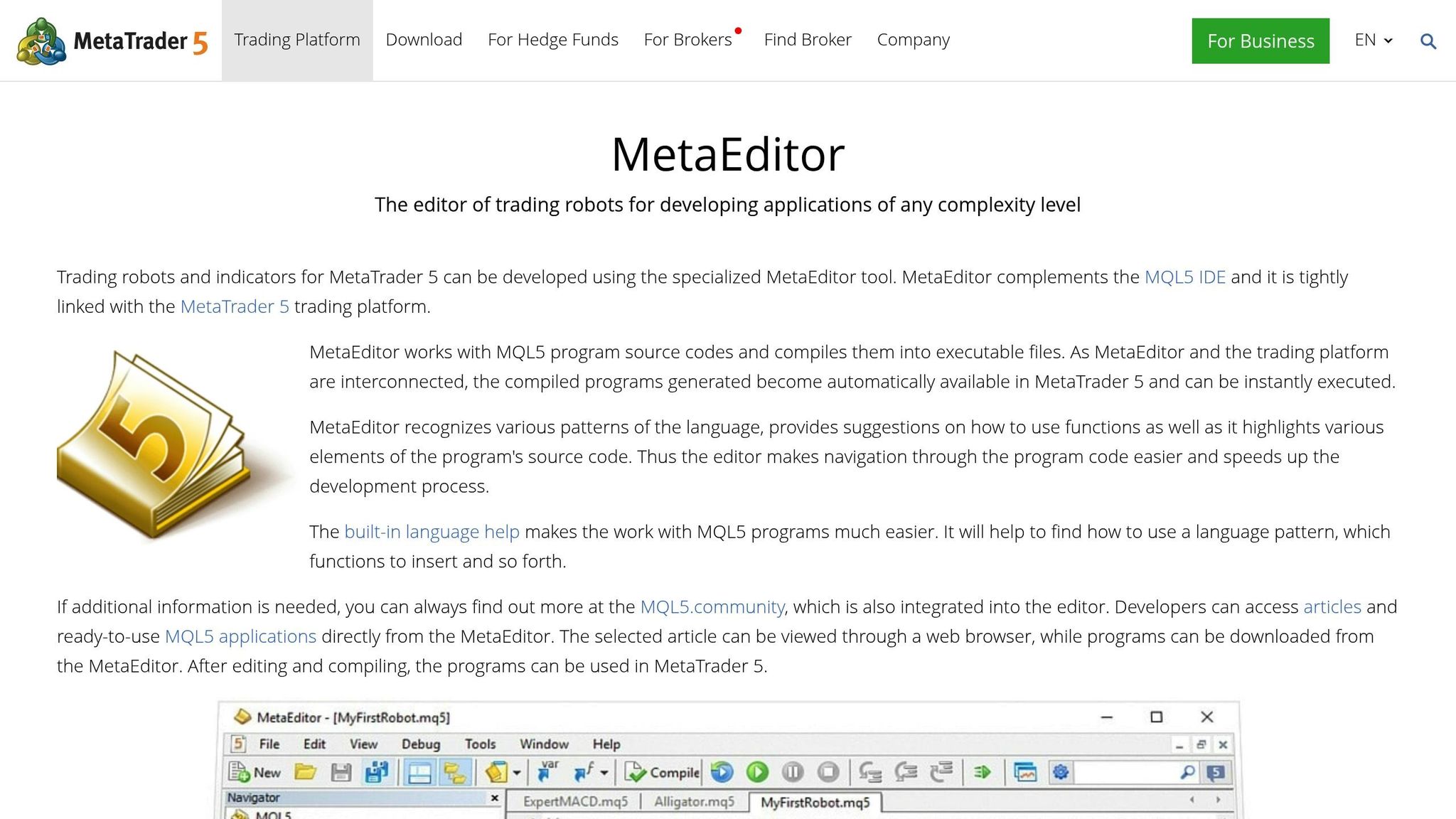
MetaEditor’s debugging tools are an excellent complement to log analysis, providing a live look at your code’s behavior. Press F5 to debug using real-time data or Ctrl+F5 for historical data. You can set breakpoints by clicking the margin or pressing F9, causing the program to pause at specific lines so you can inspect variable states.
The Watch window (Shift+F9) lets you monitor variable values, complex expressions, or specific array elements as the program runs. If an error occurs, the Call Stack shows the sequence of function calls leading up to the issue, making it easier to trace problems across nested functions. Use navigation tools like Step Over (F10) to execute the next line without entering functions, Step Into (F11) to dive into called functions, or Step Out (Shift+F11) to return to the calling function.
| Feature | Hotkey | Description |
|---|---|---|
| Start Debugging (Real Data) | F5 | Runs the program on a live chart with debugging information |
| Toggle Breakpoint | F9 | Adds or removes a pause point on a specific line of code |
| Step Over | F10 | Executes the next line without stepping into called functions |
| Step Into | F11 | Executes the next line and enters any functions being called |
| Add Watch | Shift+F9 | Adds a variable or expression to the observation list for real-time tracking |
For more control, you can use DebugBreak() to automatically pause execution at critical points in your code. This is particularly helpful when working through complex logic flows.
How to Handle Runtime Errors
Once you've pinpointed errors through logs and debugging, it's time to set up reliable error-handling mechanisms. In MQL5, the _LastError variable stores the most recent error, but it gets overwritten with each new operation. To ensure you're capturing the right error, use ResetLastError() before performing a critical action like OrderSend(). Immediately after, check GetLastError() to identify any issues tied to that specific operation.
"The ability of a program to 'digest' incorrect data without fatal consequences is the most important indicator of its quality, along with producing correct results for correct input data." - MQL5 Programming for Traders
Server responses generally fall into a few categories: no error, trading disabled, fatal errors requiring program exit, parameter issues needing correction, requotes that call for updated data, and temporary freezes needing a pause. For transient errors like "Trade context busy", a retry loop with up to five attempts and Sleep() intervals can help. However, critical errors such as "zero divide" or "array out of range" demand preventative measures like thorough pre-checks to avoid program crashes.
Error Handling in Trading Operations
When it comes to trading operations, validation is key - both before and after execution. For instance, use OrderCheck() to confirm that margin is sufficient and parameters are correct before making a trade request. If you're working with calculated trade volumes, functions like MathMax(result, SYMBOL_VOLUME_MIN) and MathMin(result, SYMBOL_VOLUME_MAX) can help keep values within the broker's allowed range. Additionally, confirm the trading environment by checking TerminalInfoInteger(TERMINAL_CONNECTED) for connectivity and TerminalInfoInteger(TERMINAL_TRADE_ALLOWED) to ensure automated trading is enabled.
To avoid issues like broker disconnections, limit the frequency of requests. For example, if you're running trailing stops, you can implement a timer to ensure at least 20–30 seconds pass between requests. This prevents overwhelming the server with excessive communication. For more complex scenarios, you can define custom error codes using SetUserError() starting at 65536 (ERR_USER_ERROR_FIRST) to handle specific failure states.
Input Validation and Pre-Checks
A strong error prevention strategy starts with input validation. The OnInit() function is your first opportunity to catch potential issues. Validate all user-defined parameters here - like ensuring a fast moving average period isn't set higher than a slow one. If parameters are invalid, use Alert() to notify the user and return INIT_PARAMETERS_INCORRECT to safely stop execution. This approach ensures the program doesn't proceed with flawed configurations.
"For a trading robot it is best to stop its work than to open a trade with an excessive volume." - Sergey Eryomin, MQL5 Author
To prevent negative values, define parameters as uint instead of int. This way, the compiler and input dialog automatically block invalid inputs. Inline comments (e.g., input int MA_Period = 10; // Period must be > 0) also guide users during configuration. Additionally, always check divisors for zero before performing division, and verify array indices to ensure they fall within valid ranges (0 to ArraySize() - 1).
Logging and Notifications
Effective logging is crucial for catching and resolving issues. Categorize logs into different levels: Debug (development details), Info (routine system activities), Warning (auto-corrected problems), Error (issues needing attention), and Fatal (critical failures). This structure helps prioritize responses without being overwhelmed by unnecessary messages.
For critical errors, MQL5 provides several notification options. Use SendNotification() for push alerts to mobile devices, SendMail() for email updates, and Alert() for terminal-based warnings. Be cautious with Alert() in the Strategy Tester, as it doesn't function there and can freeze the terminal if overused. For more control, use FileWrite() to create custom log files categorized by event type or EA. Including details like the function name, error code, and a clear description using ErrorDescription() can streamline troubleshooting.
"Users should be explicitly notified for any critical errors or situations that require involvement, and for all other cases log files should be kept." - Sergey Eryomin
To keep logs manageable, implement file rotation. For example, create a new log file daily or once the file size reaches 1 MB. Additionally, timers can help limit repeated notifications, reducing the risk of broker disconnections.
Best Practices for Error-Resistant MQL5 Code
When it comes to creating resilient MQL5 code, combining error detection with smart coding practices can make a big difference.
Resetting Error States
One thing to keep in mind: the _LastError variable doesn't reset itself. This means GetLastError() could return an error code from a completely unrelated operation that happened earlier in your program. To avoid this, always call ResetLastError() right before running any critical function you want to monitor. Then, immediately after the function runs, check GetLastError() to capture the error specific to that operation.
"Each MQL5 statement is a potential source of runtime errors. If such an error occurs, the terminal saves a descriptive code to the special _LastError variable. Make sure to analyze the code immediately after each statement, since potential errors in subsequent statements can overwrite this value." - MQL5 Programming for Traders
By checking the error code right after the function executes, you ensure you're addressing the current issue and not a leftover error from earlier steps.
Defensive Programming Techniques
Defensive programming is all about ensuring your code behaves correctly, even in unexpected situations. For trading systems, this often means prioritizing safety over continuing with potentially harmful actions. For example, it’s better to halt an Expert Advisor entirely than to risk executing a trade with incorrect parameters.
"Stability implies that the program will continue working with errors, even if it leads to slightly inaccurate results. Correctness doesn't allow returning inaccurate results or performing wrong actions." - Sergey Eryomin, Developer
Here are a few ways to build more robust code:
- Use the right data types: Define parameters like time periods or array indices as
uint(unsigned integer) instead ofint. This prevents negative values from causing "array out of range" errors at the compiler level. - Clamp values: Use functions like
MathMax()andMathMin()to keep calculated values within the limits defined by your broker. - Control array indices: Use the modulus operator (
%) to ensure indices stay within valid bounds.
For temporary issues, like file locks, implement retry logic. Use a loop with Sleep() intervals to give the system time to resolve the problem. And if a critical error arises - something that makes trading unsafe - use ExpertRemove() to shut down your EA gracefully.
Another important strategy is rate limiting. To avoid broker disconnections caused by too many requests, enforce a delay between actions like trailing stop modifications. A minimum interval of 20–30 seconds is a good rule of thumb for keeping your EA stable and maintaining a good relationship with the server.
Using Traidies for Error-Resistant MQL5 Code

When it comes to creating reliable MQL5 code, Traidies offers AI-powered tools that simplify the process. These tools can transform natural language strategy descriptions into functional, resilient MQL5 code, saving time and reducing the risk of errors.
One standout feature is the automated handling of error states. Instead of requiring you to manually reset errors with ResetLastError() before critical operations or check them with GetLastError() afterward, Traidies' tools take care of this for you. The platform also generates code that interprets trade server return codes intelligently, distinguishing between fatal errors and those that need a "wait and retry" or "update and retry" approach.
Traidies also helps avoid runtime crashes caused by common coding mistakes. It incorporates input validation and defensive coding techniques, such as checking if trading is allowed on your account (ACCOUNT_TRADE_EXPERT) or ensuring the terminal is properly connected before initiating trade operations.
Another major benefit is automated backtesting. By using historical data, Traidies can identify subtle logic flaws and trade server errors like "Insufficient funds" or "Invalid stops" before you go live. Studies indicate that simple backtesting across various instruments and deposit values can catch up to 99% of errors in trading robots.
Additionally, the platform includes structured logging, which categorizes messages to make live debugging more straightforward. By combining AI-generated error-resistant code with thorough automated testing, Traidies ensures that your MQL5 strategies are well-prepared to handle the complexities of live trading environments. This comprehensive approach helps create trading systems that are ready to face real-world market conditions.
Conclusion
Runtime errors in MQL5 pose a serious risk to both trading capital and the stability of your trading systems. As highlighted in the MQL5 Programming for Traders guide:
Any program written correctly enough to compile without errors is still not immune to runtime errors.
Major errors, like division by zero or accessing invalid array indexes, can abruptly terminate your Expert Advisor. Meanwhile, less obvious issues may lead to incorrect outputs, gradually undermining your trading performance without immediate detection.
This guide covered several key strategies to mitigate such risks. Techniques like using ResetLastError() before critical operations, validating trades with OrderCheck(), maintaining structured logs, and adopting defensive programming practices can help you create more reliable MQL5 systems. It's important to strike the right balance - halting the program when necessary is often safer than letting it proceed with flawed logic, especially when real money is involved.
For a more streamlined approach to error management, tools like Traidies offer features such as automated input validation, intelligent retry mechanisms, and robust backtesting. These capabilities can help identify and address errors long before they impact live trading.
FAQs
When should my EA stop instead of retrying after an error?
When your EA encounters critical or unrecoverable errors, like divide-by-zero errors, invalid input parameters, or system instability, it should immediately halt. These types of issues can compromise its functionality and lead to significant problems if ignored.
For temporary issues, such as brief connection interruptions, implementing retries or introducing delays can be a practical solution. However, the general rule is clear: stop the EA if continuing operations could result in faulty trading decisions or if a system restart is necessary to fix the problem.
How do I tell if an issue is a code bug or a broker/server trade error?
To figure out whether a problem stems from a code bug or a trade error caused by the broker or server, you can use the GetLastError() function to pull up the error code. System errors like ERR_INTERNAL_ERROR or ERR_INVALID_PARAMETER typically point to bugs in the code itself. On the other hand, broker-related errors, such as order rejections, usually signal issues outside your code. Checking the description tied to each error code can clarify where the problem originates.
What’s the safest way to prevent repeated OrderSend failures from spamming the server?
When dealing with repeated OrderSend failures, it's important to avoid overwhelming the server. A smart approach is to implement a retry mechanism that specifically checks for error codes such as ERR_SERVER_BUSY or ERR_TRADE_CONTEXT_BUSY. Before making another attempt, use the IsTradeContextBusy() function to confirm whether the trade context is ready.
To prevent excessive retries, set a limit on the number of attempts and include a delay (e.g., using Sleep) between each retry. This helps reduce server strain and ensures your requests are handled more reliably, even during high-traffic periods.