10 Best Practices for MQL5 Code Optimization

10 Best Practices for MQL5 Code Optimization
Want to make your MQL5 code faster and more efficient? Here are 10 practical ways to optimize your Expert Advisors (EAs), improve performance, and avoid common pitfalls like excessive resource use or missed price updates. These tips cover everything from event flow to memory management and strategy-level testing.
Key takeaways:
- Control execution frequency: Use
OnTimer()or new-bar detection instead of processing every tick for higher timeframes. - Streamline trading logic: Separate decision-making from trade execution and avoid redundant computations.
- Optimize indicators: Minimize recalculations by using closed-bar logic and
prev_calculatedfor custom indicators. - Manage memory wisely: Avoid frequent array resizing; use circular buffers and release resources properly.
- Improve order handling: Validate orders with
OrderCheckand useOrderSendAsyncfor lower latency. - Test and debug: Use MetaEditor’s profiler to identify slow code and Strategy Tester for performance validation.
- Leverage AI tools: Use platforms like ChatGPT or Traidies for quick code generation and refactoring.
- Set risk controls: Externalize parameters like lot sizes and implement safeguards for drawdowns.
- Write maintainable code: Modularize your EA and centralize shared logic for easier updates.
- Avoid overfitting: Test strategies on out-of-sample data and limit parameter tuning to ensure reliability.
Simple Tricks to Increase Expert Advisor Efficiency and Testing Speed
sbb-itb-3b27815
1. Optimize Event Flow and Execution Frequency
In MQL5, one of the most common performance pitfalls is overly frequent code execution. By default, the OnTick() function runs every time there’s a price change - which can occur hundreds of times per second during busy market hours. If your strategy operates on H1 or D1 candles, processing every tick is a massive waste of resources.
"Why check your logic multiple times a second when you only care about the state of a new bar once an hour?" - Michael Prescott Burney, Trading Systems Developer
Tailor your execution frequency to your strategy. For higher timeframes, you can use EventSetTimer() to trigger OnTimer() at regular intervals instead of reacting to every tick. If your logic depends on new bars, implement a new-bar detection mechanism by storing the last bar's open time and running your logic only when a new bar is detected. This prevents erratic signals caused by mid-bar evaluations and keeps your strategy focused.
Another easy improvement is adding early exit logic. For example, place spread checks at the start of OnTick() using SymbolInfoInteger. If trading conditions aren’t favorable, exit immediately to conserve CPU cycles.
This isn’t just about speed. MetaTrader 5 has a fixed-size event queue, and if a new NewTick event arrives while the previous one is still being processed, it gets discarded, not queued. Inefficient OnTick() processing can waste CPU resources and cause you to miss crucial price updates. The table below outlines the best use cases for each execution method:
| Method | Best Use Case | CPU Impact |
|---|---|---|
OnTick() every tick |
Scalping, trailing stops, spread monitoring | High |
| New-bar detection | Trend following, MA crosses, closed-bar signals | Low |
OnTimer() fixed interval |
H1/D1 strategies, multi-symbol monitoring | Very Low |
OnTradeTransaction() |
Trade managers, equity protectors | Reactive only |
Lastly, don’t forget to call EventKillTimer() inside OnDeinit(). Failing to do so leaves behind a resource leak every time your EA is removed or reloaded.
2. Design Efficient Trading Logic and Data Access
After managing execution frequency, the next step is refining your trading logic and optimizing data access. Inefficient logic can lead to unnecessary condition evaluations, which become a major issue during active sessions. For example, OnTick() can be triggered hundreds of times per minute. Even minor inefficiencies in your logic will multiply with each call. By combining streamlined trading logic with efficient data handling, you can significantly enhance the performance of your Expert Advisor (EA).
"The key point of tick processing optimization is not simply increasing processing speed. The purpose is to make it clear when the EA checks the market, when it evaluates order conditions, and when it sends orders." - MQL5 Tick Processing Optimization for Faster, Safer EA Execution
A practical way to achieve this is by separating your code into a Decision Layer and an Execution Layer. The Decision Layer handles market checks, while the Execution Layer manages order placement. This structure reduces redundant computations and improves error handling. For example, lightweight checks like spread validation, trading hours, or new-bar confirmation can run first. Only after these basic checks pass should the heavier trade logic, such as indicator computations, execute. This avoids wasting resources on complex calculations when basic conditions aren't met.
Efficient data access is just as critical as efficient logic. To minimize overhead, create indicator handles (e.g., iMA, iRSI) once in OnInit() and release them in OnDeinit(). Recreating these handles within OnTick() can severely impact performance. Use CopyBuffer() to retrieve only the bars you need and always validate the returned data. If the retrieved values are fewer than expected, halt further processing to prevent errors.
To further enhance efficiency, declare arrays or objects globally to avoid repeated memory allocations. For managing price history, a circular buffer is a great choice, offering O(1) time complexity for both adding and retrieving data. This is far more efficient than repeatedly resizing arrays. The table below outlines best practices for handling different data types:
| Data Type | Allocation | Best Practice |
|---|---|---|
Primitive types (int, double) |
Stack | Use for local calculations; these are managed automatically. |
| Dynamic arrays | Heap | Declare globally and reuse with ArrayResize() to avoid frequent reallocation. |
| Strings | Heap | Avoid concatenation in loops; use array-based methods for building strings. |
| Class objects | Heap | Use pointers and manage with new/delete or memory pools for better control. |
3. Minimize Indicator Workload and Recalculation
Once you've refined your event flow and trading logic, the next step is to lighten the computational load caused by indicators.
Indicators can put a heavy strain on an EA because their logic is triggered repeatedly by OnTick(), sometimes hundreds of times a minute. Instead of eliminating indicators, you can optimize how and when they perform calculations.
Use new-bar detection: Before retrieving indicator values, check if a new bar has formed. For strategies like trend-following or signal-based systems, this simple adjustment can drastically reduce CPU usage. Additionally, rely on closed-bar logic by reading index 1 (the last completed bar) instead of index 0, which constantly changes with each tick.
For custom indicators, take advantage of the prev_calculated parameter within OnCalculate(). This ensures only new bars are processed. However, keep in mind that when the terminal detects major history changes, it resets prev_calculated to zero, requiring a full recalculation.
Streamline algorithmic complexity: Opt for more efficient methods where possible. For instance, while a standard 200-period SMA has O(n) complexity for each update, a ring buffer approach achieves O(1) by subtracting the oldest value, adding the newest, and dividing.
"The ring buffer algorithm solves the efficient calculation issue providing a sliding window to the calculation block so that its internal calculations remain simple and as efficient as possible." - Vasiliy Sokolov, MQL5 Author
If you're working with composite or custom indicators, consider internalizing their calculation logic instead of repeatedly calling iCustom(). According to the MQL5 Algo Book, "calling API functions is a more 'expensive' operation than manipulating your own array". To further optimize, validate data using BarsCalculated() before calling CopyBuffer(), and limit the data copied to just 2–3 bars.
These adjustments can make your EA significantly more efficient without sacrificing functionality.
4. Manage Memory, Arrays, and Data Structures Carefully
Once you've optimized your indicator logic, the next hurdle to tackle is memory management. In MQL5, memory is split into two types: fast, automatic stack memory (used for local variables) and slower, manually managed heap memory (used for arrays and objects). How you handle memory allocation, resizing, and release can directly affect the speed and stability of your system, especially in long-running or multi-symbol setups.
One common pitfall is creating and resizing arrays repeatedly inside OnTick(). This leads to "memory churn", where constant allocation and deallocation create unnecessary latency with every tick. To avoid this, declare arrays as class members or global variables to prevent repeated allocations. And when you need to grow an array, always use the reserve parameter in ArrayResize(). Tests show that using reserve in ArrayResize() can slash elapsed time from 219 ms to 0 ms over 300,000 iterations. Another tip: store the result of ArraySize() in a variable before entering a loop to cut down on CPU usage. Beyond array handling, choosing the right data structures can improve performance even further.
"Many developers focus solely on strategy logic... while memory handling quietly becomes a ticking time bomb in the background." - MQL5 Articles
Efficient memory management doesn’t just improve stability - it also boosts speed. For tasks like sliding window calculations (e.g., moving averages), use a circular buffer. This approach overwrites the oldest data without reallocating memory, achieving O(1) complexity. In contrast, resizing a standard array has O(n) complexity, which slows things down.
Proper cleanup is just as important as efficient allocation. Use ArrayFree() to completely release memory when an array is no longer needed. Simply setting an array size to zero with ArrayResize(array, 0) won’t free the reserved memory. Similarly, any object created with new must be explicitly deleted using delete. If not, the terminal will log memory leaks at shutdown, with messages like "168 bytes of leaked memory" or "1 undeleted object left".
5. Optimize Order Management and Trade Execution
After addressing memory handling, the next step is to fine-tune order management to cut down on latency. Poor trade execution can lead to delays and even order rejections. By refining these processes, you can make execution faster and minimize network-related issues.
For high-frequency trading setups, it's better to use OrderSendAsync instead of OrderSend. The main difference? OrderSend waits for the server to respond before continuing, while OrderSendAsync allows your Expert Advisor (EA) to keep running immediately after sending the order. You can track the outcome using the OnTradeTransaction handler and the returned request_id. Keep in mind that both functions behave the same way in the Strategy Tester, so test your asynchronous logic on a demo account before going live.
Before sending any order, validate it locally using OrderCheck. This step ensures the order parameters are correct and avoids potential issues during execution.
"Running OrderCheck before OrderSend makes it easier to detect insufficient margin or invalid order conditions." - Trilogy Finance Media
When preparing an order, normalize price and volume values using SYMBOL_TRADE_TICK_SIZE and SYMBOL_VOLUME_STEP. For example, you can use a function like MathRound(price / tick_size) * tick_size to round values properly. This prevents errors such as "Invalid Price" or "Invalid Volume" from the broker's server.
For event handling, opt for OnTradeTransaction instead of OnTrade. In a test involving a four-month OCO strategy, OnTradeTransaction was triggered 132 times, compared to 438 calls for OnTrade, while producing the same results with significantly less overhead. However, note that the transaction queue has a limit of 1,024 elements. If your handler is slow, older transactions might be dropped.
Here’s a quick comparison of OrderSend and OrderSendAsync:
| Feature | OrderSend |
OrderSendAsync |
|---|---|---|
| Execution | Synchronous (waits for server) | Asynchronous (returns immediately) |
| Latency | Higher | Lower |
| Result Tracking | Immediate via MqlTradeResult |
Delayed via OnTradeTransaction |
| Best Use Case | Standard, low-frequency EAs | High-frequency trading (HFT), multi-symbol scalping |
6. Use Profiling, Testing, and Debugging Tools
Once you've fine-tuned your order management, it’s time to ensure your code runs efficiently and reliably. Profiling, testing, and debugging tools are here to take the guesswork out of the process.
MetaEditor's built-in profiler is an excellent starting point for identifying slow code. It samples your program around 10,000 times per second, gathering performance data without disrupting execution.
"Sampling is a lightweight and accurate method. Unlike other methods, sampling does not make any changes to the analyzed code, which could affect its running speed." - MetaEditor Help
Pay close attention to two key metrics: Total CPU and Self CPU. Total CPU highlights a function's overall impact, while Self CPU pinpoints the specific bottleneck. The profiler even color-codes source lines, making it easy to spot slower sections at a glance. These insights naturally guide your load testing efforts.
Once you’ve identified bottlenecks, it's time to validate your EA's performance under real-world conditions. Use the Strategy Tester to replay years of market activity in minutes. To get clear results, disable visual rendering during the test. Before profiling, make sure function inlining is turned off in MetaEditor options. This ensures you’re analyzing pure function performance instead of compiler-optimized code. Once profiling is complete, recompile in "Maximum Optimization" mode (F7) for live use, as profiling builds tend to run slower. These steps confirm whether your earlier optimizations - like improving event flow, logic, and memory management - are delivering as expected.
For a deeper dive into your code, use the built-in Debugger (F5). With it, you can set breakpoints, step through your code (F10 for Step Over, F11 for Step Into), and monitor variables in the Watch window. Additionally, leverage the MQL_PROFILER and MQL_DEBUG flags through MQLInfoInteger() to adjust your EA’s behavior during profiling or debugging sessions. For example, you might disable heavy logging in production builds to streamline performance.
| Profiler Metric | What It Measures | Why It Matters |
|---|---|---|
| Total CPU (%) | Time in a function and all its children | Reveals the overall impact of a logic branch |
| Self CPU (%) | Time spent only inside the function body | Identifies the exact bottleneck |
| Calls | Number of times a function was executed | Highlights redundant or overly frequent calls |
7. Use AI Tools for Code Generation and Refactoring
Once you've completed performance profiling, AI tools can help you generate and refine MQL5 code quickly. For example, tools like ChatGPT can produce 200 lines of compilable MQL5 code in just 30 seconds. This approach complements earlier optimization methods by significantly speeding up the development process.
That said, speed doesn't always mean success. As trading systems developer barmenteros FX points out:
"ChatGPT can generate 200 lines of MQL5 in 30 seconds... Then it will lose money in live trading - not because the strategy is wrong, but because the code is missing three things: state persistence, order context validation, and broker-specific constraint enforcement."
Roughly 40% of AI-generated code projects need adjustments for state persistence. To address this, always scan PositionsTotal() in OnInit() and incorporate broker-specific checks. Additionally, refine the code to ensure it includes state persistence - using tools like GlobalVariables or file-based methods - and modularize it for easier testing and reuse.
AI tools don't just speed up code production; they also help improve performance over time. For instance, AI can break down monolithic code into modular structures, enhancing maintainability and efficiency. Platforms like Traidies take this a step further by allowing you to describe a strategy in plain English. They then generate MQL5 code and conduct automated backtests, transforming a process that once took days into a streamlined workflow.
One important tip: adjust the AI's temperature settings based on your needs. For structured outputs like JSON trade signals, set the temperature between 0.0 and 0.2 to ensure deterministic results. On the other hand, for brainstorming or creative tasks, a higher temperature (around 0.7) works better.
8. Set Up Configuration and Risk Controls
After refining your order execution, the next step is setting up proper configuration and risk controls to ensure your EA runs smoothly and reliably.
Hardcoding values directly into your EA can lead to maintenance headaches. Instead, take advantage of MQL5's input keyword to externalize parameters like lot sizes, stop-loss levels, and daily loss limits. This approach allows you to adjust these settings through the UI or by swapping .set files - no code changes required. Plus, externalized parameters make it easier to test multiple configurations in the Strategy Tester without needing to recompile the EA.
Want your EA to work across multiple instruments? Externalize the symbols. Instead of hardcoding a pair like EURUSD, use a string input such as "EURUSD,GBPUSD,USDJPY". This way, a single EA can handle multiple pairs dynamically. You can also use the input group keyword to neatly separate risk settings from signal parameters, keeping everything organized.
When it comes to risk management, design your EA to handle failures gracefully. Break down the trading logic into clear stages: signal generation, risk checks, pre-order validation, and post-execution management. For example, always run OrderCheck() before OrderSend() to ensure margin, lot sizes, and spread conditions are within acceptable limits. This pre-validation step helps prevent invalid orders from being sent.
"Risk control is not a feature for increasing profit. It is a design element for limiting unexpected loss expansion." - MQL5 Reference
For account-level safeguards, track key risk states - like peak equity or consecutive loss streaks - using GlobalVariableSet and GlobalVariableGet. A common fail-safe is to stop new trades after a 15% drawdown or three consecutive losses. For conservative risk management, limit your exposure to 0.5%–1% of the account balance per trade. Using ATR-based stops can provide better adaptability to market volatility compared to fixed stop values.
| Lot Sizing Method | Flexibility | Risk Precision | Best Used For |
|---|---|---|---|
| Fixed Lot | Low | Low | Initial validation |
| Balance-Proportional | Medium | Medium | Long-term validation |
| Risk-Percentage | High | High | Professional EAs |
| Volatility (ATR) | High | Very High | High-volatility symbols |
If you're running multiple EA instances, use GlobalVariableSetOnCondition to manage shared variables safely. This ensures atomic access and prevents issues like accidentally doubling trade orders - a problem that's almost impossible to catch during backtesting.
9. Write Code for Maintainability and Reuse
Once you've established solid risk controls, it's time to focus on making your Expert Advisor (EA) easier to update, debug, and scale. Monolithic EAs - where everything is crammed into one giant block of code - can be a nightmare to manage, especially when you're juggling multiple strategies. By structuring your code for maintainability, you set yourself up for long-term success and smoother debugging.
Start by modularizing your EA. This means separating decision-making from execution. Use a clean directory structure to keep things organized. For example, create separate .mqh include files for core components like TradeEngine and RiskManager. Store entry and exit logic in their own files, and keep utility functions - like indicators and logging - in dedicated files. This approach ensures each part of your EA stays focused and easier to tweak or troubleshoot. Plus, it makes your code reusable across different strategies.
Reusability is key. Centralize shared logic - such as lot normalization, new-bar detection, or trade execution helpers - into a library folder under MQL5/Include. This way, you only need to update one central file, and the changes will apply to every EA that references it. For example, if you decide to switch from RSI to EMA as your signal source, you can do so without touching your EA's core architecture.
Adopting good coding habits can make a big difference. Use descriptive variable names like movingAveragePeriod instead of vague ones like a. Stick to PascalCase for global variables and function names to maintain consistency. Keep lot sizing logic as a standalone function. This way, you can easily switch between fixed lot sizes, balance-proportional sizing, or risk-percentage methods without rewriting other parts of your code. And don’t forget to log the reasoning behind your trade decisions - it’s invaluable for improving your system over time.
For scalability, consider managing positions through separate EA instances, each with a unique Magic Number. This keeps risk under control and makes debugging much simpler. As Keisuke Kurosawa suggests, following a "One EA, One Position" rule can prevent about half of the common disasters that plague EAs.
10. Optimize at the Strategy Level and Avoid Overfitting
Fine-tuning your code is important, but the real success of an Expert Advisor (EA) depends on a solid trading strategy. Even the most well-written MQL5 code won’t perform well without a strategy that holds up under real market conditions.
Overfitting, also known as curve-fitting, happens when your EA memorizes historical market noise rather than identifying actual trends. This can create backtests that look perfect but fall apart when applied to live trading. As highlighted in MQL5 Articles:
"The noise of the past is not the signal of the future." - MQL5 Articles
This quote emphasizes the importance of balanced parameter tuning to avoid overfitting.
To keep overfitting in check, limit input parameters to just 2–4. If small changes in these parameters cause a significant drop in performance, it’s a clear sign of over-optimization.
A good validation process involves splitting your data into three parts: development, confirmation, and a final test set. Reserving 25–30% of historical data for out-of-sample testing provides a more accurate picture of your strategy’s reliability. Additionally, using a custom OnTester() function allows you to optimize for risk-adjusted metrics like the Sharpe Ratio or Recovery Factor. This approach is far more reliable than focusing solely on net profit, which can be misleading if paired with high drawdowns or a low number of trades.
For consistency, evaluate signals based on the previous closed bar (index 1). This ensures backtests align with live trading results. Adding confluence filters can also help eliminate low-probability signals. For instance, in March 2022, Hlomohang John Borotho, CEO of GIT Capital, demonstrated that combining RSI (14-period) and MACD with a simple three-bar reversal pattern for XAU/USD improved backtest reliability compared to relying solely on the pattern.
Naohiro Sagawa, Director at Trilogy Inc., explains the purpose of avoiding over-optimization:
"The role of over-optimization control is not to make an EA's backtest performance look better. It is to find conditions that are less likely to break down in forward testing." - Naohiro Sagawa, Director, Trilogy Inc.
Lastly, if you’re using AI tools like Traidies for automated backtesting, take advantage of their speed to test the robustness of your strategy rather than just chasing the most profitable parameters. This approach ensures your EA is prepared for real-world trading challenges.
Comparison Table
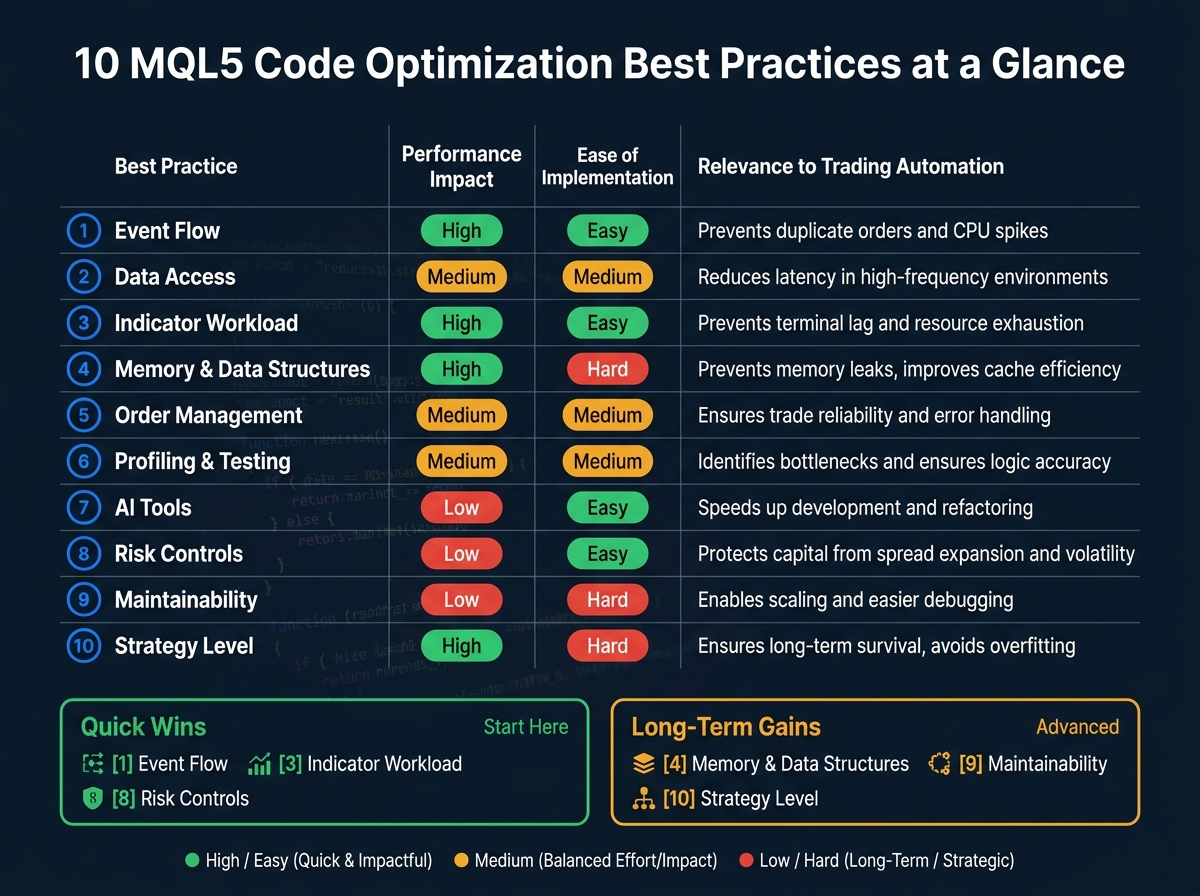
10 MQL5 Code Optimization Best Practices: Impact, Effort & Relevance
Here’s a quick overview of all 10 practices, showing their performance impact, ease of implementation, and relevance to trading automation. Use this table to decide where to focus your efforts first.
| Best Practice | Performance Impact | Ease of Implementation | Relevance to Trading Automation | Example |
|---|---|---|---|---|
| 1. Event Flow | High | Easy | Prevents duplicate orders and CPU spikes | Detect a new bar before executing logic |
| 2. Data Access | Medium | Medium | Reduces latency in high-frequency environments | Reuse class-member arrays instead of local ones in OnTick |
| 3. Indicator Workload | High | Easy | Prevents terminal lag and resource exhaustion | Create handles in OnInit; call CopyBuffer only on new bars |
| 4. Memory/Data Structures | High | Hard | Prevents memory leaks and improves cache efficiency | Implement a circular buffer for sliding window price data |
| 5. Order Management | Medium | Medium | Ensures trade reliability and error handling | Run OrderCheck to verify margin before calling OrderSend |
| 6. Profiling & Testing | Medium | Medium | Identifies bottlenecks and ensures logic accuracy | Use TERMINAL_MEMORY_AVAILABLE to monitor RAM usage |
| 7. AI Tools | Low | Easy | Speeds up development and refactoring | Use AI to generate boilerplate for complex indicator handles |
| 8. Risk Controls | Low | Easy | Protects capital from spread expansion and volatility | Exit OnTick early if SYMBOL_SPREAD exceeds a max limit |
| 9. Maintainability | Low | Hard | Enables scaling and easier debugging | Separate logic into .mqh files (e.g., RiskManager.mqh) |
| 10. Strategy Level | High | Hard | Ensures long-term survival and avoids overfitting | Test your EA across multiple brokers and spread conditions |
These practices highlight a key takeaway: efficient code is the backbone of reliable trading automation. The table provides a roadmap, helping you implement the most impactful changes first.
For quick wins, start with practices 1, 3, and 8. They’re easy to implement and can significantly improve performance, like managing indicator handles in under an hour. However, if you’re aiming for long-term success, focus on practices 4, 9, and 10. Although more challenging, they address scalability and resource management, ensuring your strategy remains robust over time.
If you’re new to this, begin with simpler tasks like refining event flow, managing indicator workloads, and adding risk controls. As you gain confidence, tackle more complex optimizations like circular buffers or strategy-level testing. Tools like Traidies can also help streamline your development, keeping your code efficient and your performance steady.
"Poorly optimized code can distort back-test outcomes through delayed order execution, incorrect signal detection, or resource exhaustion - issues that mask a strategy's true potential."
Conclusion
Improving MQL5 code is a multi-step process, with each step focusing on critical aspects like event handling, memory usage, trade execution, and avoiding overfitting. Together, these practices create a faster, more dependable EA designed for steady performance.
As Naohiro Sagawa puts it: "The key point of tick processing optimization is not simply increasing processing speed. The purpose is to make it clear when the EA checks the market, when it evaluates order conditions, and when it sends orders." This clarity is what distinguishes a well-designed EA from one that performs well in backtesting but struggles in live trading. Addressing every layer - from event handling to risk management - ensures that your EA operates at its best.
Neglecting even one area, such as memory management, can cause instability during intensive backtesting or when analyzing multiple symbols, even if your trading logic is solid.
For those looking to simplify this process, Traidies offers AI-powered tools that let you describe strategies in plain language, generate MQL5 code, and conduct automated backtests. These tools make it easier to adopt practices like pre-order validation and closed-bar logic without starting from scratch.
The ultimate aim? Code that delivers consistent results - whether in backtests, forward tests, or live trading.
FAQs
When should I use OnTick, OnTimer, or new-bar detection?
The choice between these methods hinges on what your strategy requires in terms of responsiveness and efficiency:
- OnTick: Ideal for real-time updates, such as high-frequency trading. To manage CPU usage, pair it with new-bar detection.
- OnTimer: Best for executing actions at fixed intervals, irrespective of incoming ticks.
- New-bar detection: Ensures your logic operates only once per bar, preventing repeated signals within the same bar.
How can I stop missing ticks or trade events in MT5?
To ensure you don't miss any ticks or trade events in MT5, leverage the full event model, particularly the OnTradeTransaction() function. This allows you to track real-time updates for all trading activities. Keep your OnTick() function streamlined by separating tasks that need to run on every tick from those that can be processed at intervals. Save intensive calculations for specific moments, like the formation of new bars. This approach helps your Expert Advisor remain responsive and effectively handle all crucial trade events.
What’s the fastest way to optimize indicator calls in an EA?
To get the most out of your Expert Advisor's performance, it's essential to handle indicator calls efficiently. One effective approach is to create indicator handles in the OnInit() function. This ensures the handles are initialized only once, rather than being recreated with every tick, saving valuable processing time.
Additionally, use CopyBuffer() sparingly. Instead of calling it on every tick, trigger it only when necessary - for instance, when a new bar is detected. This strategy minimizes redundant indicator reads, reduces the overall processing load, and helps your EA run more smoothly.