Multi-Objective Optimization in MQL5 Explained

Multi-Objective Optimization in MQL5 Explained
Want to build a trading strategy that balances profit, risk, and reliability? Multi-objective optimization in MQL5 can help you achieve that by combining various performance metrics into a single score. This approach ensures your Expert Advisor (EA) performs consistently across different market conditions.
Here’s how it works:
- What It Is: Multi-objective optimization balances conflicting goals, like maximizing profit while minimizing drawdowns.
- How It’s Done: MQL5’s
OnTester()function allows you to merge metrics (e.g., profit, Sharpe ratio) into a custom score for optimization. - Why It Matters: Focusing on one metric can lead to poor live performance. This method ensures balanced strategies.
- Key Method: Use the Weighted Sum Formula to combine metrics effectively, assigning importance to each based on your priorities.
Multi-Objective Optimization: Easy explanation what it is and why you should use it!
sbb-itb-3b27815
The Weighted Sum Method for Combining Objectives
The weighted sum method provides a simple way to combine multiple objectives into a single value that MetaTrader 5's genetic algorithm can optimize. By merging goals like profit maximization and drawdown minimization into one formula, it helps ensure the EA achieves balanced performance. The key is to normalize each metric to a common scale and assign weights based on their importance.
How the Weighted Sum Formula Works
In MQL5, the commonly used weighted sum formula is:
F(x) = ( Σ (Wi · fi(x) / Ti) ) / ( Σ Wi )
Here’s what each part means:
- fi(x): Represents each objective function, such as Net Profit, Sharpe Ratio, or Win Rate.
- Wi: The weight indicating how important that objective is relative to others.
- Ti: The target value used to normalize the metric.
Normalization ensures that metrics with different scales - like a $20,000 account balance versus a profit factor of 1.5 - can be compared directly. Dividing by the sum of the weights ensures that only the relative proportions matter. For example, weights of 10, 5, and 1 have the same effect as 100, 50, and 10. This formula captures the trade-offs necessary for robust EA performance.
How to Set Weights and Targets
Start by running a few pre-optimization tests to understand the typical ranges of your objectives. For example, if your EA usually achieves a balance near $20,000 and a profit factor around 0.9, you could set a balance target of $30,000 and a profit factor target of 2.0. This ensures the normalized values are comparable.
When assigning weights, focus on their relative importance rather than absolute values. For instance, if Annual Return is twice as important as Recovery Factor, use a 2:1 ratio (e.g., weights of 10 and 5). Avoid extremely low weights, as the algorithm might overlook them. Remember, both weights and targets must be positive to ensure the genetic algorithm works as intended.
How to Implement Multi-Objective Optimization in MQL5
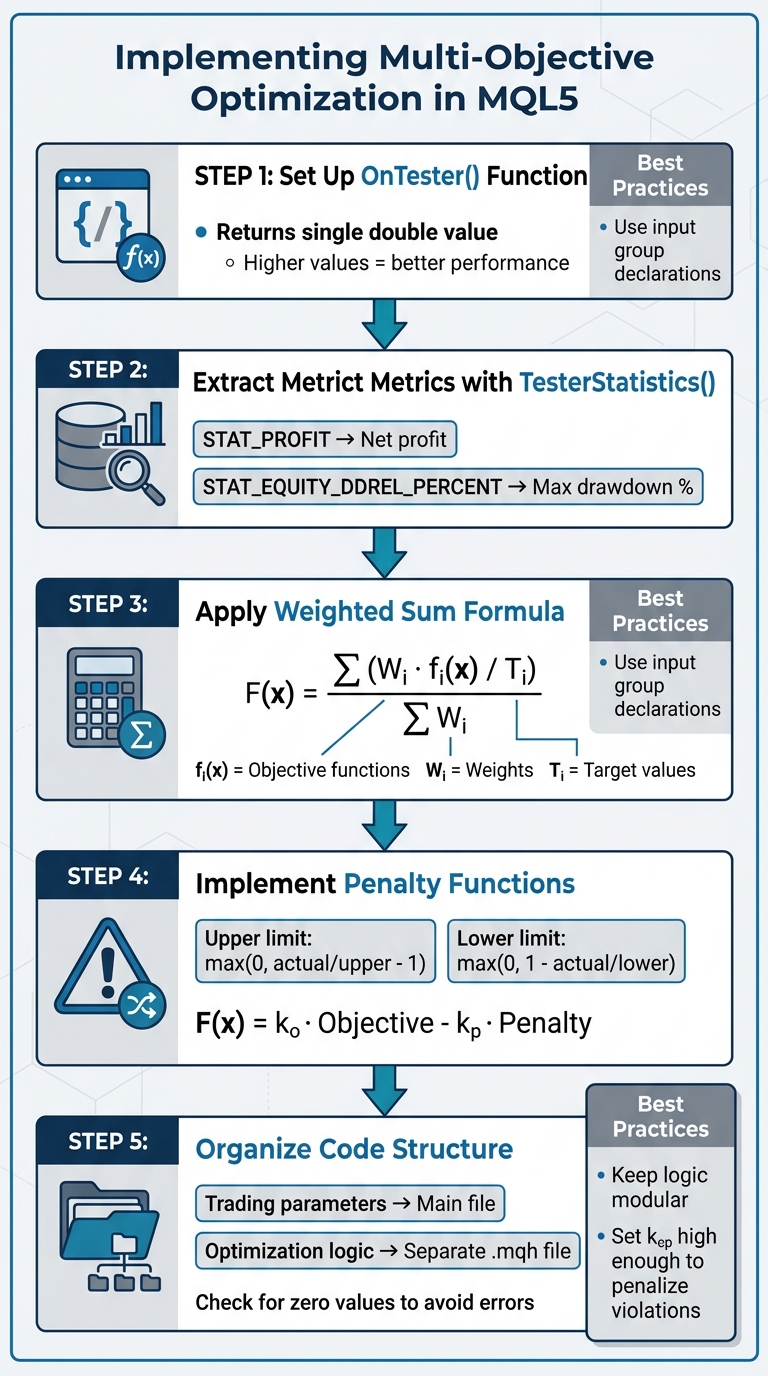
Multi-Objective Optimization Implementation Process in MQL5
This section focuses on turning your multi-objective framework into actionable optimization steps for better algorithmic performance.
Setting Up Objective and Constraint Functions
In MQL5, the OnTester() function is the key to handling multi-objective optimization. This built-in function executes at the end of each test pass and must return a single double value that reflects how well a particular parameter set performed. MetaTrader 5's genetic algorithm relies on these values, ranking results by size - higher values are considered better.
To calculate this value, use TesterStatistics() to extract critical metrics like balance, profit factor, or drawdown. For instance:
TesterStatistics(STAT_PROFIT)retrieves the net profit.TesterStatistics(STAT_EQUITY_DDREL_PERCENT)provides the maximum equity drawdown percentage.
These metrics form the basis of your objective functions, which are then integrated into the weighted sum formula you’ve developed.
Constraints, however, require a different approach. MetaTrader 5 natively supports "side constraints", such as setting input variable ranges (e.g., a moving average period between 10 and 50). For more complex constraints, you’ll need to implement a penalty function. This function applies a penalty to the objective score if a constraint is violated. Examples include:
- For an upper limit (e.g., maximum drawdown), use:
max(0, actual_value/upper_limit - 1). - For a lower limit (e.g., minimum trades), use:
max(0, 1 - actual_value/lower_limit).
The final OnTester() return value combines these elements: F(x) = k_o · CombinedObjective - k_p · TotalPenalty
Here, k_o and k_p are scaling factors (e.g., 100 or 1,000) that adjust the results for the Strategy Tester’s output and ensure penalties significantly impact rankings. Make sure k_p is high enough to push any constraint-violating parameter set to the bottom of the rankings.
Lastly, ensure your code is organized to cleanly separate trading logic from optimization routines.
Organizing Your MQL5 Code
Once your optimization functions are ready, structuring your code effectively is essential for flexibility and clarity. Use input group declarations to organize parameters:
- Keep trading strategy parameters (like stop loss or take profit) distinct from optimization settings (weights, targets, and constraint limits).
- Place optimization-specific logic in a separate
.mqhfile. This keeps your main trading logic clean and focused.
When performing calculations involving metrics (e.g., dividing by drawdown), always check for zero values to avoid runtime errors during optimization passes.
For example, the FanExpert EA uses the formula balance * (1.0 / min_dd) * trades_number in its OnTester() function. This approach balances trade count and drawdown, while its modular structure allows easy adjustments to metric priorities without altering the core trading logic.
Running Optimization in MetaTrader 5

Once you've defined the multi-objective scoring in your OnTester() function, the next step is configuring the Strategy Tester in MetaTrader 5. This setup determines how the genetic algorithm evaluates parameter sets and the speed at which results are generated.
Setting Up the Strategy Tester
Start by opening the Strategy Tester in MetaTrader 5 and selecting your Expert Advisor. For the "Optimization" field, choose "Custom max", which optimizes based on the return value from your OnTester() function.
From the optimization mode dropdown, pick "Fast genetic-based algorithm". This method prioritizes efficiency by ranking results according to your custom criterion, allowing it to navigate large parameter spaces without testing every possible combination.
"In genetic optimization, the results are sorted within one generation in the criterion descending order... the results with the highest value are considered the best." – MQL5 Programming for Traders
Next, set the tick generation mode. For initial testing, use "1 Minute OHLC" or "Open Prices Only" to save time. For final verification, switch to "Every Tick" or "Real Ticks" for more precision.
Adjust the date range, deposit amount, and leverage to fit your testing goals. To avoid overfitting, enable the Forward Testing option. Splitting the data (e.g., 1/2 or 1/3) reserves a portion for out-of-sample validation, ensuring more reliable results.
Once the tester is configured, move on to pre-optimization tests to fine-tune your parameter ranges and constraints.
Running Pre-Optimization Tests
Before committing to full-scale optimization, it’s smart to run a few preliminary tests with a limited parameter range. These initial runs help you gauge realistic ranges for each objective function, which is essential for setting normalization targets (Ti) in the weighted sum formula.
"The selection of targets $T_i$ must be done carefully after a few simulations, before doing the full fleshed optimization. The reason for doing so is to estimate the ranges of each objective function." – MQL5 Articles
Run 50–100 quick passes using "Open Prices Only" mode. Monitor the typical ranges for your metrics and use this data to define realistic target values in your OnTester() function. This ensures metrics are normalized to comparable scales.
Preliminary tests also help refine constraint limits. If a large number of parameter sets fail a specific constraint, consider adjusting the threshold or tweaking the penalty weight (kp). This adjustment helps the genetic algorithm navigate parameter spaces more effectively.
Lastly, tools like Traidies can assist in transforming your optimized MQL5 strategies into automated bots, complete with natural language descriptions and built-in backtesting capabilities.
How to Analyze Results and Pick the Best Strategies
Once you've set up your multi-objective optimization in MetaTrader 5, the next step is to carefully analyze the results. This ensures that your chosen strategy balances all key performance metrics effectively. After running your preliminary tests, it's time to dive into the data and identify strategies that perform well across multiple objectives.
Sorting and Comparing Results
When the optimization process finishes, you'll find all the tested parameter sets in the Optimization Results tab. The challenge here is to sort and filter this data in a way that highlights strategies meeting your specific goals.
If you used "Custom max" earlier, the Strategy Tester will rank all results based on the value returned by your OnTester() function. This custom score appears in the Result column, with the highest scores listed first. However, don't rush to pick the top result - it might be an outlier that doesn't perform well under live market conditions.
Instead, sort the data by individual metrics like Profit, Drawdown %, Sharpe Ratio, or Recovery Factor by clicking on their respective column headers. This allows you to see how the highest-ranked strategies perform across different objectives. For instance, a strategy ranked third overall might have better drawdown control than the top-ranked one, making it a better choice if you're prioritizing risk management.
MetaTrader 5 also includes a Complex Criterion score (ranging from 0 to 100), which evaluates strategies based on five metrics: number of deals, drawdown, recovery factor, expected payoff, and Sharpe ratio. The results are color-coded - red for scores below 20 and dark green for scores above 80 - providing a quick visual indicator of balanced strategies.
To make comparisons easier, export the top 10–20 results to a spreadsheet. Normalize the objectives and list them side-by-side. This approach helps you spot strategies that perform consistently well across multiple metrics, rather than excelling in just one area.
For a more thorough analysis, you can also look into advanced techniques like identifying Pareto-optimal solutions.
Finding Pareto-Optimal Solutions
A Pareto-optimal solution strikes the best balance between competing objectives. In trading, this means finding a strategy where improving one metric (like profit) would worsen another (like drawdown). These solutions represent the best trade-offs available.
While MetaTrader 5 doesn't have a dedicated feature for identifying Pareto-optimal solutions, you can do this manually. Start by sorting your results by a primary metric, such as Net Profit, and focus on the top 20 entries. Within this group, identify the strategy with the lowest Drawdown %. This strategy is Pareto-optimal because it achieves high profit while maintaining excellent risk control.
You can repeat this process for other metric pairs. For example, sort by Sharpe Ratio and then look for the highest Recovery Factor, or sort by Number of Trades to ensure statistical reliability and choose the strategy with the smoothest balance curve. Each of these strategies represents a point on the Pareto frontier, offering a different balance of trade-offs.
If you've implemented the OnTesterPass() function and are using data frames, you can overlay the balance curves of your top candidates on a single chart. This visual comparison highlights which strategies show steady, consistent growth and which are prone to sudden spikes or crashes. Generally, smoother curves indicate more robust strategies that are better suited to adapt to changing market conditions.
Lastly, consider analyzing the Average or Median results for parameter sets that appear multiple times among your top performers. If similar parameter sets consistently rank highly, that region of the parameter space is likely to be more stable than an isolated top performer. This helps reduce the risk of selecting a strategy that only appears strong due to over-optimization.
Conclusion
Multi-objective optimization brings a fresh perspective to developing automated trading strategies in MQL5. Relying on a single metric, like maximum balance, can lead to overfitting. Instead, evaluating multiple factors - such as net profit, drawdown, Sharpe ratio, and recovery factor - offers a more balanced and comprehensive assessment. By using the OnTester() function to combine these metrics into a custom criterion, you can better manage both performance and risk.
The Weighted Sum Method allows you to set target values and assign weights based on your priorities, while hard constraints act as safeguards against risky strategies. For instance, adding constraints like a minimum number of trades or a cap on consecutive losses ensures that strategies meeting profit targets don’t come with unacceptable risk levels. This blend of weighted objectives and penalty functions enables the MetaTrader 5 genetic algorithm to identify parameter sets that consistently satisfy multiple performance benchmarks across generations.
This approach not only saves time but also boosts reliability. Rather than running separate optimizations for individual metrics and manually comparing results, you can optimize all objectives simultaneously. This streamlines the process of sorting metrics, identifying Pareto-optimal strategies, and selecting robust equity curves. It’s an efficient way to refine trading strategies and enhance your workflow.
For even greater efficiency, tools like Traidies (https://traidies.com) simplify your process by leveraging AI. They enable you to describe strategies in plain language, automatically generate MQL5 code, and perform backtesting with historical data - all in one streamlined platform.
FAQs
How do I pick good weights and targets in the weighted-sum formula?
When choosing effective weights for the weighted-sum formula, focus on the relative importance of each objective. Assign higher weights to the goals that are most critical to your strategy. This often requires a mix of domain expertise and trial-and-error testing to find the right balance between competing priorities - like increasing profit while reducing risk. The ultimate aim is to ensure the weights reflect your strategic goals and the importance of each objective in your trading approach.
How can I enforce rules like max drawdown or minimum trades in OnTester()?
In OnTester(), you can enforce rules like maximum drawdown or minimum trade requirements by leveraging custom criteria and event handling. This function allows you to calculate and return specific values - like drawdown or the number of trades - as optimization criteria. Additionally, you can integrate monitoring for these constraints within your code. If the set limits are exceeded, you can halt or modify the testing process accordingly. This method makes use of MQL5's event-handling features effectively.
How do I confirm the top optimization result isn’t overfit?
To ensure the top optimization result isn't overfitting, it's crucial to validate it with out-of-sample data or by applying cross-validation techniques. These approaches help confirm that the strategy works effectively on unseen data instead of being overly tailored to the training dataset. For instance, you can use purged k-fold cross-validation or test the strategy across various market conditions. This helps assess its reliability and reduces the risk of overfitting.