Modular Trading Systems: MQL5 Architecture Basics

Modular Trading Systems: MQL5 Architecture Basics
Want to build trading systems that are flexible and easy to maintain? Modular architecture in MQL5 is the key.
Here’s the gist: Break your trading system into smaller, independent parts (modules) like signal logic, risk management, and trade execution. Each module does one job, making updates or fixes simple without affecting the entire system.
Why modular systems work:
- Flexibility: Update individual modules without rewriting everything.
- Resilience: If one strategy fails, others can still function.
- Scalability: Run multiple strategies across currencies and timeframes with ease.
MQL5 supports this with tools like Expert Advisors, indicators, libraries, and scripts, plus features like object-oriented programming. You can even integrate AI tools like Traidies to generate code and speed up development.
Want a stable, future-ready trading system? Start building modular.
MQL5 TUTORIAL ENGLISH - SIMPLE MODULAR EXPERT ADVISOR
sbb-itb-3b27815
Core Components of Modular Architecture in MQL5
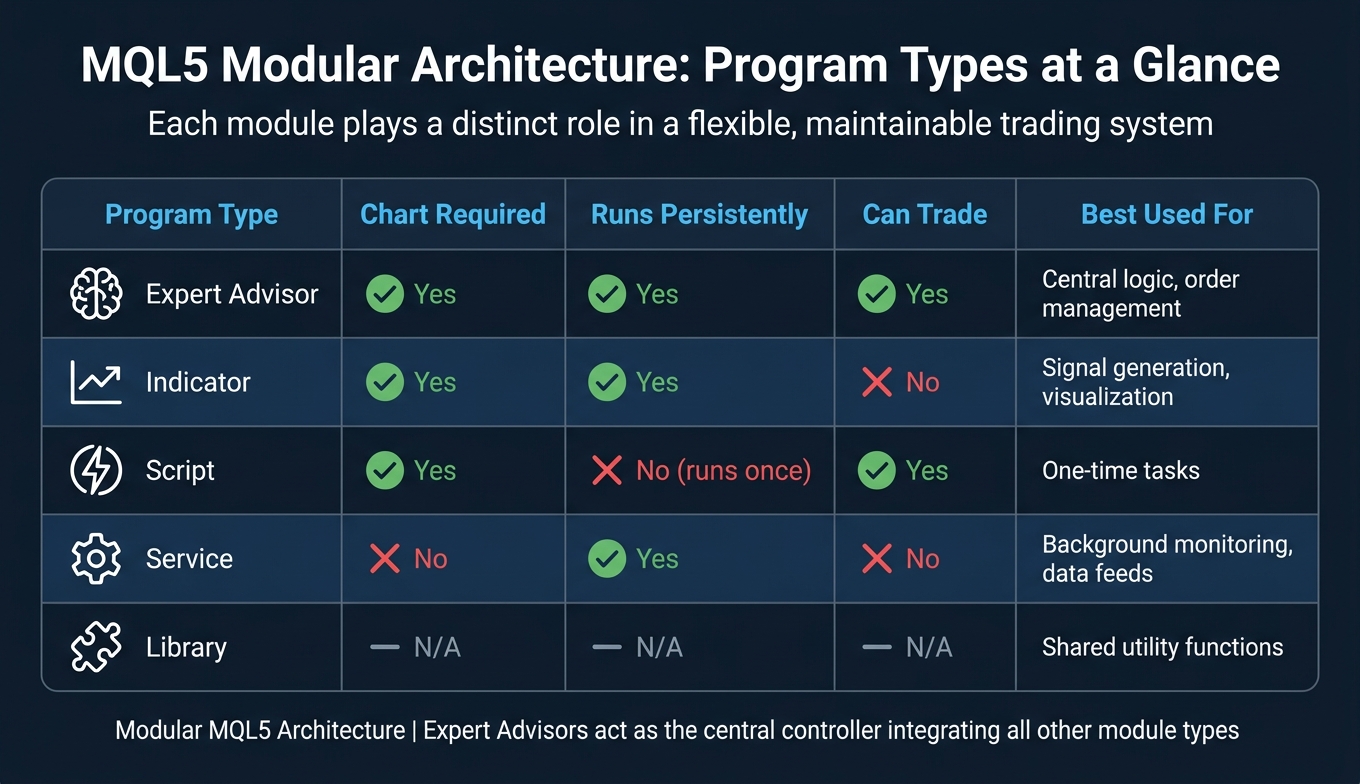
MQL5 Program Types: Modular Architecture Comparison Guide
MQL5 Program Types as Modular Components
In MQL5, modular systems are built around distinct program types, each with a specific role. These roles form the backbone of a modular trading architecture.
"The program type is a fundamental property in MQL5... the developer should decompose it into parts, and the functionality of each part should fit into the specialization of a separate type."
- Expert Advisors (EAs): These act as the system's brain. They listen for market events like
OnTickandOnTrade, process data from other modules, and execute trades. - Indicators: These are the system's analytical tools. They perform technical analysis and share results through indicator buffers. While they can't place trades, they provide vital insights for decision-making.
- Libraries: Stored as
.ex5files, libraries are collections of reusable functions. They don't operate independently but can be imported into EAs, scripts, or other components. - Services: Running in the background without attaching to a chart, services are ideal for tasks like monitoring account activity or updating custom data streams.
- Scripts: These handle single-use tasks, executing once and then terminating after completing their
OnStartfunction.
Here’s a quick comparison of these program types:
| Program Type | Chart Required | Runs Persistently | Can Trade | Best Used For |
|---|---|---|---|---|
| Expert Advisor | Yes | Yes | Yes | Central logic, order management |
| Indicator | Yes | Yes | No | Signal generation, visualization |
| Script | Yes | No (runs once) | Yes | One-time tasks |
| Service | No | Yes | No | Background monitoring, data feeds |
| Library | N/A | N/A | N/A | Shared utility functions |
These roles lay the foundation for modular design, which is further strengthened by object-oriented programming principles.
Object-Oriented Design Principles in MQL5
Object-oriented programming (OOP) principles make modular design in MQL5 both practical and powerful. The key concepts - encapsulation, inheritance, and polymorphism - help create efficient and scalable systems.
- Encapsulation: Each class manages its own internal logic and only exposes necessary functions. For instance, a risk management class calculates position sizes internally, while the EA simply retrieves the result without needing to know the details.
- Inheritance: Developers can extend existing classes, like
CExpertSignalorCObject, from MQL5's Standard Library. This saves time by building on pre-existing functionality. - Polymorphism: This allows you to define a base class, such as
CModel, with a virtual function likeProcessing(). You can then manage multiple trading strategies through a single interface.
"Objects are essentially mini-programs - each is responsible for solving its own, albeit small, but logically complete task."
A practical use of polymorphism is leveraging the CList class from the Standard Library to handle multiple trading models dynamically. For example, an EA can iterate through a list of models, calling Processing() on each tick. This setup can manage complex scenarios, such as running a MACD strategy across 8 currency pairs and 19 timeframes - resulting in 152 independent trading instances - all through a single, streamlined interface.
Structuring Multi-Module Expert Advisors
In a multi-module Expert Advisor, responsibilities are divided across specialized modules. Signal generation, trade filtering, risk management, and execution each operate independently, with their logic encapsulated in separate classes or .mqh header files. This keeps the main .mq5 file focused on event handlers like OnInit(), OnTick(), and OnDeinit().
Adding a new module to an EA follows a clear process:
- Include the module’s header file.
- Declare the object instance globally.
- Initialize the object using
Create()inOnInit(). - Update the module during
OnTick()orOnTimer(). - Clean up resources in
OnDeinit()to avoid memory leaks or leftover objects.
For multi-signal systems, modules don't simply return "buy" or "sell" signals. Instead, they provide a confidence weight - a value between 0 and 100. For example, a primary signal might contribute 80 points, while a secondary filter adds 10. Trades are executed only when the combined weight exceeds a set threshold. This weighted voting system ensures modules remain independent while supporting a unified decision-making process for the EA.
Dynamic Module Loading and Configuration
Expanding on modular components, dynamic configuration in MQL5 provides a way to adapt systems during runtime, even with certain limitations.
Configuration-Driven System Design
MQL5 operates with early binding, meaning all .ex5 and DLL libraries are loaded at startup, which prevents true dynamic linking. To work around this, you can design your Expert Advisor (EA) to adjust its configuration during runtime using external inputs.
Organize related settings into specific structures like TradeConfig for execution details, ZoneBoundaries for strategy levels, and LossTracker for tracking performance metrics. These structures can be paired with a centralized parameter class, such as CParam, to handle input-derived values. This keeps the global namespace tidy and ensures state updates remain predictable.
For added flexibility, configurations can be sourced from external text or JSON files stored in directories like MQL5\Files or Common\Files. By employing a timer to monitor these files for changes, the EA can automatically reconfigure itself whenever an external tool or API updates the file.
Runtime Module Control and Factory Patterns
Although MQL5 libraries are loaded at startup, runtime logic can still be switched by manipulating object instances. For example, you can use a base-class pointer like CStrategy *currentStrategy. When conditions change, delete the current object and replace it with a new derived class using the new operator.
A factory function, sometimes referred to as a switcher, can simplify this process. By checking input parameters or chart events, the factory function can return the correct derived class instance. MQL5 developer Vasily Sokolov elaborates on this approach:
"With our programming approach, we can implement dynamic EA strategy replacement... The resulting EA will have two kernels which implement two strategies... we can implement multiple Expert Advisors within one EA and switch them dynamically."
It’s essential to delete the old object before creating a new one to avoid memory leaks. Indicators, however, are an exception. MQL5 supports dynamic linking for indicators during execution through functions like iCustom() or IndicatorCreate, making them a rare case of true dynamic loading.
This approach to runtime control integrates well with a modular communication framework.
Communication and State Management Between Modules
When swapping modules at runtime, the new module must immediately access shared resources, such as the trade executor, account details, or the current parameters. Use a structure like CInitializeStruct to initialize the new module.
Before replacing a module, save the outgoing module's settings to a temporary file. This ensures state preservation and protects against data loss. To keep modules independent and debugging straightforward, limit data exchange to essential handles and buffers, especially for indicator-based modules. By avoiding unnecessary exposure of internal states, you maintain module isolation and simplify troubleshooting. This clear state management ensures smooth integration of new modules within the EA workflow.
Practical Implementation and Best Practices
File and Module Organization in MQL5
A well-organized directory structure is crucial for managing modular systems effectively. In MQL5, the convention is straightforward: .mqh include files are stored in MQL5\Include, compiled binary libraries go into MQL5\Libraries, and the main Expert Advisor (EA) source resides in MQL5\Experts. For larger projects, you can create custom subfolders within these directories, such as MQL5\Include\MyProject\SignalModules, to keep related elements grouped together.
"By breaking the code into structured modules, we simplify navigation, making development and maintenance much more efficient." - Clemence Benjamin, MQL5 Author
Think of the .mq5 file as the project coordinator, responsible for integrating specialized modules. Meanwhile, .mqh files handle the specific logic. Use #include <FileName.mqh> for global library references and #include "FileName.mqh" for files relative to the current directory. For compiled binary modules, leverage #import "LibraryName.ex5" to access their exported functions. To avoid namespace conflicts, make sure each library has a distinct name since libraries operate in isolated environments.
After organizing your modules, ensure that each component undergoes thorough testing before integrating it into the system.
Testing and Validating Modular Systems
Once your modules are structured, you can test each one individually to pinpoint issues before combining them. For example, you might isolate and verify a signal module, trade execution class, or custom indicator. Testing in isolation simplifies debugging significantly compared to troubleshooting a fully integrated EA.
When ready for system-wide testing, MetaTrader 5's Strategy Tester offers several tick generation modes. The mode you select can greatly impact the accuracy and speed of your testing:
- "Every Tick" mode provides the highest accuracy, making it ideal for final validation and strategies that execute intrabar.
- "Open Prices Only" mode is the fastest but works best for strategies trading at bar open. Misusing this mode can produce misleading outcomes.
- "1 Minute OHLC" mode offers a balance between speed and accuracy, suitable for initial evaluations of trend-following systems.
- "Real Ticks" mode uses broker-provided data for absolute accuracy, though its speed varies.
| Tick Generation Mode | Accuracy | Speed | Best Use Case |
|---|---|---|---|
| Every Tick | Highest | Slowest | Final validation and intrabar strategies |
| 1 Minute OHLC | Medium | Fast | Initial evaluation of trend-following systems |
| Open Prices Only | Lowest | Fastest | Rapid optimization of bar-open strategies |
| Real Ticks | Absolute | Variable | Testing against actual broker-provided data |
For modules with graphical elements, such as dashboards or control panels, use Visualize mode since standard optimization runs do not render graphical objects.
To catch errors effectively, wrap critical functions like OrderSend() and ObjectCreate() with ResetLastError() and GetLastError(). This approach provides specific error codes in the Journal tab, making it easier to troubleshoot issues.
Maintaining and Extending Modular Systems
One of the advantages of using compiled .ex5 libraries is that they can be updated independently of the main EA, as long as the exported function prototypes remain unchanged. This allows for quicker iterations on individual modules. When updating a library, follow this process: compile the updated library, adjust any changed function prototypes in the main program, and then recompile the main project.
As your project grows, use #ifndef and #define header guards in every .mqh file. These prevent the compiler from processing the same include file multiple times when referenced by different modules. Additionally, always include a cleanup routine in OnDeinit(). This ensures dynamic objects are deleted and resources are released, avoiding memory leaks and leftover chart objects after the EA is removed.
"The more modular structure a program has, the easier it is to develop and maintain it. This becomes especially important when working in a team." - MQL5 Article
These practices, combined with dynamic module loading strategies, will help streamline development and ensure long-term maintainability.
Leveraging Traidies for Modular Trading Systems

Traidies takes the complexity out of building modular trading systems by automating code generation, making it easier to translate trading ideas into actionable strategies.
AI-Powered Strategy Generation with Traidies
Creating modular MQL5 systems from scratch can be a lengthy process, especially when converting trading concepts into structured code. Traidies simplifies this by allowing you to describe your strategy in plain English. It then converts your ideas into MQL5-ready components.
For example, instead of manually coding a signal module, you can specify details like entry conditions, stop-loss logic, and take-profit targets. Traidies processes this input and generates structured code that integrates seamlessly into your modular architecture. The output can be added to a SignalEngine interface or used as a standalone .mqh file, ensuring your codebase remains well-organized. If you're working with deterministic JSON trade directives to set entry, SL, and TP levels, you can fine-tune the AI's behavior by adjusting its temperature to 0.1–0.5. This ensures the generated components align perfectly with your system's modular design.
Faster Backtesting and Optimization
Once a new module is generated, quick validation becomes crucial. Traidies streamlines this process by automating backtesting with historical data. This eliminates the need to repeatedly configure MetaTrader 5's Strategy Tester, providing faster feedback on your signal module or indicator's performance.
This rapid feedback loop helps you identify and address weak logic early, preventing flawed components from becoming deeply embedded in your system. Research conducted between October 2025 and March 2026 revealed that AI-generated signals with confidence scores above 0.75 achieved a win rate of 61.7%. In contrast, signals scoring below 0.55 dropped to a 48.3% win rate. By applying a confidence threshold during backtesting - filtering out low-conviction signals - you can enhance the overall quality of your Expert Advisor.
"The traders who win in the LLM-integrated EA era are not the ones who connected to the best model - they are the ones who built the tightest feedback loop between LLM decisions and real-world outcomes." - Mauricio Vellasquez, Trading Systems Developer
With validated modules in hand, the next step is integrating them smoothly into your existing MQL5 system.
Integrating Traidies-Generated Modules into MQL5 Systems
Traidies-generated code can be incorporated into your system as a .mqh include file or a compiled .ex5 binary library. This process generally follows six key steps: Analyze → Include → Declare → Initialize → Runtime → Cleanup.
To ensure compatibility, wrap the generated logic within a standard interface, such as CStrategy or ISignalEngine. This allows your main controller to interact with the module without needing to understand its internal workings. This modular approach means you can easily swap or update a Traidies-generated module without disrupting the rest of your Expert Advisor. Additionally, always verify that the module's Initialize() or Create() method returns true before proceeding, as this helps catch integration errors early.
Conclusion
Key Takeaways on Modular Trading Systems
Modular architecture forms the backbone of reliable and adaptable trading systems. By dividing your Expert Advisor (EA) into separate units - such as signal engines, risk managers, and money management modules - you can make updates or replacements to any one component without disrupting the rest of the system.
"The advantage of a modular architecture is that you can update (replace) each module without having to change the rest of the system." - Sergey Pavlov
The benefits are clear: stability, as a single module failure won't crash the entire EA; scalability, allowing you to add features like AI-based signal checks without disturbing the core structure; and maintainability, as debugging isolated modules is far simpler than untangling a monolithic codebase. These qualities are what separate a system you can confidently enhance from one that feels risky to modify.
As markets and technologies shift, adopting modular principles becomes increasingly important.
Final Thoughts on MQL5 Architecture
These benefits set the stage for a trading framework that can evolve with future demands. By 2026, the MQL5 Marketplace reflected this trend, with an 850% surge in Expert Advisors boasting AI capabilities within just 18 months - rising from fewer than 40 in early 2024 to over 340 by April 2026.
With platforms like Traidies simplifying MQL5 component creation, adopting a modular approach has never been easier. Start small: refactor one area of your EA, such as signal generation, risk management, or UI handling, into a stand-alone module with a well-defined interface. Tools like Traidies can even convert plain-language strategy descriptions into MQL5-ready components, freeing you to focus on the bigger picture. The ultimate goal? A trading system where each module operates independently and can be replaced effortlessly.
FAQs
How do I decide what should be a module in my MQL5 EA?
To figure out what should become a module in your MQL5 Expert Advisor (EA), focus on identifying tasks that are separate from your core trading strategy. For example, features like operation schedules or trailing stops fit this description. Modules should be designed to handle independent, reusable functionalities and interact with your main trading logic through straightforward interfaces.
This kind of modular design helps keep your code well-organized, makes updates easier, and allows for better scalability by isolating components like scheduling, risk management, or data processing.
What’s the safest way to switch strategies at runtime without breaking state?
The best approach is to adopt a modular architecture with dynamic module loading and a clear separation of components. This setup allows critical modules, such as trading logic or risk management, to be updated independently without interfering with the overall system's stability.
By designing with well-defined interfaces and leveraging external modules, you can dynamically load or replace modules as needed. State integrity can be preserved by using isolated module states or managing everything through a central state manager. This ensures smooth updates and reliable performance.
When should I use an indicator module vs EA logic for signals?
In modular trading systems, an indicator module is a key tool for generating signals through technical analysis or visual elements like trend lines and oscillators. These modules work perfectly for traders who rely on visual analysis and need reusable components.
On the other hand, EA logic is best suited for automating trading decisions directly within the Expert Advisor. This approach is ideal for handling complex rules, managing trades, or making dynamic decisions. It creates a tightly integrated system that operates fully on automation.