Integrating APIs with MQL5: Step-by-Step Guide

Integrating APIs with MQL5: Step-by-Step Guide
Want to enhance your MetaTrader 5 (MT5) trading strategies with external data? APIs can bridge the gap, enabling your Expert Advisor (EA) to access real-time market data, economic indicators, sentiment analysis, and AI-driven signals. Here's how you can make it work:
- Why APIs Matter: APIs allow your EA to connect to external services, expanding beyond MT5's built-in data.
- How to Get Started: Use MQL5's
WebRequest()function to make HTTP/HTTPS calls or socket functions for direct connections. - Setup Basics: Whitelist target domains in MT5 settings and manage API keys securely.
- Practical Use Cases: Stream market data, integrate trading signals, send alerts, or even leverage AI tools.
- Error Handling: Learn to manage common issues like timeouts, malformed URLs, or rate limits.
- Advanced Techniques: Use Python bridges for WebSocket streams or offload API logic to MQL5 Services for better performance.
This guide walks you through configuration, making API calls, handling JSON responses, and optimizing performance for reliable trading strategies. Ready to integrate external data into your EA? Let’s dive in.
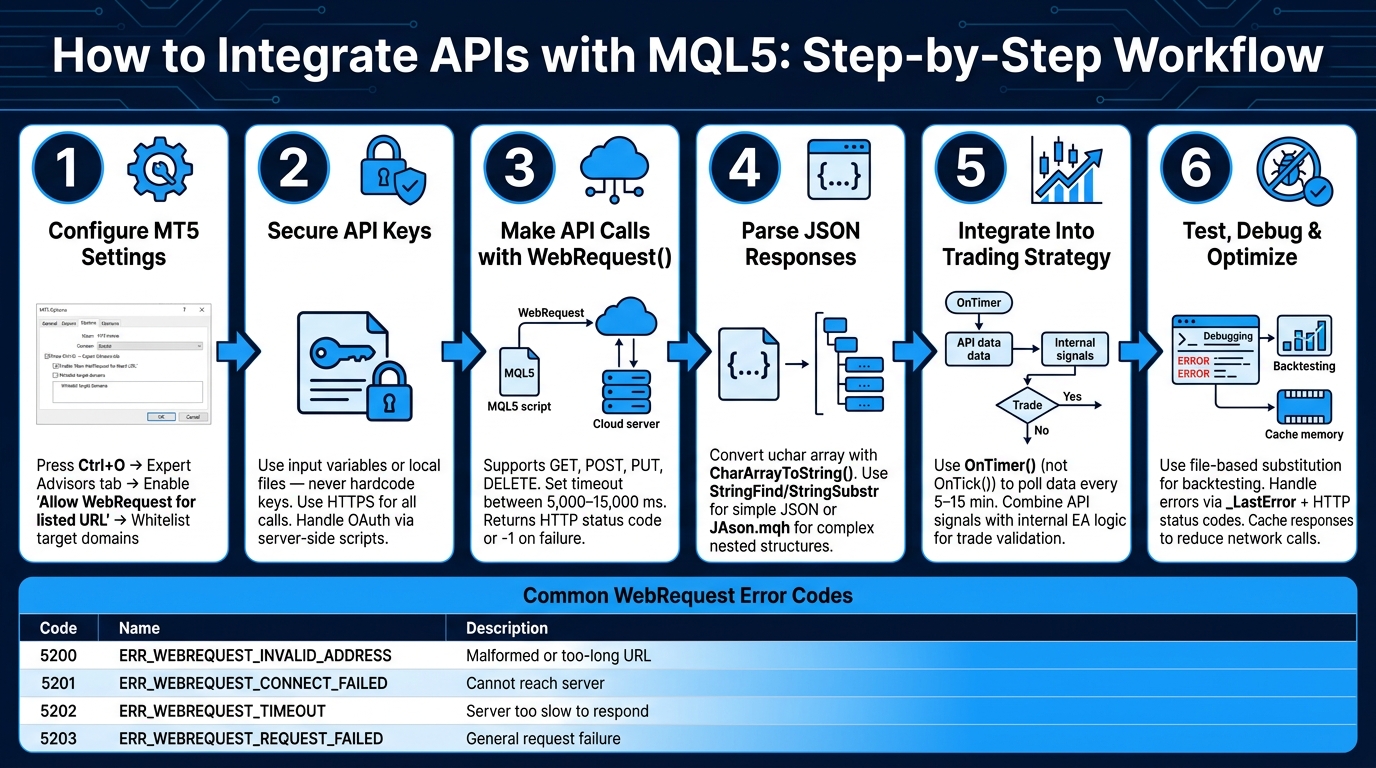
How to Integrate APIs with MQL5: Step-by-Step Workflow
Setting Up MQL5 for API Integration
Configuring MetaTrader 5 Settings

To enable your Expert Advisor (EA) to access external services, you need to allow outbound HTTP requests in MetaTrader 5 (MT5). Start by pressing Ctrl+O, navigating to the Expert Advisors tab, and enabling the option "Allow WebRequest for listed URL."
Next, add each external domain your EA will connect to. For instance, if you're pulling data from Alpha Vantage, include https://www.alphavantage.co. Similarly, if you're using a news sentiment API, add its root domain. MT5 automatically handles both HTTP and HTTPS traffic.
When adding URLs, always use the root domain (e.g., https://generativelanguage.googleapis.com) instead of specific endpoint paths. This ensures that any sub-paths under the domain remain accessible without needing additional entries.
MT5 stores allowed URLs in the
common.inifile located in the terminal's configuration directory. Backing up this file can save time if you need to reinstall the platform later.
Once domain access is configured, you can move on to setting up authentication for your API calls.
Managing API Keys and Authentication
After whitelisting the required domains, it's time to authenticate your API requests. Most REST APIs use one of the following methods: API keys, Basic Authentication, or OAuth 2.0.
Here’s a critical tip: never hardcode API keys directly into your EA's source code. MQL5 files can potentially be decompiled, exposing any embedded credentials. To safeguard your keys, consider these approaches:
- Use input variables for API keys, allowing users to enter them through the terminal's interface.
- Store API keys in a secure local file, which your EA can read when needed.
For OAuth 2.0 integrations, avoid embedding the "Client Secret" directly in your EA. As Clemence Benjamin points out, "Client secrets must never be embedded in mobile apps [or client-side scripts]... OAuth providers (including MQL5) are designed to trust server-to-server communication."
To keep sensitive information secure, handle token exchanges on a server-side script. Also, ensure all API calls are made over HTTPS to encrypt your credentials during transmission.
Settings Considerations for U.S. Traders
In addition to technical configurations, U.S.-based traders should account for regional factors that may affect API usage. For example, many APIs reset their daily request limits at midnight UTC, not local time. This can cause issues if your EA hits its daily cap during high-volatility trading periods, such as the 9:30 AM ET market open. Depending on the API, the reset might occur at 7:00 PM ET or 4:00 PM PT.
To prevent disruptions, configure your EA to track the timestamp of its last API call in UTC. This ensures better coordination with the API's reset schedule. Additionally, when retrieving U.S.-specific data - like the 10-year Treasury yield (US10Y) or the VIX - double-check the symbol formatting required by your API provider to avoid errors.
sbb-itb-3b27815
Making API Calls With WebRequest in MQL5
How the WebRequest Function Works
This section dives into the practical steps for making external API calls using MQL5's WebRequest function, an essential tool for building fully automated trading systems.
WebRequest is MQL5's built-in function for sending HTTP and HTTPS requests to external servers. It supports common HTTP methods like GET, POST, PUT, DELETE, and HEAD, making it compatible with most REST APIs you'll encounter.
One key thing to know: WebRequest operates synchronously. This means it pauses the execution of your Expert Advisor (EA) or script until it gets a response. Because of this, it's only available in EAs and scripts - not in the Strategy Tester, where API calls are unsupported.
When a request is successful, the function returns an HTTP status code (e.g., 200 for OK or 401 for Unauthorized). If something goes wrong at the system level, it returns -1. In such cases, you can check _LastError for specific network-related error codes:
| Error Code | Meaning |
|---|---|
| 5200 | Invalid or malformed URL |
| 5201 | Failed to connect to the server |
| 5202 | Server didn't respond in time |
| 5203 | General request failure |
To avoid unnecessary issues, always set a reasonable timeout for your requests. A range between 5,000 ms and 15,000 ms works well. Setting it too short could cause false timeouts on slower connections, while making it too long might leave your EA unresponsive during critical market events.
Now, let’s look at how to build and send these requests effectively.
Building and Sending REST API Requests
The extended version of WebRequest allows you to include custom headers, which is essential for working with most REST APIs. For example, headers like Content-Type and Authorization often need to be set.
Headers should follow this format: "Name: Value\r\n". For the request body, you'll need to pass a uchar array. To prepare a JSON string for this, use StringToCharArray() with CP_UTF8 encoding to handle special characters properly. Be sure to remove the null terminator that StringToCharArray() adds - this can be done using ArrayResize() or ArrayRemove() - to prevent the API from rejecting your request.
A handy tip: Use
httpbin.org/postas a test endpoint to debug your requests. This service mirrors your request back as a JSON response, making it easier to see exactly what your EA is sending.
Once your request is sent, you'll need to handle the server's response. Let’s explore how to process JSON data in MQL5.
Parsing JSON Responses in MQL5
When the server responds, the data arrives as a uchar array. To make it readable, convert it to a string using CharArrayToString(). From there, you can start parsing the JSON.
Since MQL5 doesn't have a built-in JSON parser, you have two main options:
- For simple responses: Use
StringFind()to locate keys andStringSubstr()to extract values. This works well for flat JSON structures but can break if the API changes its format. - For complex JSON: Use a third-party library like
JAson.mqh, available in the MQL5 codebase. This library converts the JSON string into an object, making it easier to work with nested structures and arrays. However, it requires some initial setup and adds a bit of overhead.
| Approach | Best For | Trade-off |
|---|---|---|
StringFind / StringSubstr |
Simple, flat JSON responses | Fragile if the API's structure changes |
JAson.mqh or similar library |
Complex, nested JSON structures | Requires additional setup and slightly increases resource usage |
One final note: if the API you're working with provides timestamp data (e.g., Binance), it's often in milliseconds. Be sure to divide the value by 1,000 before converting it to datetime in MQL5. This ensures your time calculations are accurate.
Adding API Calls to Your Trading Strategy
Using APIs for Real-Time Data and Signals
Once you’ve mastered sending requests and parsing responses, the next step is weaving that functionality into your trading strategy. In MQL5, two primary methods for making API calls are OnTick() and OnTimer().
The OnTick() function triggers every time there’s a market change, which can happen multiple times per minute. However, avoid calling WebRequest on every tick - this can lead to rate limiting or unnecessary strain on your API usage. Instead, use OnTimer() to set a fixed interval for polling data, such as every 5 or 15 minutes. This approach ensures a steady flow of updates without being overwhelmed by market noise. It’s especially useful for APIs offering insights like fundamental analysis, AI-based forecasts, or economic indicators.
You can enhance your strategy by combining internal signals from your EA with external API-generated confidence scores for better trade validation.
Now, let’s explore how to handle continuous data streams for strategies requiring real-time updates.
Working With Streaming Data
For APIs that update data every few minutes, traditional WebRequest polling may work just fine. But when you need real-time data streams, a more advanced setup is required. A practical solution is using a Python bridge to manage WebSocket streams. Here’s how it works:
- A Python script connects to the WebSocket stream, processes the incoming data, and writes the results to a shared file (e.g., in MetaTrader’s
Terminal/Common/Files/folder). - Your EA then reads this file on each tick or timer cycle, ensuring it stays updated without directly handling the WebSocket connection.
This method allows your EA to remain responsive while still benefiting from real-time data.
Improving Data Flow and Performance
Once you’ve set up API calls, optimizing data flow becomes crucial for smooth strategy execution. Here are some tips:
- Cache API Responses: Store responses locally (e.g., in JSON or TXT files) and use them until the cache expires. This reduces network calls and ensures your EA can function even during API outages.
- Handle Multiple Data Sources: If you’re integrating data from different providers - like price data from Binance and sentiment analysis from a news API - remember that JSON structures may vary. Keeping your parsing functions modular and organized will make debugging and updates easier.
For strategies where latency is critical, consider offloading API logic to an MQL5 Service. This background process runs independently of your EA and handles all network operations. It can store results in Terminal Global Variables, allowing your EA to access the data without making direct network calls. This setup keeps your trading thread focused on execution while the service manages data retrieval.
Testing and Debugging API Integrations
Testing API Calls in Strategy Tester
Important Note: The WebRequest() function does not operate within the Strategy Tester environment. If you attempt to backtest an Expert Advisor (EA) that relies on live API calls, those network requests will be skipped without any error message, and the backtest results won't include data from external sources.
To work around this limitation, you can use file-based substitution. Before starting a backtest, manually download the API responses you need and save them as local .json or .csv files. Your EA can then load data from these files instead of attempting live network calls. When saving these files, use the FILE_COMMON flag to ensure that both your live trading scripts and the Strategy Tester can access the same file directory.
To test JSON parsing and HTTP error handling, create unit test scripts that use Assert() functions. Run these tests on a demo chart rather than in the Strategy Tester. This approach ensures your parsing logic and error-handling mechanisms perform as intended. These steps help maintain consistent data integration across both live trading and backtesting scenarios.
Handling Errors and Building Resilience
Once you’ve simulated API responses, the next step is to focus on managing errors and building resilience into your integration. In MQL5, errors fall into two categories: system errors and application errors. System errors occur when WebRequest returns -1, with the specific error code stored in _LastError. Application errors, on the other hand, are indicated by HTTP status codes, meaning the server responded but flagged an issue with your request.
To handle errors effectively:
- Use
ResetLastError()before eachWebRequestcall to ensure you capture fresh error codes. - Check both the return value of
WebRequestand the HTTP status code for potential issues.
Here’s a quick reference table for common system errors:
| Error Code | Constant | Description |
|---|---|---|
| 5200 | ERR_WEBREQUEST_INVALID_ADDRESS |
The URL is malformed or exceeds 1,024 bytes |
| 5201 | ERR_WEBREQUEST_CONNECT_FAILED |
Connection to the specified URL failed |
| 5202 | ERR_WEBREQUEST_TIMEOUT |
The server took too long to respond |
| 5203 | ERR_WEBREQUEST_REQUEST_FAILED |
General failure during the request |
For HTTP status codes, a 401 indicates a credential issue, a 404 means the endpoint is unavailable, and any 5xx code signals a server-side error. Develop logic to handle these cases individually - for instance, logging a 401 as an authentication problem instead of retrying the request.
Key Tip: WebRequest can sometimes return a success code, even if the API provider includes an error message in the response body. Always convert the response array using CharArrayToString, then scan the resulting string for error messages like "invalid api key" or "rate limit exceeded".
Improving Performance and Scalability
After addressing error handling, focus on optimizing performance. The WebRequest function is synchronous, meaning it pauses your EA while waiting for a server response. If the server is slow or unresponsive, this can freeze your trading thread. To avoid this, offload network calls to an MQL5 Service (as discussed in the previous section), keeping your EA’s execution thread responsive.
Another performance tip is to implement a debug toggle in your request wrapper functions. When enabled, it logs the raw server response to the Experts tab, helping you troubleshoot issues. When disabled during live trading, it suppresses these logs to preserve performance. This simple feature can save you significant debugging time without affecting your EA’s efficiency during normal operation. By combining robust error management with efficient performance, you’ll create a more reliable API integration.
Conclusion and Next Steps
Key Points Recap
Integrating third-party APIs with MQL5 opens up a world of possibilities for enhancing your Expert Advisor (EA). In this guide, you’ve explored how MQL5’s WebRequest() function facilitates HTTP/HTTPS communication, how to handle JSON responses, and the importance of secure authentication. You’ve also learned to plan for API rate limits and seen how combining real-time data feeds, AI-driven signals, and automated notifications (e.g., through Telegram) can elevate your trading bot’s performance. For scenarios where MQL5’s native capabilities - like WebSockets - fall short, using Python as a bridge ensures you maintain flexibility.
These concepts form a solid foundation for advanced integrations, and platforms like Traidies make tackling these challenges simpler.
How Traidies Can Help

Traidies simplifies the process of turning your trading ideas into reality. By describing your strategy in plain English, the platform generates MQL5 code automatically. It even includes automated backtesting with historical data, saving you the hassle of setting up manual test scripts. This streamlined approach speeds up deployment, removing delays caused by manual coding.
Start Experimenting With API Integration
Now that you have the basics, it’s time to put them into action. Begin with a well-documented API, such as a free economic calendar or a simple price feed. Whitelist its URL in MT5 (Ctrl+O), then create a basic WebRequest() call to log the response in the Experts tab. Once you’ve mastered that, expand your script by adding JSON parsing, error handling, and caching to reduce redundant network calls. Each step not only improves your EA but also hones your skills for tackling more complex integrations in the future.
Send and Receive Data: MQL5 GET/POST Requests to Python Server
FAQs
How can I keep API keys secure in an MQL5 EA?
To keep API keys safe in an MQL5 Expert Advisor (EA), avoid embedding them directly in your code. Instead, store them in encrypted files or use environment variables, loading them only when needed during runtime. Always ensure your API requests are made over HTTPS to secure data while it's being transmitted.
For extra protection, consider using request signing methods like HMAC-SHA256. Additionally, restrict file access permissions to limit exposure of sensitive information to unauthorized users. These steps can significantly reduce the risk of compromising your API keys.
What should I do if WebRequest() freezes my EA or times out?
If WebRequest() causes your Expert Advisor (EA) to freeze or time out, you can address this by setting a proper timeout value (in milliseconds). This ensures the function doesn’t block indefinitely. Additionally, always check the return code for errors, such as -1, and implement error-handling strategies like retries or skipping problematic requests. Since WebRequest() operates synchronously, these measures can help minimize delays and keep your EA responsive during server interactions.
How can I backtest an EA that depends on external API data?
To backtest an Expert Advisor (EA) that relies on external API data, you need to simulate that data within the backtesting environment. Here's how you can do it:
-
Collect and Save Historical Data: Use
WebRequestor API calls to fetch the necessary historical data. Save this data in files or arrays for easy access later. - Simulate API Data During Backtesting: Instead of making live API calls during backtesting, configure your EA to read from the pre-stored data sources. This approach provides realistic external inputs while ensuring the EA's logic and data dependencies are tested accurately.
By using this method, you can create a controlled and reliable testing environment for your EA.