Stress Testing Tools for MQL5 Trading Bots

Stress Testing Tools for MQL5 Trading Bots
When building trading bots in MQL5, stress testing ensures your strategy can survive tough market conditions. Unlike basic backtesting, stress testing simulates challenges like high latency, fluctuating spreads, and slippage. This helps identify weaknesses before live trading, saving you from costly failures.
Key tools and methods include:
- MetaTrader 5 Strategy Tester: Simulates real-world conditions like random delays and floating spreads. Best for scalping or high-frequency strategies.
- Monte Carlo Simulations: Randomizes trade sequences to reveal hidden risks, like margin calls or extreme drawdowns.
- Low-Quality Data Testing: Uses imperfect data to expose strategies that rely on unrealistic conditions.
- Long-Term Historical Testing: Evaluates performance across years of changing market environments.
- Traidies Automated Backtesting: AI-powered tool for quickly testing multiple strategies without coding.
Each method targets specific risks, from execution delays to market volatility. Combining these approaches provides a clearer picture of your bot's reliability and resilience.
How to Test Your Trading Bot with MT5 Strategy Tester | Part 12 | MQL5 EA & Indicator Testing
sbb-itb-3b27815
1. MetaTrader 5 Strategy Tester
The MetaTrader 5 Strategy Tester is a built-in feature of the MT5 platform that allows you to test your MQL5 Expert Advisors under simulated market conditions before moving to live trading. This tool goes beyond basic backtesting by letting you tweak variables like execution latency, spread changes, and market volatility. These adjustments help determine if your trading bot can handle the challenges of real-world market dynamics. Below, we'll break down how its key features contribute to effective stress testing.
Stress Scenarios Simulated
The tester creates realistic stress scenarios to evaluate your strategy's resilience. For instance, the Random Delay mode introduces network lag and broker execution delays, simulating a 90% chance of delays between 0–8 seconds and a 10% chance of delays ranging from 9–18 seconds. It also uses floating spreads based on historical data, making it possible to assess performance during events like news spikes or weekend gaps. The Every tick based on real ticks mode replicates the sharp price movements that can trigger stop-losses, while the Forward testing feature withholds a portion of data to ensure your strategy performs well in unseen market conditions.
MQL5 Integration
This tester is fully compatible with .mq5 and .ex5 files, letting you test strategies directly without needing additional plugins. It automatically downloads and syncs historical data for all symbols used in multi-currency strategies. For complex optimization tasks, the MQL5 Cloud Network taps into thousands of remote CPUs and uses all logical cores of your processor to run parallel optimizations, significantly cutting down on time.
Pros
- Provides 99% modeling accuracy when using real broker tick data.
- Supports multi-currency testing, which is crucial for strategies relying on correlations between instruments.
- The Visual Mode allows you to watch trades unfold in real time, helping pinpoint issues that might not show up in numerical reports.
Cons
- The accuracy of results depends heavily on the quality of the broker's historical data. Poor data can lead to misleading profit curves that aren't achievable in live trading.
- The Open Prices Only mode can create overly optimistic "Testing Grails", as it lacks intra-bar data critical for live scenarios.
- The Random Delay mode doesn't apply to pending orders executed on the server, which might limit its realism.
Best Use Case
The MetaTrader 5 Strategy Tester is particularly effective for validating high-frequency or scalping strategies, where execution speed and spread sensitivity are crucial. It ensures your strategy can handle tight spreads and fast order execution under simulated market pressures.
2. Testing Across Multiple Trading Environments
The MT5 Strategy Tester does a great job simulating real-time trading conditions, but relying on a single backtest can give you a false sense of security. To truly understand the risks, testing across multiple trading environments is essential. Why? Because markets are unpredictable, and a single sequence of trades can’t account for all possible scenarios. As EA developer Duy Van Nguy highlights:
"A backtest ending with 42% net profit and a 1.8 profit factor looks great on paper. But here's the uncomfortable truth: that result is path-dependent."
In other words, the results you see could vary significantly depending on the order of trades. This is where stress testing and Monte Carlo simulations come into play.
Stress Scenarios Simulated
Monte Carlo simulations are a powerful way to uncover the hidden risks in your trading strategy. By randomly shuffling trade sequences thousands of times, this method shows the full range of possible outcomes. For instance:
- In May 2026, a trend-following EA on EURUSD M30 with a profit factor of 1.6 underwent Monte Carlo testing. The results? While the original backtest looked promising, 12% of the shuffled trade sequences would have triggered a margin call before reaching trade 80.
- Another test in April 2026 on a GOLD H1 EA revealed a median maximum drawdown of 15.1%. However, the 95th percentile "Stress Drawdown" reached a staggering 30.6%, with a 25.4% chance of hitting a 20% ruin threshold.
Beyond Monte Carlo, MT5's Random Delay mode helps test strategies under realistic conditions like network latency and processing delays. By adding delays of 50 to 100 milliseconds, you can see if a strategy’s profits rely on perfect execution. Testing with floating spreads instead of fixed ones also highlights vulnerabilities during news-driven market spikes, where spreads can widen unexpectedly.
MQL5 Integration
Monte Carlo stress testing integrates seamlessly with MT5's backtest results, making it easy to analyze risk without needing third-party tools. For reliable results, at least 200 closed trades are recommended. MT5's multi-currency support adds another layer by showing how correlations between different instruments impact overall drawdown. This is especially useful for managing portfolios of bots trading across various symbols.
Pros
Testing in diverse environments gives you a clearer picture of the Probability of Ruin - the chance that your strategy could face catastrophic losses. For trend-following systems, Monte Carlo simulations often reveal that the worst-case drawdown is 1.5 to 2.5 times higher than what the original backtest suggests. MT5’s "Forward" testing feature further strengthens your analysis by using out-of-sample data (e.g., reserving one-quarter of the dataset) to ensure your strategy performs well in unseen market conditions.
Cons
Monte Carlo simulations have their limitations. They assume that trades are independent, which doesn’t account for market regime changes or streaks of wins and losses. Additionally, strategies that behave differently in trending versus ranging markets may not be fully captured by these methods. Running 1,000 or more simulations is also resource-intensive, especially for complex EAs.
Best Use Case
Monte Carlo simulations are invaluable for position sizing and risk management. Quantitative specialist Antoine Mercier puts it best:
"Monte Carlo is key. A non-negotiable tool."
For traders managing real money, knowing that your strategy has a 25.4% chance of hitting a 20% drawdown - even if the backtest looks flawless - can make all the difference in how you allocate risk per trade.
3. Testing with Low-Quality Historical Data
Testing with low-quality historical data pushes your bot to operate under less-than-ideal conditions. The purpose? To see if it can hold up when the data isn't perfect. As quantitative specialist Sofia Petrov explains:
"If you feed the MT5 Strategy Tester low-quality price history, it will return a 'hallucination' - a profit curve that looks great but is physically impossible to achieve in a live environment."
Stress Scenarios Simulated
Low-quality data modes like "1 minute OHLC" and "Open prices only" often create a false sense of success. These methods fill in gaps between known price points, producing profit curves that don't reflect real market behavior [5, 19]. For instance, one trader reported a $50,000 profit using 1-minute OHLC data, only to face a $90,000 loss when testing the same strategy with real tick data - a staggering $140,000 difference. This highlights how misleading poor data quality can be.
Another issue is intrabar blindness. Low-quality modes fail to capture price swings within bars, which can be critical for strategies using tight stop-losses, such as 5 pips. The difference between simulated and real tick data can mean the difference between a winning trade and a losing one. If your strategy thrives on low-quality data but falls apart under high-quality testing, it’s likely too fragile for live trading.
These simulations are just the starting point. MT5's integration features offer tools to further test your bot under stress.
MQL5 Integration
MT5 provides various modeling modes to simulate different levels of data accuracy. The History Quality metric in backtest reports indicates how consistent the M1 data is - gaps or missing bars lower this percentage, skewing results. To mimic high-stress conditions, you can manually adjust symbol settings in the Strategy Tester, such as adding wider fixed spreads or introducing custom latency (50 ms–100 ms), which can simulate the impact of news events [1, 3]. Additionally, the Strategy Tester Journal flags synthetic data by displaying the "real-tick availability range", helping you identify when low-quality data is being used.
Pros
Low-quality modes are excellent for quick, initial tests. For example, "1 minute OHLC" mode can run tests 23 times faster than "Every tick" mode. This speed makes it ideal for catching major logic errors early, ensuring your bot follows its basic rules before moving on to more detailed testing [18, 19]. However, a key warning sign is if your bot’s performance improves as data quality decreases - this suggests it may be exploiting data interpolation rather than functioning reliably in real market conditions.
Cons
The biggest danger is false confidence. Trader Mauricio Vellasquez summed it up well:
"97% of traders use the wrong backtest settings. They're essentially testing their strategies in a fantasy world that doesn't exist."
Low-quality data skips over micro-volatility and price wicks, making it impossible to determine the sequence of Highs and Lows within a bar [1, 3]. This can lead to stop-outs that would happen in real trading but are ignored in the simulation. Scalping strategies and bots with tight stop-losses are especially prone to these inaccuracies. Relying solely on low-quality data can hide critical weaknesses in your strategy.
Best Use Case
Using low-quality data works best as an initial filter before moving on to high-precision testing. Start with "Open prices only" to catch obvious bugs, progress to "1 minute OHLC" for broader tests, and finally use "Every tick based on real ticks" for detailed validation [3, 18]. If your strategy crumbles when switching to stricter models, it’s a sign that it’s built on shaky ground. As MQL5 programmer Tetsushi O-nishi advises:
"The fastest route is not 'find an EA that wins under perfect conditions.' It's 'keep only the EAs that don't collapse under bad conditions.'"
4. Long-Term Historical Period Testing
Long-term historical period testing helps evaluate how well your Expert Advisor (EA) performs across changing market conditions over extended periods. The goal is to ensure the EA remains reliable as market dynamics shift over time. For instance, a bot that excels during a prolonged bull market might struggle when volatility spikes or trends reverse. Building on short-term and randomized simulations, this type of testing ensures your EA can handle a variety of market environments.
Stress Scenarios Simulated
This testing method recreates market regime shifts - such as transitions between trending and choppy markets or fluctuations in volatility levels. For example, a trend-following EA tested over multiple years might encounter sharp downturns, strong recoveries, and periods of heightened market turbulence. Long-term testing also uncovers sequence risk, where Monte Carlo simulations shuffle trade orders to assess the likelihood of ruin. By exposing hidden weaknesses, this approach ensures your EA can withstand a wide range of market conditions.
MQL5 Integration
MetaTrader 5's (MT5) Strategy Tester simplifies long-term testing by automatically syncing and loading historical data from the trade server. This ensures the EA has enough data to calculate indicators at the start of a test. For daily or lower timeframes, at least one year of historical data is required; for weekly (W1) timeframes, 100 bars (roughly 2 years) are needed; and for monthly (MN1) timeframes, 96 bars (around 8 years) are necessary. The History Quality metric in backtest reports reflects the consistency of M1 data - gaps or missing bars can lower this percentage and distort test results.
Pros
Long-term testing provides a clearer picture of your EA's performance. With a sample size of 200+ closed trades, performance metrics like win rates, average profit/loss, and drawdowns become more reliable, avoiding the misleading results of short-term lucky streaks. It also highlights "uncomfortable" market conditions where the EA might struggle, giving you a better understanding of its limitations before live trading.
Cons
One major risk is curve fitting, where the EA becomes too tailored to specific historical data, reducing its effectiveness in future markets. As EA developer Tetsushi O-nishi cautions:
"A backtest is a reference, not a guarantee... Use backtests to find failure points, not to 'prove profits'"
Another challenge is path dependency. A single equity curve might not reveal whether the strategy is genuinely robust or just benefited from a favorable sequence of trades. Monte Carlo stress tests often show that the 95th percentile drawdown can be 1.5 to 2.5 times deeper than what a standard backtest suggests, indicating the potential for greater losses than initially observed.
Best Use Case
Long-term testing is most effective when you include a mix of market conditions. Combine both trending and ranging periods, as well as phases of high and low volatility, to minimize bias. If a continuous multi-year test isn't possible, break the test into distinct windows, such as recent periods and high-stress intervals, to check for consistency. Additionally, factor in realistic execution costs - like slippage, commissions, and wider spreads - to ensure your strategy's edge isn't dependent on ideal conditions. If your EA can't handle a decade of diverse market scenarios, it likely isn't ready for live trading.
5. Traidies Automated Backtesting

Traidies offers a fast and AI-powered way to validate trading strategies, complementing traditional manual stress testing. By automating the process, it eliminates the need for manual MQL5 coding and complex setups. All you have to do is describe your trading strategy in plain English, and the platform takes care of the rest - generating MQL5 code, running backtests, and delivering results.
Stress Scenarios Simulated
Traidies puts your strategy through its paces using historical data, including price, volume, and volatility metrics. This allows your Expert Advisor (EA) to face a variety of market conditions, such as crashes, trending markets, and periods of consolidation. Testing under these scenarios reveals whether your strategy can withstand tough market phases or only performs well in ideal conditions.
MQL5 Integration
One of the standout features is Traidies' ability to generate MQL5 code automatically from your strategy description. It then runs backtests using historical data, removing the need for manual coding or configuring MetaTrader 5 (MT5). Once your strategy is entered, the system handles everything - from simulations to detailed performance reports, including win rates, drawdowns, and profit factors. This makes the process highly efficient, even for those with no coding experience.
Pros
- Speed and accessibility: Traders can test strategies in minutes without needing to learn MQL5.
- Error reduction: AI-driven code generation minimizes mistakes that can occur during manual coding.
- Immediate feedback: Automated reports quickly show whether your strategy has potential or needs adjustment.
Cons
- Data limitations: The quality of backtests depends on the historical data available, which might not fully capture extreme market events.
- Execution nuances: AI-generated code may overlook finer details, such as handling slippage or broker-specific factors, that experienced developers typically fine-tune.
Best Use Case
Traidies is ideal for traders looking to quickly prototype and test multiple strategies before moving to live trading. If you're experimenting with a new idea and need fast insights into its historical performance, this platform streamlines the process. For a thorough validation, combine Traidies' automated backtesting with manual stress tests in MT5’s Strategy Tester. This dual approach ensures your EA is prepared for both historical scenarios and randomized simulations, giving you a more robust evaluation framework.
Pros and Cons Summary
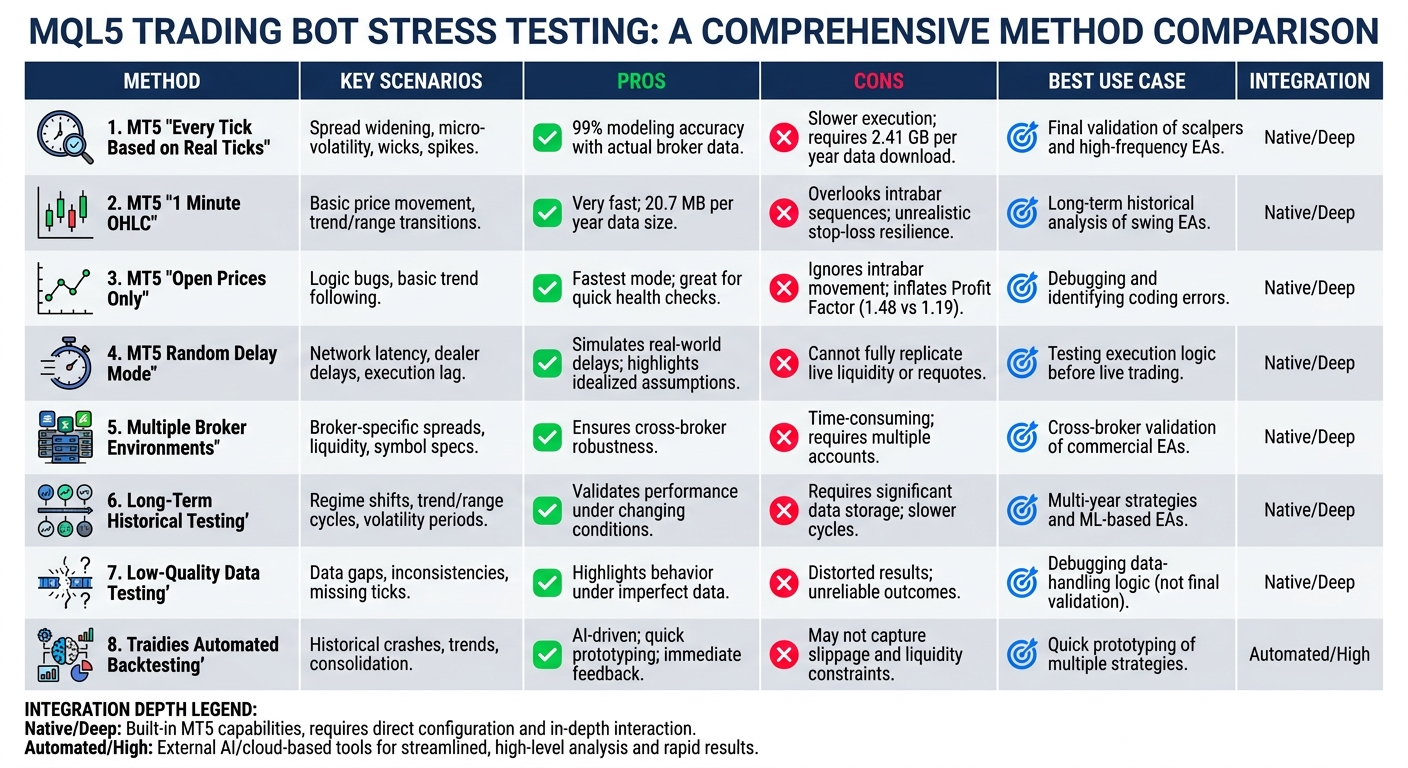
MQL5 Stress Testing Methods Comparison: Pros, Cons, and Best Use Cases
Stress testing methods offer different benefits and drawbacks, so selecting the right tool depends on your EA's precision requirements and testing timeframe. The table below summarizes the key features of the methods discussed earlier.
| Tool/Method | Key Stress Scenarios Simulated | Pros | Cons | Best Use Case | Integration Depth |
|---|---|---|---|---|---|
| MT5 "Every Tick Based on Real Ticks" | Spread widening, micro-volatility, wicks, spikes | Provides the highest accuracy by using actual broker data; achieves 99% modeling quality | Slower execution; requires large data downloads (around 2.41 GB per year); results may vary | Ideal for final validation of scalpers and high-frequency EAs | Native / Deep |
| MT5 "1 Minute OHLC" | Basic price movement; trend/range transitions | Very fast; supports extensive optimization with smaller data size (around 20.7 MB per year) | Overlooks intrabar sequences; may give stop-loss orders an unrealistic resilience in live conditions | Best for long-term historical analysis of swing EAs | Native / Deep |
| MT5 "Open Prices Only" | Logic bugs; basic trend following | Fastest mode; great for quick health checks | Unrealistic as it ignores intrabar movement; can inflate Profit Factor (e.g., 1.48 vs. 1.19) | Useful for debugging and identifying obvious coding errors | Native / Deep |
| MT5 Random Delay Mode | Network latency, dealer delays, execution lag | Simulates real-world conditions by introducing delays; highlights sensitivity to idealized assumptions | Still a simulation and cannot fully replicate live liquidity or requotes | Best for testing execution logic and order handling before live trading | Native / Deep |
| Multiple Broker Environments | Broker-specific spreads, liquidity, symbol specifications | Ensures robustness across different brokers | Time-consuming and requires managing multiple accounts and data downloads | Best for cross-broker validation of commercial EAs | Native / Deep |
| Long-Term Historical Testing | Regime shifts, trend/range cycles, high/low volatility periods | Validates EA performance under changing market conditions | Requires significant data storage and slower test cycles | Suitable for multi-year strategies and machine learning-based EAs | Native / Deep |
| Low-Quality Data Testing | Data gaps, inconsistencies, missing ticks | Highlights EA behavior under imperfect data conditions | Results can be distorted; low History Quality scores may lead to unreliable outcomes | Best for debugging data-handling logic (not for final validation) | Native / Deep |
| Traidies Automated Backtesting | Historical market conditions - including crashes, trends, and consolidation phases | Offers speed and ease of use; AI-driven code generation quickly converts strategies and provides immediate feedback | May not fully capture live market factors like slippage and liquidity constraints | Ideal for quick prototyping and testing multiple strategies before live trading | Automated / High |
This breakdown highlights how each tool can serve specific needs depending on your EA's risk profile. By weighing these pros and cons, traders can choose the most effective stress testing approach to ensure their strategy holds up under both historical and randomized conditions.
Conclusion
A layered stress testing approach is key to ensuring strong EA performance. The method you choose should align with your testing goals. For scalping or high-frequency EAs, using "Every tick based on real ticks" is critical. This method captures the small-scale volatility and spread fluctuations that could disrupt strategies relying on tight stops. On the other hand, "1 Minute OHLC" is well-suited for swing strategies, offering an efficient way to test over extended periods.
Random Delay Mode and Monte Carlo simulations address the limitations of standard backtesting. They reveal how execution delays and trade sequences could impact profits. As EA developer Duy Van Nguy explains:
"A backtest ending with 42% net profit... is path-dependent. The specific sequence of wins and losses... produced that particular equity curve".
Monte Carlo testing highlights the risk that a favorable equity curve might simply result from a lucky sequence of trades, rather than a robust strategy.
For those looking to quickly prototype strategies, Traidies Automated Backtesting provides a streamlined solution. Its AI-driven code generation and real-time historical feedback let you test multiple strategies in the time it usually takes to configure a single MT5 optimization. Once you've identified a promising strategy, stricter methods - like real tick testing, latency simulation, and Monte Carlo analysis - ensure it’s ready for live trading. Combining these tools strengthens your strategy's resilience.
FAQs
Which MT5 testing mode should I use for my EA?
When choosing the best MT5 testing mode for your Expert Advisor (EA), it all comes down to what you're aiming for and how precise you need the results to be:
- Open Prices Only: This mode is quick and works well for spotting errors, but it sacrifices accuracy. Use it for a fast overview.
- Every Tick: Offers better precision, making it a good choice for strategies involving tight stop-losses or intraday trading.
- Every Tick Based on Real Ticks: The most precise option, as it uses actual historical tick data. Perfect for realistic stress-testing and high-accuracy needs.
How many trades are needed for Monte Carlo to be meaningful?
Monte Carlo analysis works best when there’s a healthy mix of both winning and losing trades. This variation is crucial because, without any losses in the data, the simulation can't effectively evaluate or provide insights about risk.
What should I do if my EA only performs well on low-quality data?
If your Expert Advisor (EA) shows promising results only on low-quality data, it’s a red flag for live trading reliability. To get a more accurate picture, switch to higher-precision modeling modes in MT5, such as 'Every tick' or 'Real ticks'. These modes provide more realistic simulations by closely mimicking actual market behavior.
Also, take a moment to review the quality of your historical data. Clean, consistent data is crucial for meaningful backtesting. Beyond that, test your strategy across various market conditions. This kind of stress-testing helps gauge how well your EA handles different scenarios and reduces the risk of overfitting.