Ultimate Guide to Disaster Recovery for Traders
Ultimate Guide to Disaster Recovery for Traders
When trading, even a few seconds of downtime can lead to significant losses. System outages, data feed lags, or order routing failures can leave you exposed to market risks. This guide walks you through building a disaster recovery plan tailored for traders, covering:
- Key Metrics: Recovery Time Objective (RTO) and Recovery Point Objective (RPO) help define acceptable downtime and data loss.
- Common Failures: From total blackouts to subtle data feed lags, understanding risks is essential to mitigate them.
- Backup Strategies: Protect critical files like trading configurations, runtime states, and logs using layered backups (local, cloud, offsite).
- Recovery Steps: Act swiftly during outages by validating positions, contacting brokers, and ensuring system integrity before resuming trades.
- Testing Plans: Regularly test your backup and recovery processes to ensure they work under pressure.
Trading systems demand a higher level of resilience compared to standard IT setups. By planning ahead, you can minimize risks and protect your trading operations from unexpected disruptions.
Key Disaster Recovery Concepts for Traders
Trading Disaster Recovery: Hot vs Warm vs Cold Standby Strategies
Before crafting a recovery plan, it's crucial to determine two things: how fast you need to recover and how much data you can afford to lose.
Recovery Time Objective (RTO) and Recovery Point Objective (RPO)
Recovery Time Objective (RTO) refers to the maximum downtime your system can tolerate after a disaster. On the other hand, Recovery Point Objective (RPO) defines the amount of data loss you can accept, measured by the age of your most recent backup.
Stewart Robinson's kdb+ documentation explains it well:
"RTO, or Recovery Time Objective, is the maximum target time set for recovery of the systems after a disaster has struck. How quickly the system needs to recover can dictate the type of preparations required and determine the overall budget."
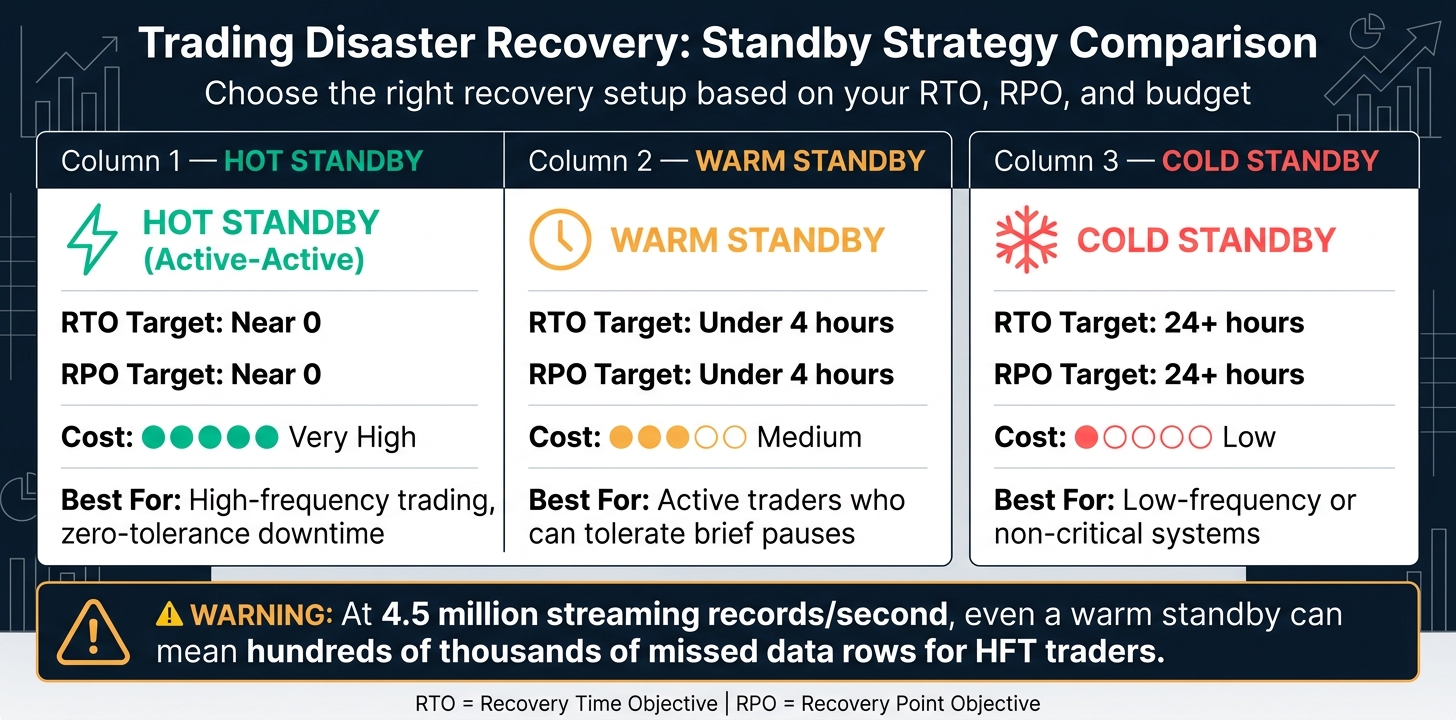
These metrics play a critical role in shaping system architecture and budget allocation. Systems demanding near-instant recovery often require a hot standby (active-active) setup. For less urgent needs, warm or cold standby configurations might suffice. Here's a quick comparison:
| Strategy | RTO Target | RPO Target | Cost |
|---|---|---|---|
| Hot Standby (Active-Active) | Near 0 | Near 0 | Very high |
| Warm Standby | Under 4 hours | Under 4 hours | Medium |
| Cold Standby | 24+ hours | 24+ hours | Low |
For traders, even a warm standby might fall short. High-performance trading databases like kdb+ can process up to 4.5 million streaming records per second per core. A few seconds of downtime could translate into hundreds of thousands of missed data rows - an unacceptable risk in high-frequency trading.
Grasping these metrics lays the foundation for evaluating uptime and failover strategies.
Uptime, Failover, and Testing
Beyond recovery metrics, maintaining continuous uptime and ensuring reliable failover are critical. Uptime measures how consistently your system stays operational, while failover refers to the automatic switch to a backup system when something goes wrong.
Active-active setups offer immediate recovery but come with higher costs. Active-passive configurations, where a standby system takes over only when needed, introduce a brief pause during the transition. However, failover mechanisms aren't foolproof - they can degrade over time without regular testing. This is why routine drills, often called chaos engineering, are vital. They expose hidden issues before a real disaster strikes.
John Murillo of B2BROKER highlights this nuance:
"What teams usually misunderstand is that failover in trading is not just about switching systems. It's about carrying over the exact trading context at the moment of failure."
Preserving that "trading context" means ensuring that partial fills, open positions, and risk limits remain intact, enabling a seamless and safe recovery.
What Makes Trading Systems Different
Trading systems aren't like typical IT setups - they come with unique challenges tied to live market conditions. When a trading platform goes offline, open positions remain exposed to market fluctuations, potentially causing unexpected losses. A lost connection might cancel some orders while leaving others active on the exchange. Worse, partial failures - like a stalled data feed - can mislead traders into making decisions based on outdated information.
A good example is the ZenFire data feed outages between December 2013 and January 2014. Traders who relied solely on ZenFire were left unable to operate, while those with backup feeds managed to keep trading.
Additionally, regulatory demands add another layer of complexity. During failover events, trading systems must maintain audit trails, pre-trade risk checks, and exposure records. These requirements go far beyond the standards set for most IT recovery plans.
sbb-itb-3b27815
Risk Assessment for Trading Systems
To build a strong recovery plan, it's crucial to pinpoint potential failures and understand their impact. Trading systems can fail in ways that aren't always obvious - sometimes, the issues are subtle and deceptive rather than complete shutdowns. Below, we'll break down key failure scenarios and the risks they bring.
Common Disaster Scenarios
Failures in trading systems don't always come as total blackouts. A total blackout, where data feeds, order entry, and position displays all fail simultaneously, is easy to identify. However, other failures are less obvious but just as damaging. For example, a data feed failure can make the platform appear functional while providing outdated prices, leading traders to act on incorrect information. Similarly, an order routing failure might display live prices but fail to process orders, leaving them to time out, get rejected, or disappear without any error message.
Another tricky issue is account sync problems. In these cases, orders may execute correctly, but the platform shows incorrect positions or profit and loss (P&L) data. This can lead traders to make decisions based on false information - like liquidating positions that don’t exist or ignoring real ones. A notable example is the February 2021 Phillip Capital / Trading Technologies incident. A back-office outage caused incorrect position data to upload to platforms, followed by CME routing issues, leaving traders struggling with reconciliation for days.
Exchange-level disruptions add even more complexity. Failures in middleware systems like Trading Technologies or Rithmic can simultaneously impact all brokers routing through those platforms.
"Major outages can affect geographically dispersed infrastructure simultaneously - a 'backup connection in Europe' isn't always a real backup if the problem is broker-side." - geodoc, Trader
| Failure Type | System Behavior | Immediate Risk |
|---|---|---|
| Total Blackout | No data, no order entry, no P&L | Flying blind with open positions |
| Data Feed Only | Platform looks active; prices are stale | Trading on outdated information |
| Order Routing Only | Live prices; orders time out or vanish | Assuming orders filled when they haven’t |
| Account Sync Issue | Incorrect position or P&L display | Acting on false position data |
Critical Components to Protect
Understanding these failure modes helps you identify which parts of your system need the most protection. Not all components carry the same level of risk.
Your broker's trade desk is your ultimate safety net. Every regulated Futures Commission Merchant (FCM) is required to maintain a staffed phone line for manually modifying or canceling orders during digital system failures. Make sure to keep this phone number written down somewhere offline - you don’t want to rely solely on your trading platform to access it.
Your VPS host is another essential component. As Moheb Hanna, a market analyst at OANDA, emphasizes: "A VPS is non-negotiable, as infrastructure is as important as the algorithm". Hosting your system in a professional data center, such as NY4 (New York) or LD4 (London), can shield you from local power outages, internet disruptions, and latency issues.
On top of infrastructure, securing your MQL5 strategy files and API credentials is critical. If a bot loses track of open positions after a VPS reboot, it could mistakenly re-enter trades, doubling your risk. This can be mitigated by implementing a state manager, which uses persistent storage to track open positions even after restarts. Additionally, maintaining a complete audit trail with timestamped order state transitions is often required by regulators during failover events.
How to Build a Backup Strategy for Trading
Once you've completed a risk assessment, the next step is creating a strong backup strategy. This ensures you know what needs saving, where to store it, and how often to back it up. Proper backups are essential for reducing downtime and avoiding data loss during unexpected disruptions.
What to Back Up in MQL5 Trading Setups
Backing up your Expert Advisors (EAs) is just the beginning. A complete MQL5 backup plan should cover six key areas:
| Component Type | File Extensions | Why It Matters |
|---|---|---|
| Source & Project Files | .mq5, .mqh, .mqproj |
Contains the core logic and project structure. |
| Configuration | .set, .json |
Stores input parameters and custom settings. |
| Runtime State | .bin |
Captures EA memory snapshots and session data. |
| ML Models & Data | .onnx, .csv |
Includes trained models and exported market data. |
| External Libraries | .dll |
Ensures third-party dependencies are available. |
| Logs & Order History | Custom logs, reports | Helps with recovery validation and analysis. |
One critical but often overlooked component is the runtime state. This includes in-memory data from your EA, which, if not saved, results in a "blind" restart after a VPS reboot. Without this data, the EA loses track of open positions and calculated values. To address this, the Horizon5 algorithmic trading framework, updated by Pedro Carvajal in April 2026, incorporates a "crash-safe persistence" model. This feature uses asynchronous JSON serialization to save order states without interrupting the main trading thread. On restart, the EA reloads these states and uses deterministic magic numbers to reconnect trades to their original strategies.
Backup Locations and Frequency
To safeguard your data, use a layered backup strategy that includes local, cloud, and offsite storage. For source code, MQL5 Algo Forge is the go-to solution. This Git-based system keeps a complete change history both locally and in the cloud, and it's free for MQL5.community members.
"MQL5 Algo Forge is more than just storage – it's a complete project management system for algorithmic traders." - MetaQuotes
For other files, like .set configurations, .bin state snapshots, and logs, schedule a weekly manual backup of your MetaTrader data folder. The ideal time for this is during the weekend market close (Friday evening to Sunday evening). This window also allows you to handle tasks like applying Windows updates, clearing logs, and restarting your VPS to reduce memory fragmentation.
Backup Best Practices
Automate as much as possible to avoid missed backups. Use MQL5's OnDeinit() event handler to save EA state automatically whenever the terminal closes. Save backups with the FILE_COMMON flag to allow shared access across MetaTrader instances on the same machine.
Be mindful of potential file path issues. Windows, by default, limits file paths to 260 characters, which can cause silent backup failures in deeply nested MQL5 folders. You can increase this limit via the Windows Registry on Windows 10 (build 1607) and later. If you need to store backups outside the MQL5 sandbox, use symbolic links (mklink /J) to redirect folders within MQL5/Files to an external drive or cloud-synced location. This avoids breaking MQL5's security rules.
Finally, whenever you make changes to your strategy or update your system, perform a fresh backup immediately to ensure everything is up to date.
Next, learn how to restore operations swiftly after an outage.
How to Recover After a System Outage
When a system outage strikes, having a well-rehearsed recovery plan can save you from making costly errors. Here's how to act quickly and decisively.
Immediate Recovery Steps
The first moments after an outage are critical. Follow this step-by-step guide:
- Check your internet connection (0–10 seconds).
- Verify your last known position - contracts held, direction, and any resting stops (10–20 seconds).
- Consult a secondary data source (like TradingView or the CME website) to see if the market is moving against you (20–30 seconds).
- Assess your immediate risk exposure (30–45 seconds).
- Contact your broker's trade desk or troubleshoot (45–60 seconds).
Understanding the nature of the outage is key to determining the right course of action. Different problems require different solutions:
| Outage Type | Primary Symptom | Immediate Action |
|---|---|---|
| Total Blackout | No data, no order entry, no P&L | Call the trade desk immediately if you have open positions. |
| Data Feed Only | Prices are frozen or stale; platform "on" | Use a secondary source to confirm; treat as a blackout if data is stale. |
| Order Routing | Prices move, but orders fail or disappear | Verify using your broker's API or another platform window. |
| Account Sync | Incorrect position size or P&L displayed | Avoid trading; wait for corrected broker statements. |
If your main internet connection is down, switch to a backup provider or mobile hotspot before trying to fix your router. Once reconnected, reload your MetaTrader terminal and reapply any missing .set configurations or .bin snapshots from your backups.
After completing these steps, ensure your system is fully restored before moving forward.
Validating Restored Systems
Before diving back into live trading, double-check that everything is working as it should. Start by confirming account access and verifying that your EA settings match your saved .set file. Even small errors, like incorrect lot sizes or risk percentages, can lead to problems. Test your EA in a demo or paper trading environment to confirm automated execution is functioning properly.
Compare your restored trade history and open positions with your broker's records to identify any discrepancies. Keep a detailed log of every action you take during the recovery process.
"The disaster recovery plan is only as good as its last successful test." - Chris Faraglia
Once you're confident in the system's integrity, focus on managing any ongoing risks tied to open trades.
Managing Open Trades and Risk Controls During Recovery
When an outage occurs, refrain from opening new positions. The instability of the situation makes it risky, as stops might not execute correctly and order fills could fail.
It's worth noting that stop-loss and take-profit orders are typically stored on the exchange's matching engine, meaning they can still execute even if your connection drops. However, some brokers cancel pending orders during a disconnect. Understanding how your broker handles such scenarios is crucial before an outage happens.
"If your account remains impacted by the outage, we continue to suggest you do not trade until corrected statements are available." - NT Brokerage
Once you're ready to resume trading, use unique Client Order IDs for any retry attempts. This helps avoid duplicate positions in case the original order was processed without your confirmation. After reconnecting, trade manually for 30–60 minutes to monitor execution latency and fill quality. Only after confirming normal conditions should you allow your EA to operate fully automated again.
Testing and Maintaining Your Disaster Recovery Plan
A recovery plan that hasn’t been tested is just a theory. Systems evolve, brokers update platforms, and configurations shift over time - what worked months ago might fail unexpectedly today. Regular testing transforms a theoretical plan into one that performs reliably under pressure.
How to Test Backup and Restore Procedures
Start with monthly tabletop exercises to simulate failure scenarios and discuss response strategies. Then, advance to quarterly simulation tests by running recovery procedures in a non-production environment to validate their effectiveness. At least once a year, perform a full failover test by transferring production traffic to your backup environment for four to eight hours of planned downtime.
Conduct tests during business hours to uncover issues that may arise under actual trading load conditions. The primary goal is to ensure that your Recovery Time Objective (RTO) and Recovery Point Objective (RPO) targets are achievable in practice - not just theoretical benchmarks on a spreadsheet.
"What teams usually misunderstand is that failover in trading is not just about switching systems. It's about carrying over the exact trading context at the moment of failure." - John Murillo, Chief Business Officer, B2BROKER
Throughout each test or real incident, compile an "Evidence Pack". This should include logs of market data, bridge and aggregator activity, and platform order lifecycles. These records are invaluable for resolving disputes and refining your recovery procedures.
Monitoring and Updating Recovery Plans
Testing often reveals gaps, and continuous monitoring ensures these are addressed before the next exercise. Use real-time alerts for replication lag, as growing lag is an early warning that redundancy is weakening.
After every test or incident, update your recovery plan to reflect changes like broker updates, new middleware dependencies (e.g., Rithmic or CQG), or platform upgrades. Maintain a detailed map of all connectivity layers, since failures in shared routing infrastructure can disrupt multiple brokers simultaneously . Additionally, regulatory bodies such as the SEC and FINRA mandate that audit trails and pre-trade risk checks remain operational during failover events .
Validating Automation Systems Against Backup Environments
For automated systems, precise replication is critical to avoid configuration drift. Your backup environment must match the primary environment exactly - this includes software versions, configuration files, and risk parameters. Configuration drift, where discrepancies arise between the primary and backup environments, is a frequent cause of failover failure.
Two strategies can help prevent this. First, use heartbeat checks - a periodic signal confirming the system is functioning. If the heartbeat fails, the backup environment should immediately trigger an alert or automated response. Second, consider deploying a shadow instance of your strategy. This instance tracks positions without executing trades, staying ready to take over if the primary system fails.
The February 2021 outage involving Phillip Capital and Trading Technologies highlights the importance of these measures. A back-office failure led to incorrect position data cascading through the middleware routing layer (TT), resulting in days of reconciliation issues. The problem wasn’t a platform failure but a loss of state awareness in the routing layer connecting systems. Validating your automation stack end-to-end - not just the trading platform - is essential to prevent such cascading failures.
This cycle of rigorous testing, monitoring, and validation strengthens the resilience of your trading systems, ensuring they align with a robust disaster recovery strategy.
Simplifying Disaster Recovery with Traidies
Traidies builds on established disaster recovery principles, making it easier to restore your trading system with the help of advanced AI tools. Instead of spending days rebuilding your automated strategy after a VPS crash, corrupted MQL5 files, or a wiped local environment, Traidies offers a smarter, faster way to recover. This approach eliminates the hassle of rewriting strategy logic and sets you up with a more efficient backup workflow.
AI-Powered Strategy Backup with Traidies
Traidies introduces a fresh take on strategy preservation. Instead of relying on local code files that are prone to corruption, it allows you to describe your trading logic in plain English. The AI then converts this description into production-ready MQL5 code. This plain-language backup is human-readable and avoids the risks associated with binary files.
A helpful tip is to maintain a library of these plain-language prompts for each strategy. With this, you can regenerate your MQL5 code in under 10 minutes if your original .ex5 or .mq5 files are lost. No need to reinstall MetaEditor, search through old versions, or rewrite code from scratch.
Traidies also simplifies version tracking by storing your strategy iterations in a structured, cloud-based workspace. This eliminates the chaos of manually naming files like strategy_v3_FINAL_2.mq5. Even if your hardware fails, the latest version of your strategy is always accessible.
Faster Recovery Using Traidies' Automated Backtesting
Recovering your strategy file is just the first step. Before going live, you need to validate its performance on historical data. Traidies’ built-in backtesting tools let you do just that. You can analyze your strategy’s performance through P&L curves, payoff charts, and margin requirement calculations - all before executing a single live trade.
This process is crucial because AI-generated MQL5 code can sometimes overlook broker-specific rules, a problem referred to as "broker constraint blindness." For example, the restored strategy might miss key details like SYMBOL_TRADE_STOPS_LEVEL or lot step sizes. Running a thorough backtest helps identify these issues before they cause real-world losses. As barmenteros FX explains:
"AI-generated MQL code treats the order pool as a static list... In the Strategy Tester, it does. In live trading, it does not." - barmenteros FX
Another potential issue is that terminal restarts can wipe in-memory trade states, leading to duplicate positions. To avoid this, ensure your restored strategy scans PositionsTotal() during OnInit() to rebuild the trade state from the live order pool, rather than relying solely on in-memory variables. For a robust validation process, aim to test at least 100 trades to gather meaningful data before redeploying your strategy.
Conclusion
Trading systems can and do fail. Incidents like the Interactive Brokers outage in January 2018 and the Phillip Capital/Trading Technologies disruption in February 2021 highlight just how real this risk is. The traders who weather these storms successfully? They’re the ones with a solid disaster recovery plan in place.
As NexusFi Academy put it:
"The traders who handled them well had a plan. The ones who got hurt badly - either through missed exits or panic decisions - didn't."
To protect yourself, start by defining your Recovery Time Objective (RTO) and Recovery Point Objective (RPO). These benchmarks help you understand how much downtime you can tolerate and how much data loss is acceptable. Stick to the 3‑2‑1 backup rule: keep three copies of your data, store them on two different types of media, and ensure one copy is offsite. Always have your broker's trade desk number accessible offline, and test your recovery plan quarterly to ensure it actually works. Whether you’re trading manually or using automated systems, these steps are critical.
For automated trading, recovery logic is especially important. Bots follow their programming, and without safeguards like state persistence or a kill switch, they can quickly drain an account during a disruption. Building recovery logic into your automation isn’t optional - it’s essential if you’re serious about trading.
As Positioned aptly said:
"A backup strategy is the ultimate insurance policy against the unexpected. It ensures that a momentary failure does not become a permanent loss."
The bottom line? Start with the basics. Build redundancy into your setup, create a clear recovery plan, and ensure every trading strategy is backed up. Even a modest, well-tested plan can prevent a temporary hiccup from turning into a disaster. Define your RTO and RPO, back up everything consistently, and test your recovery process regularly. These steps can safeguard not just your trades but your entire trading career.
FAQs
How do I pick the right RTO and RPO for my trading setup?
To select the right RTO (Recovery Time Objective) and RPO (Recovery Point Objective), start by evaluating your trading requirements, risk tolerance, and financial constraints. Decide how much data loss (RPO) and downtime (RTO) your operations can handle. If you need stricter objectives, you’ll likely need to invest in advanced systems such as active-active configurations. On the other hand, if you can afford longer recovery times, more budget-friendly solutions like cold standby might work. The key is finding the right balance to minimize disruptions while staying aligned with your risk tolerance and operational goals.
What should I do first if my platform is up but prices look stale?
If prices appear outdated, start by checking whether the data is actually stale. Compare the quotes on your platform with those from another reliable source, such as a broker's platform or a market data page. Also, confirm that your internet connection is stable and functioning properly.
If the data is indeed stale and you have active positions, reach out to your trade desk right away. During volatile market conditions, focus on managing risk rather than spending time troubleshooting. Protecting your capital should always come first.
How can I prevent my bot from duplicating trades after a restart?
To avoid trade duplication following a restart, make sure your bot reviews and reconciles any open positions during its initialization process. Assign unique identifiers, such as magic numbers, to track trades accurately. You can also use recovery mechanisms like snapshot-based state management to maintain continuity and ensure your bot resumes operations without errors.
Adding safeguards like anti-duplicate filters and verifying existing positions before initiating new trades can provide extra protection against duplication and overexposure. These steps help ensure your trading strategy stays consistent and avoids unnecessary risks.